

A PowerShell-native shell tool for pi, with persistent tasks, interactive terminal sessions, and user requests.
Windows shell work is more reliable when the tool name, syntax, process model, and paths all agree. pi-pwsh gives the model a real pwsh tool instead of asking it to translate bash assumptions at runtime.
- PowerShell-native — commands use PowerShell 7 syntax and Windows paths from the start.
- Runs in the background and notifies automatically — every command becomes a persistent task, so pi can continue other work and receive readiness or completion without polling.
- Durable across sessions — tasks survive later tool calls,
/reload, pi restarts, wait timeouts, and tool aborts. - Progressive helper loading — PTY and user-request helpers are loaded only when their PowerShell functions are referenced; detailed help remains available through
Get-PtyHelpandGet-PiRequestHelp. - Real interactive sessions — persistent terminal sessions support REPLs, prompts, and full-screen applications.
- Correct Windows behavior — UTF-8 source and output, final-command exit codes,
.cmdfallback, process-tree cleanup, and streaming output are handled for you. - Strict, optional configuration — select the PowerShell executable and control profiles, execution policy,
!/!!, stop-on-error, and Python UTF-8 defaults without expanding the base prompt. - Optional elevation guidance — an available Windows Sudo installation is surfaced to the model automatically.
This lets pi use PowerShell without blocking on long-running work: task persistence, notifications, terminal sessions, and UI requests stay behind the extension.
Pi 0.84.3 added an optional built-in powershell tool for Windows. It is a lightweight foreground command executor built on pi's existing shell-tool infrastructure. pi-pwsh adds a persistent task and interaction layer for work that must continue independently of one tool call.
| Area | Pi built-in powershell |
pi-pwsh |
Better fit |
|---|---|---|---|
| Basic command execution | Built into pi with no extension dependencies | Separate extension with task, PTY, and coordination dependencies | Built-in for simple commands |
| Shared baseline | Runs in the current directory, captures stdout/stderr, bounds returned output, and can terminate a process tree | Same | Equivalent |
| Foreground experience | Waits for completion and streams live output into the current tool card | Starts a task and returns immediately by default; waiting returns a task snapshot rather than live tool updates | Built-in for short foreground work |
| Background work | No managed background-task API or task ID | Every command is a persistent task with inspect, wait, and stop operations | pi-pwsh |
| Abort and timeout | Aborting the tool call or reaching its timeout terminates the process tree | Aborting or timing out a wait leaves the task running; only stop=true terminates it |
Depends on whether work should stop or continue |
| Readiness and completion | No readiness detection or deferred notification | Reports readiness from notifyOn, then completion, failure, or cancellation without polling |
pi-pwsh |
| Durability and output | Returns the last 2,000 lines or 50 KiB and writes truncated full output to a temporary file | Persists task metadata and full logs across later calls, /reload, and pi restarts; snapshots return the latest 50 KiB and terminal records are retained for 24 hours |
pi-pwsh |
| Interactive programs | Non-interactive process with no stdin or terminal session | Persistent ConPTY sessions with input, screen snapshots, transcript reads, waiting, resizing, and process control | pi-pwsh |
| User interaction | No command-to-UI request API | Commands can request text, confirmation, selection, masked input, or secret input sent directly to a PTY | pi-pwsh |
| PowerShell runtime | Prefers pwsh.exe but falls back to Windows PowerShell; fixed -NoProfile -NonInteractive -ExecutionPolicy Bypass |
Requires and verifies PowerShell 7+; executable, profile loading, execution policy, and stop-on-error behavior are configurable | Built-in for broad availability; pi-pwsh for consistent behavior |
| Encoding and source transport | Sets console output to UTF-8 and passes the command as a process argument | Sends UTF-8 source through stdin, configures PowerShell and native-command encodings, strips styling for task output, and can default Python to unbuffered UTF-8 | pi-pwsh |
| Exit status | Reports the outer PowerShell process exit code | Preserves the final native command's exact exit code and maps final PowerShell command failures consistently | pi-pwsh |
! and !! shortcuts |
Continue to use Bash | Use the configured PowerShell runtime by default; this replacement is optional | pi-pwsh for a consistent shell |
| Pi integration | Core tool, available through defaultTools and the SDK, with current PI_* session/model environment variables |
Custom task UI, coordinated notifications, and the shared /tasks catalog |
Depends on the integration needed |
Choose the built-in tool when commands are short-lived and native pi integration matters most. Choose pi-pwsh for builds, tests, servers, watchers, interactive applications, durable output, or commands that need to ask the user for input. The tools have different names and can coexist, but enabling both gives the model two PowerShell tools with different lifecycle semantics; most setups should select one.
Every pwsh command starts a persistent background task and returns immediately by default. Pi can continue reviewing code, editing files, or planning the next step while builds, tests, scripts, servers, and watchers run. There is no separate job mode and no need to wrap the command in another background layer.
Completion, failure, and cancellation are reported automatically. Long-running services can also announce readiness as soon as a chosen literal appears in their output, without ending the task. If the current turn depends on the result, pi can wait on that same task; a timeout or cancelled wait leaves it running.
Each task remains available through its ID for later status and output snapshots or explicit process-tree termination. Snapshots are bounded and repeatable rather than consumable. Task state and notification markers survive /reload and pi restarts, and terminal records are retained for 24 hours.
Persistent terminal sessions support REPLs, prompts, and full-screen terminal applications:
Start-Pty -Command 'python' -Name py
Get-PtyScreen -Name py
Send-PtyInput -Name py -Text 'print(6 * 7)' -Enter
Wait-Pty -Name py | Receive-Pty
Stop-Pty -Name py | Remove-Pty

Get-PtyHelp
PTYs live for the current pi session. Aborting an ordinary pwsh task wait does not stop an existing PTY.
Pi's ! and !! shell shortcuts use the same PowerShell runtime and execution behavior as the pwsh tool. Set replaceUserBash to false if those shortcuts should retain pi's default shell behavior.
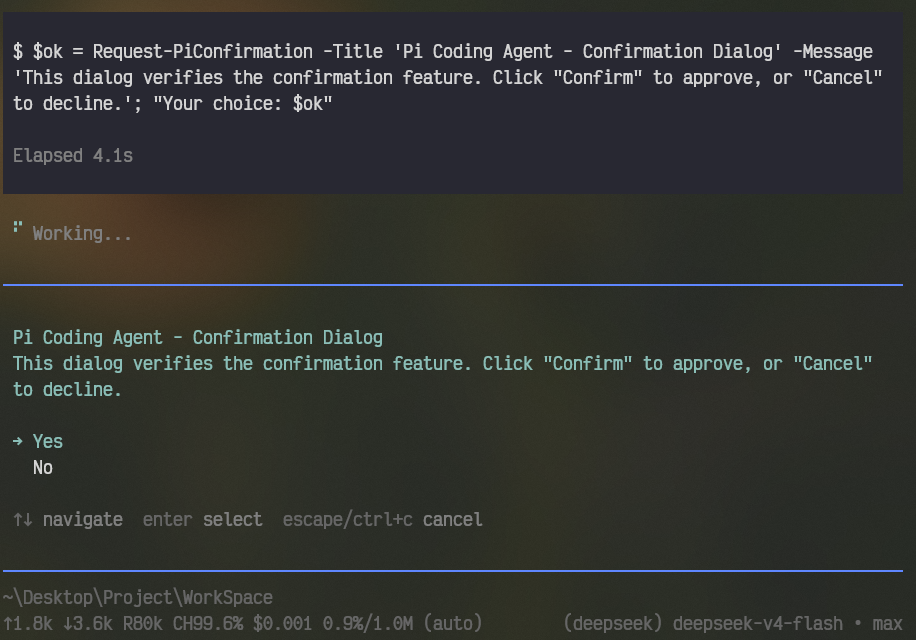
PowerShell commands can ask through pi's UI for text, confirmation, selection, or masked input:
Request-PiInput -Title 'Setup' -Prompt 'Display name'
$ok = Request-PiConfirmation -Title 'Deploy' -Message 'Continue?'
$region = Request-PiSelection -Title 'Region' -Options @('cn', 'us', 'eu')

Get-PiRequestHelp
For terminal logins, Request-PiPtyInput -Secret sends input directly from the UI to a PTY without returning the secret to PowerShell or the model.
Readiness, completion, failure, and cancellation are reported automatically. Notifications cooperate and aggregate with installed @4fu background-task plugins. Successfully retrieving a ready or terminal result explicitly cancels its pending notification, avoiding repeated status and output.
The shared Tasks widget combines active work and retained terminal records from participating plugins. Run /tasks for the complete bounded catalog. Pwsh tool calls keep their compact TUI and expose task details and bounded output when expanded. Upgrade all participating @4fu task plugins together so they use the same shared task-presentation generation.
Configuration is optional. Create ~/.pi/agent/pwsh.json and run /reload after changing it:
{
  "executable": "auto",
  "loadProfile": false,
  "executionPolicy": "Bypass",
  "replaceUserBash": true,
  "stopOnError": false,
  "pythonUtf8": true,
  "pythonUnbuffered": true
}| Setting | Default | Effect |
|---|---|---|
executable |
"auto" |
Probes PowerShell 7 and pins its executable path for the session. Set an absolute Windows path to select a specific pwsh.exe. |
loadProfile |
false |
Loads the user's PowerShell profile for task commands and PTYs. |
executionPolicy |
"Bypass" |
Execution policy passed to user PowerShell processes. Use null to omit the argument. |
replaceUserBash |
true |
Routes pi's ! and !! shortcuts through the same PowerShell operations. |
stopOnError |
false |
Sets $ErrorActionPreference = 'Stop' before user commands. |
pythonUtf8 |
true |
Defaults PYTHONIOENCODING=utf-8 and PYTHONUTF8=1 unless already set. |
pythonUnbuffered |
true |
Defaults PYTHONUNBUFFERED=1 unless already set. |
Environment variables override the JSON file:
| Environment variable | Setting |
|---|---|
PI_PWSH_CONFIG |
Alternate configuration file path |
PI_PWSH_EXECUTABLE |
executable |
PI_PWSH_LOAD_PROFILE |
loadProfile |
PI_PWSH_EXECUTION_POLICY |
executionPolicy |
PI_PWSH_REPLACE_USER_BASH |
replaceUserBash |
PI_PWSH_STOP_ON_ERROR |
stopOnError |
PI_PWSH_PYTHON_UTF8 |
pythonUtf8 |
PI_PWSH_PYTHON_UNBUFFERED |
pythonUnbuffered |
Boolean environment values accept true/false, 1/0, yes/no, and on/off. Configuration is strict: unknown fields, invalid values, or an unavailable configured executable produce an error instead of silently changing shell behavior.
Pair this extension with pi-bin-hints. It detects which commonly used modern command-line programs are installed and tells pi through one small, stable prompt line.
A useful Windows baseline is:
- PowerShell 7
- Git for Windows
rg(ripgrep),fd,jq,fzf, andbatas useful optional additions
winget or Scoop can install most of these tools. pi-bin-hints detects them at the next pi session start, so the model can prefer them without probing PATH on every turn.
- Node.js 22.19 or newer.
- PowerShell 7+, discoverable through
PATH, the standard installation location, or an absoluteexecutablepath inpwsh.json. - Windows 10 version 1809 or newer for ConPTY sessions on Windows.
- Permission for the trusted
node-ptynative install script when your package manager restricts dependency scripts.
pi install npm:@4fu/pi-pwshTry it for one run without installing:
pi -e npm:@4fu/pi-pwshRun npm install, then add the repository path to ~/.pi/agent/settings.json:
{
  "extensions": ["C:/path/to/pi-pwsh"]
}
Run /reload in pi after changing the extension.
npm install
npm test
npm pack --dry-run
The test suite covers configuration and runtime resolution, UTF-8 source transport, exit codes, persistent tasks, notifications, timeouts, process-tree cleanup, PTYs, and UI requests.
MIT