This is a fork of apa4h/nginx-3x-ui-subscription-proxy with the following improvements:
- Added support for subscription statistics aggregation (upload, download, total, expire)
- Added support for Profile-Title and Profile-Update-Interval headers
The proxy processes and aggregates the following headers from 3x-UI servers:
Aggregates statistics from all servers:
upload: Sum of upload traffic from all serversdownload: Sum of download traffic from all serverstotal: Minimum total quota from all servers (to ensure the client doesn't exceed any server's limit)expire: Minimum expiration time from all servers (to ensure the client doesn't use expired subscription)
Takes the first available value from servers:
Profile-Title: Profile name from the first server that provides itProfile-Update-Interval: Update interval from the first server that provides it
A reverse proxy configuration for Nginx to dynamically handle and aggregate 3x-UI subscriptions from multiple servers.
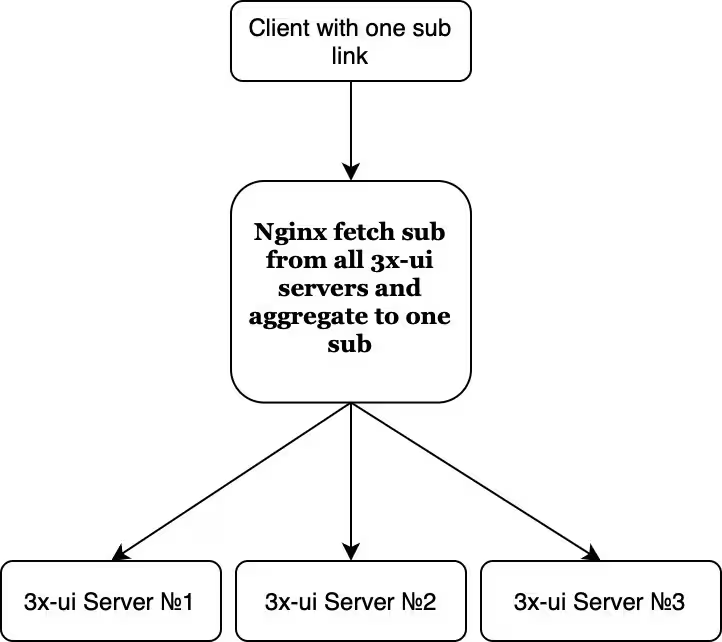
This project allows you to set up an Nginx-based reverse proxy that fetches and aggregates subscription configurations from multiple 3x-UI servers. It simplifies subscription management by unifying configurations in a single endpoint.
- Each client must have the same subscription ID across all your servers.
- Subscription encryption must be enabled on all 3x-UI servers.
git clone https://github.com/apa4h/nginx-3x-ui-subscription-proxy.git
cd nginx-3x-ui-subscription-proxycp .env.template .envEdit the .env file and fill in the following variables with your own data:
| Variable | Description |
|---|---|
TLS_MODE |
Enables or disables SSL. Default set off. When set to on, SSL certificates must be generated (e.g., via Certbot), and their paths must be specified in the PATH_SSL_KEY variable. |
PATH_SSL_KEY |
Path to the directory containing your SSL certificate and private key (e.g., /etc/letsencrypt/live/your_site/). |
SITE_HOST |
Domain name for your Nginx server (e.g., subserver.example). |
SITE_PORT |
Port number where Nginx will listen for requests (e.g., 443). |
SERVERS |
List of 3x-UI server URLs to aggregate subscriptions from (e.g., https://server1.com/sub/ https://server2.com/sub/). |
SUB |
Static part of the subscription path (e.g., sub). |
Once you've configured the environment variables, your subscription URL will look like this:
https://subserver.example/sub/subscription_ID
Where:
subserver.exampleis the domain you set in theSITE_HOSTvariable.subis the static part of the subscription path, set in theSUBvariable.subscription_IDis the unique ID for each client from 3x-ui.
Run the following command to start the application:
docker compose up -dThis will build and start the Nginx container with the provided configuration.
- The proxy dynamically fetches subscription configurations from the servers listed in
SERVERS. - It listens on the domain and port specified in
SITE_HOSTandSITE_PORT. - SSL certificates are loaded from the path specified in
PATH_SSL_KEY.
Here is an example .env file:
PATH_SSL_KEY=/etc/letsencrypt/live/example.com/
SITE_HOST=example.com
SITE_PORT=443
SERVERS="https://server1.com/sub/ https://server2.com/sub/"
SUB=sub
TLS_MODE=offThis project is licensed under the MIT License. See the LICENSE file for details.
Contributions are welcome! Feel free to open an issue or submit a pull request.