Seeing below error while installing in mac with latest poppler.
> node-gyp rebuild

Package poppler-qt5 was not found in the pkg-config search path.
Perhaps you should add the directory containing `poppler-qt5.pc'
to the PKG_CONFIG_PATH environment variable
No package 'poppler-qt5' found
gyp: Call to 'pkg-config --libs  cairo poppler-qt5' returned exit status 1 while in binding.gyp. while trying to load binding.gyp
gyp ERR! configure error
gyp ERR! stack Error: `gyp` failed with exit code: 1
gyp ERR! stack     at ChildProcess.onCpExit (/Users/ram4975/.nvm/versions/node/v12.21.0/lib/node_modules/npm/node_modules/node-gyp/lib/configure.js:351:16)
gyp ERR! stack     at ChildProcess.emit (events.js:314:20)
gyp ERR! stack     at Process.ChildProcess._handle.onexit (internal/child_process.js:276:12)
gyp ERR! System Darwin 20.6.0
gyp ERR! command "/Users/ram4975/.nvm/versions/node/v12.21.0/bin/node" "/Users/ram4975/.nvm/versions/node/v12.21.0/lib/node_modules/npm/node_modules/node-gyp/bin/node-gyp.js" "rebuild"
gyp ERR! cwd /Users/ram4975/git/ms-pdf-to-json/node_modules/pdf-fill-form
gyp ERR! node -v v12.21.0
gyp ERR! node-gyp -v v5.1.0
gyp ERR! not ok
npm WARN @grpc/grpc-js@1.0.5 requires a peer of google-auth-library@5.x || 6.x but none is installed. You must install peer dependencies yourself.

npm ERR! code ELIFECYCLE
npm ERR! errno 1
npm ERR! pdf-fill-form@5.1.0 install: `node-gyp rebuild`
npm ERR! Exit status 1
npm ERR!
npm ERR! Failed at the pdf-fill-form@5.1.0 install script.
npm ERR! This is probably not a problem with npm. There is likely additional logging output above.

npm ERR! A complete log of this run can be found in:
Looks like latest poppler installs by default with qt6 not with qt5 anymore.
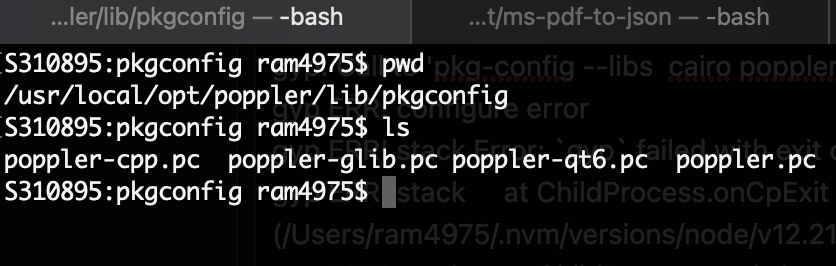
When i look at poppler pkgconfig folder all is see is poppler-qt6.pc not poppler-qt5.pc.
Is there any workaround to proceed further?
Seeing below error while installing in mac with latest poppler.
Looks like latest poppler installs by default with qt6 not with qt5 anymore.
When i look at poppler pkgconfig folder all is see is poppler-qt6.pc not poppler-qt5.pc.
Is there any workaround to proceed further?