First of all, thank you for such excellent components.
I myself, I'm trying to mimic the UWP appearance using Delphi.
So far, this is what I came up.

And I love the Windows 10 Blur Glassframe a.k.a. Fluent, but I don't know if your components will be capable to support alpha channels.
So in order to test it, I added the following code to the demo.
// uses DwmApi, UxTheme;
procedure TformDemo.WndProc(var Msg: TMessage);
var
  margins: _MARGINS;
  v: Integer;
begin
  case (Msg.Msg) of
  WM_NCPAINT:
    begin
      v := 2;
      DwmSetWindowAttribute(Self.Handle, 2, @v, 4);
      DwmExtendFrameIntoClientArea(Self.Handle, margins);
    end;
  end;

  inherited WndProc(Msg);
end;
However, this is what I got, some colors were filtered due to not having alpha channel on the canvas.
Focused:
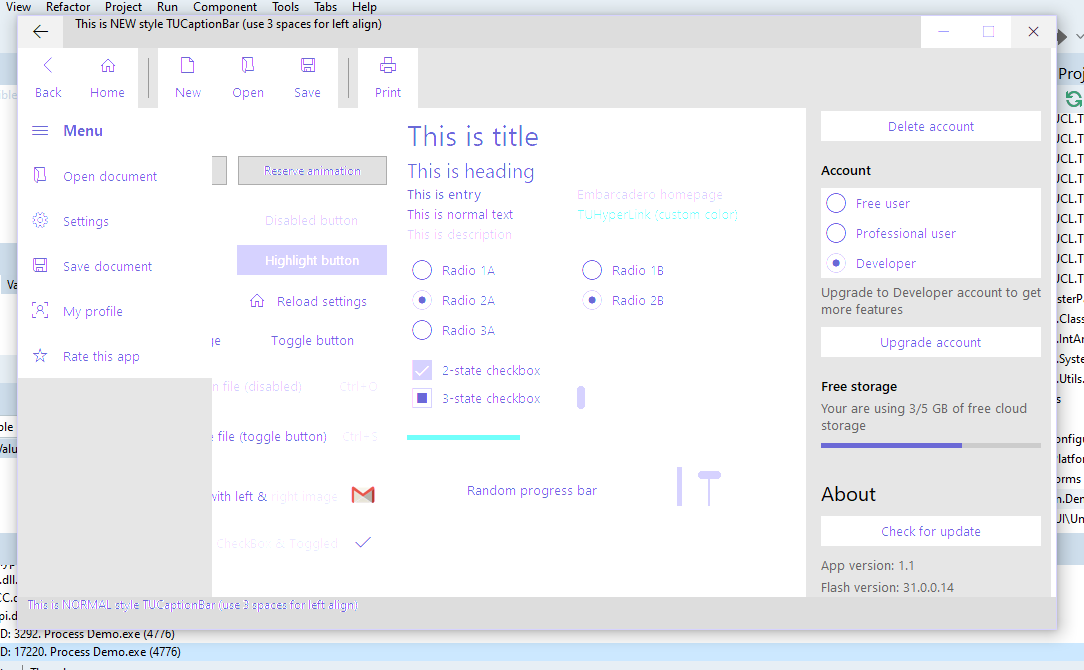
Unfocused:
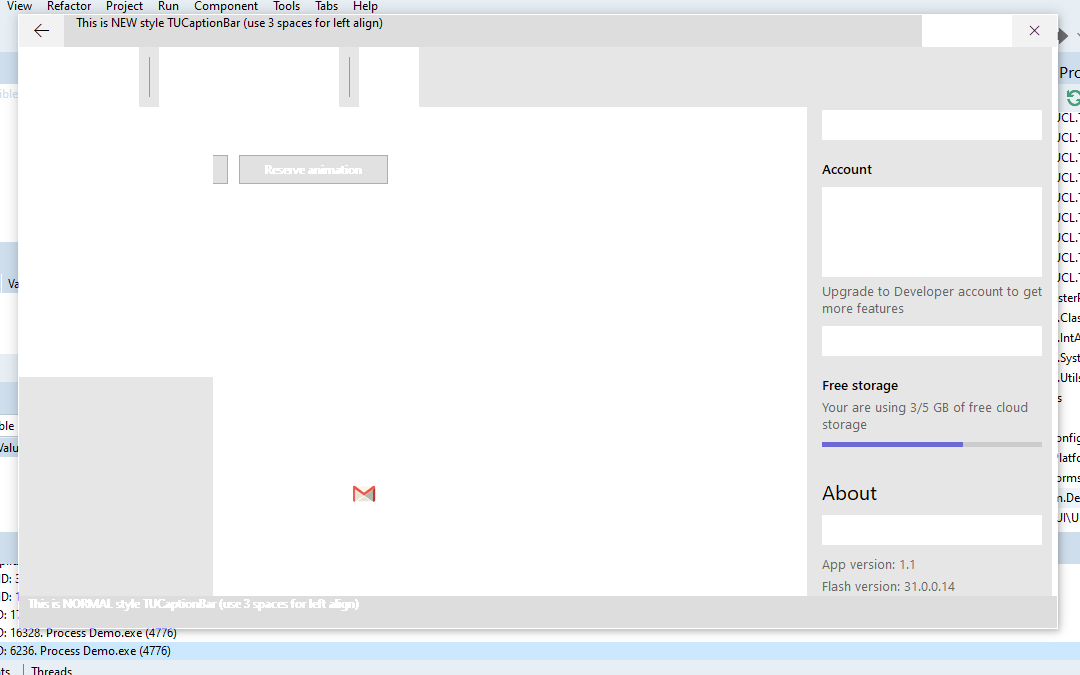
As you can see, the only part that shows almost correctly is the caption bar, and that's because I added a Paint override procedure in order to add alpha channel as follows.
function CreatePreMultipliedRGBQuad(Color: TColor; Alpha: Byte = $FF): TRGBQuad;
  begin
    Color := ColorToRGB(Color);
    Result.rgbBlue := MulDiv(GetBValue(Color), Alpha, $FF);
    Result.rgbGreen := MulDiv(GetGValue(Color), Alpha, $FF);
    Result.rgbRed := MulDiv(GetRValue(Color), Alpha, $FF);
    Result.rgbReserved := Alpha;
  end;
function CreateSolidBrushWithAlpha(Color: TColor; Alpha: Byte = $FF): HBRUSH;
  var
    Info: TBitmapInfo;
  begin
    FillChar(Info, SizeOf(Info), 0);
    with Info.bmiHeader do
    begin
      biSize := SizeOf(Info.bmiHeader);
      biWidth := 1;
      biHeight := 1;
      biPlanes := 1;
      biBitCount := 32;
      biCompression := BI_RGB;
    end;
    Info.bmiColors[0] := CreatePreMultipliedRGBQuad(Color, Alpha);
    Result := CreateDIBPatternBrushPt(@Info, 0);
  end;

procedure TUCustomCaptionBar.Paint;
const
  Alignments: array[TAlignment] of Longint = (DT_LEFT, DT_RIGHT, DT_CENTER);
  VerticalAlignments: array[TVerticalAlignment] of Longint = (DT_TOP, DT_BOTTOM, DT_VCENTER);
var
  Flags: Integer;
  Rect: TRect;
begin
  inherited;

  Rect := GetClientRect;
  with Canvas do
  begin
    Brush.Handle := CreateSolidBrushWithAlpha($DDDDDD, 255);
    FillRect(Rect);
    if ShowCaption and (Caption <> '') then
    begin
      Flags := DT_EXPANDTABS or DT_SINGLELINE or
        VerticalAlignments[FVerticalAlignment] or Alignments[FAlignment];
      Flags := DrawTextBiDiModeFlags(Flags);
      Font := Self.Font;
      //SetTextColor(Handle, CreateSolidBrushWithAlpha(Font.Color, 255));
      //SetBkMode(Handle, TRANSPARENT);
      DrawText(Handle, Caption, - 1, Rect, Flags);
    end;

  end;
end;
BTW notice that DWM also added a shadow to the window.
However, I don't know if it might be better to draw text using GdiPlus instead.
First of all, thank you for such excellent components.
I myself, I'm trying to mimic the UWP appearance using Delphi.

So far, this is what I came up.
And I love the Windows 10 Blur Glassframe a.k.a. Fluent, but I don't know if your components will be capable to support alpha channels.
So in order to test it, I added the following code to the demo.
However, this is what I got, some colors were filtered due to not having alpha channel on the canvas.
Focused:


Unfocused:
As you can see, the only part that shows almost correctly is the caption bar, and that's because I added a Paint override procedure in order to add alpha channel as follows.
BTW notice that DWM also added a shadow to the window.
However, I don't know if it might be better to draw text using GdiPlus instead.