Bug Report
In Settings › Video, set Select your reception resolution (max.) to Low definition. Join a meeting already in progress. The cameras already on arrive at High definition.
In a meeting of three, you get High definition from whoever was there before you and Low definition from whoever joins after.
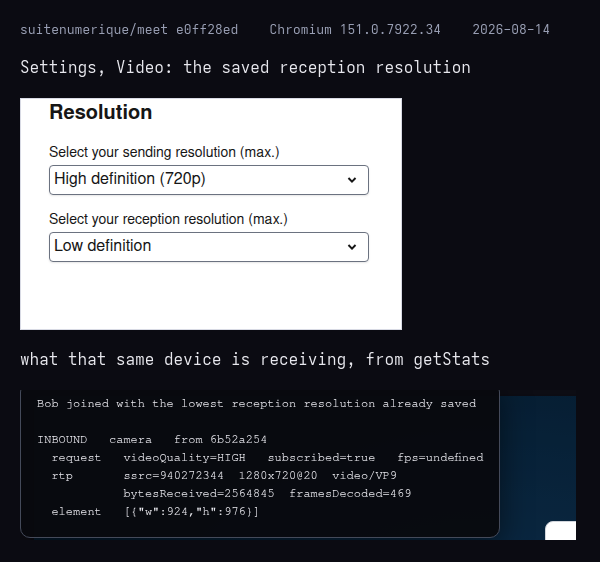
Here is an example run in Chromium 151. Settings shows Low definition, while the video arriving on that same device is 1280x720, the largest of the three sizes a camera offers.
VideoResolutionSubscription applies the setting only at the moment a camera starts sending, on RoomEvent.TrackPublished. livekit-client does not raise that event for cameras already sending when you joined, so nothing ever applies the setting to them. Turning that camera off and on does not help either: the camera is paused rather than stopped, so it never starts sending again.
Since c330ec6, 2025-08-13.

Bug Report
In Settings › Video, set Select your reception resolution (max.) to Low definition. Join a meeting already in progress. The cameras already on arrive at High definition.
In a meeting of three, you get High definition from whoever was there before you and Low definition from whoever joins after.
Here is an example run in Chromium 151. Settings shows Low definition, while the video arriving on that same device is 1280x720, the largest of the three sizes a camera offers.
VideoResolutionSubscriptionapplies the setting only at the moment a camera starts sending, onRoomEvent.TrackPublished. livekit-client does not raise that event for cameras already sending when you joined, so nothing ever applies the setting to them. Turning that camera off and on does not help either: the camera is paused rather than stopped, so it never starts sending again.Since c330ec6, 2025-08-13.