





Built by Oussama Sahnoun — for the community 🌍
100% free AI assistant that hunts threats in your logs like a senior SOC analyst

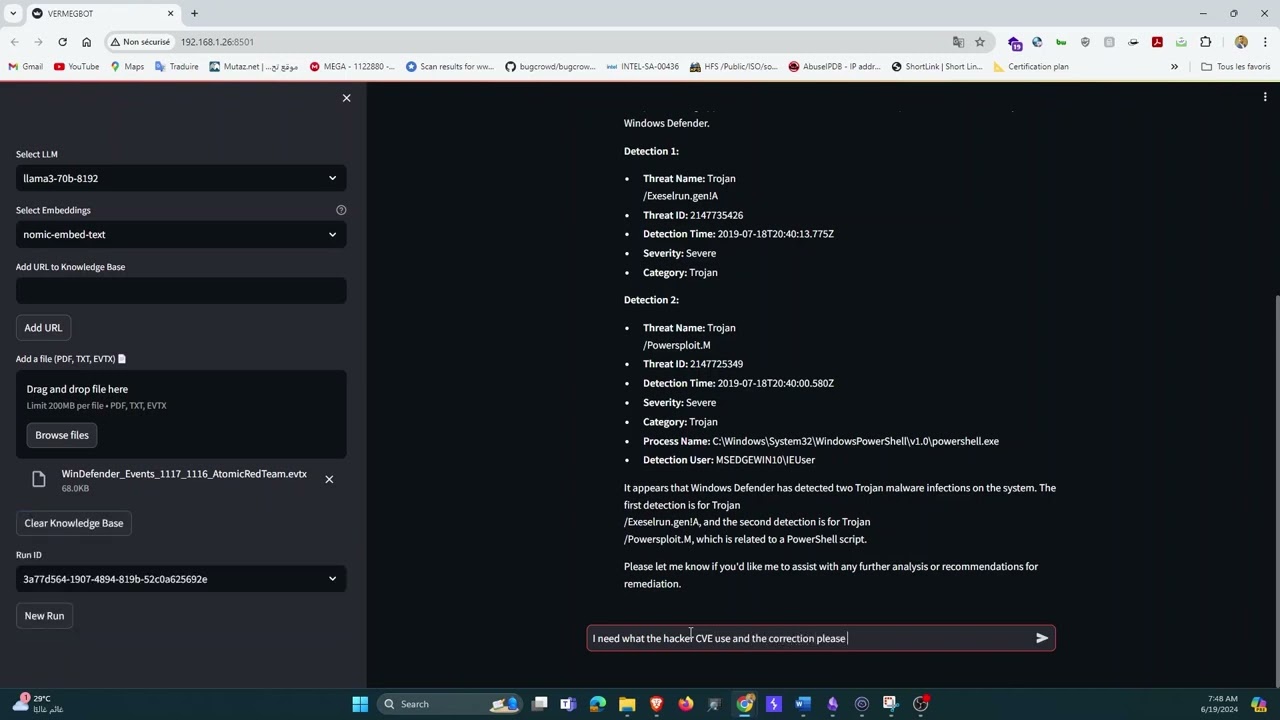
ThreatLens is an open-source AI-powered log analysis and threat hunting assistant built for SOC analysts and cybersecurity professionals. Upload your Windows Event Logs (.evtx) or Linux logs (.txt), ask questions in plain English, and get expert-level threat hunting answers in seconds — faster than any manual review.
Built on a fully free stack: Groq API for ultra-fast LLM inference, Ollama for local private embeddings, and PostgreSQL + pgvector for semantic search. No data leaves your machine.
🇹🇳 Built in Tunisia — 100% free stack, no international payment required
| Feature | Description |
|---|---|
| 📂 Log ingestion | Windows EVTX and Linux TXT log support |
| 🌐 URL ingestion | Scrape and index any web page into the knowledge base |
| 🧠 RAG pipeline | Logs are chunked, embedded locally, and stored in pgvector |
| ⚡ Groq LLM | Ultra-fast inference with LLaMA 3.3 70B via free Groq API |
| 🔒 Private embeddings | Fully local via Ollama — no data sent to the cloud |
| 💬 Conversational memory | Multi-turn chat with full history awareness |
| 🆓 100% Free | Groq API + Ollama + Docker — zero cost |
| Format | Extensions | Status |
|---|---|---|
| Windows Event Log | .evtx |
✅ Supported |
| Plain text / Linux logs | .txt |
✅ Supported |
| JSON logs | .json |
🔜 Roadmap |
| CSV logs | .csv |
🔜 Roadmap |
| XML event logs | .xml |
🔜 Roadmap |
User uploads log (EVTX / TXT) or pastes a URL
              │
              ▼
     Chunker (300 chars/chunk)
     Safe for nomic-embed-text 512-token limit
              │
              ▼
   Ollama (nomic-embed-text)  ──►  pgvector (PostgreSQL)
              │
              ▼
       User asks a question
              │
              ▼
   Semantic search in pgvector
              │
              ▼
   Groq LLM — LLaMA 3.3 70B
              │
              ▼
   Expert threat hunting answer 🎯
| Component | Technology |
|---|---|
| UI | Streamlit |
| LLM | Groq API — llama-3.3-70b-versatile (free) |
| Embeddings | Ollama — nomic-embed-text (local, private) |
| Vector DB | PostgreSQL + pgvector (Docker) |
| RAG Framework | phidata |
| EVTX Parser | python-evtx |
- Python 3.10+
- Docker
- Ollama
- A free Groq API key — no credit card needed
git clone https://github.com/sahnoun11/threatlens.git
cd threatlensdocker run -d --name threatlens-db --restart always \
-e POSTGRES_DB=ai \
-e POSTGRES_USER=ai \
-e POSTGRES_PASSWORD=ai \
-p 5532:5432 ankane/pgvectorollama serve
ollama pull nomic-embed-textpython3 -m venv venv
source venv/bin/activate # Windows: venv\Scripts\activate
pip install -r requirements.txtexport GROQ_API_KEY="your_free_key_here"Or create a .env file:
GROQ_API_KEY=your_free_key_herestreamlit run app.pyOpen your browser at http://localhost:8501 🚀
threatlens/
├── app.py              # Streamlit UI + file readers + chunking logic
├── assistant.py        # AI brain — Groq + RAG + SOC analyst prompts
├── requirements.txt    # Python dependencies
├── assets/             # Banner and media files
├── LICENSE             # MIT License
└── README.md
streamlit>=1.35.0
phidata>=2.4.0
groq>=0.9.0
ollama>=0.2.0
pgvector>=0.2.5
psycopg[binary]>=3.1.0
sqlalchemy>=2.0.0
python-evtx>=0.7.4
evtx>=0.8.2
requests>=2.31.0
beautifulsoup4>=4.12.0
openai>=1.0.0
Don't have logs to test with? Here are great free resources:
Windows EVTX:
- EVTX-ATTACK-SAMPLES — real attack scenarios mapped to MITRE ATT&CK
- OTRF Security Datasets — simulated APT campaigns
- evtx-baseline — baseline vs anomaly EVTXs
Linux Logs (TXT):
From your own machine:
cp /var/log/auth.log ~/test_auth.txt
cp /var/log/syslog   ~/test_syslog.txt
dmesg > ~/test_dmesg.txtOnce you upload a log file, try asking:
What failed login attempts are in this log?
Are there any signs of lateral movement?
Summarise all privilege escalation events.
List all unique source IPs and flag suspicious ones.
What happened between 2:00 AM and 3:00 AM?
Are there any indicators of compromise (IOCs)?
Contributions are welcome from the community! Feel free to open issues or pull requests for:
- New log format support (JSON, CSV, XML, Syslog)
- Better chunking strategies
- MITRE ATT&CK mapping
- Dashboard / visualisation features
- Bug fixes and improvements
MIT — see LICENSE for details.
👨💻 Built by Oussama Sahnoun
"Analyse faster. Hunt smarter. Stay ahead." 🛡️
⭐ Star this repo if you find it useful!