You signed in with another tab or window. Reload to refresh your session.You signed out in another tab or window. Reload to refresh your session.You switched accounts on another tab or window. Reload to refresh your session.Dismiss alert
{{ message }}
This repository was archived by the owner on Apr 19, 2023. It is now read-only.
Many people get Errors like Failed to get file: googleapi: Error 403: Rate Limit Exceeded, rateLimitExceeded
and thanks to LINKIWI #392 (comment) I found a way to fix it properly.
What causes the problem?
The developer made one API for this program and an Google API can "only" make 10 million requests at a day. That means that too many people use this program and the requests gets full.
How much does an own API cost?
Nothing, Google made them free for everyone.
How do I fix it then?
You have to make an own API, download the programing language go, change the API to your own one and compile it to an .exe.
(And btw. binary editing resulted in errors)
Fill the things like I did and then click on "What credentials do I need?"
Give it a name (I took the name of the API)
Next select your e-mail and then give it a name (I again took the name of the API)
Click on "Download" (A .json file will be downloaded)
Open the .json file in the editor of your choice.(Notepad++ prefered)
You should see :
"client_id" which looks like this: 81915486XXXX-XXXX22bh62ql2rbnaqtpds82od4ql976.apps.googleusercontent.com
"client_secret" which are random characters like this: lnA7ZFg5NEGOMpFhd6e4Pqny
In the unzipped repository open the file names "handlers_drive.go" (via Notepad++) and change these 2 variables to the ones you got in step 14
and save it
open CMD/terminal and go to the folder where the "handerls_drive.go" is.
First type this: go get github.com/prasmussen/gdrive (thanks to mbenlioglu TUTORIAL: How to get rid of 403 Errors #426 (comment))
Now type this: go build -ldflags '-w -s'
Now you should have an executable for you platform which you can use normally
You can reset your data by deleting the %appdata%\.gdrive on Windows, $HOME/.gdrive on other platforms
Cross Compiling a Linux/OS X/Windows etc. version of gdrive from your device:
If you want to compile the binary for an OS other than the one you're using you should first set GOOS and GOARCH variables for that system.
Look up your target OS here: https://golang.org/doc/install/source#environment
Now do this in terminal: On Windows:
SET GOOS=your os
SET GOARCH=your arch
On Mac OS/Linux:
export GOOS=your os
export GOARCH=your arch
then do go build -ldflags '-w -s'
Example variables if target platform is a 64 bit Linux machine: GOOS=linux GOARCH=amd64
How to get rid of 403 errors
Many people get Errors like
Failed to get file: googleapi: Error 403: Rate Limit Exceeded, rateLimitExceededand thanks to LINKIWI #392 (comment) I found a way to fix it properly.
What causes the problem?
The developer made one API for this program and an Google API can "only" make 10 million requests at a day. That means that too many people use this program and the requests gets full.
How much does an own API cost?
Nothing, Google made them free for everyone.
How do I fix it then?
You have to make an own API, download the programing language go, change the API to your own one and compile it to an .exe.
(And btw. binary editing resulted in errors)
And now step by step:
Download "go" for your platform from https://golang.org/dl/ and install it following the instructions for your platform here and download Git from https://git-scm.com/downloads and install it with standard settings
Download the repository as .zip from GitHub and unzip it in a new folder or simply execute

git clone https://github.com/gdrive-org/gdrive.gitLog into your Google Account (or create one) and go to the Google Developer API Website (and if needed accept the ToS)
Click on "Create Project"
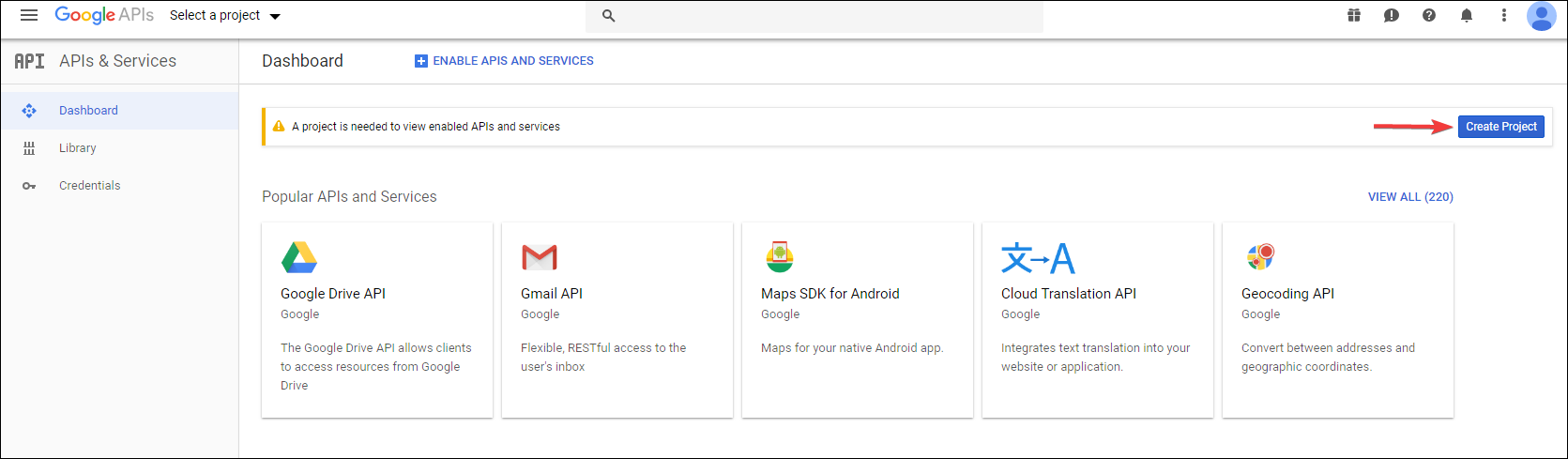
and then click "CREATE"

Give it a name (in my case "Google CLI TA40") and click "Create"

Now go to Google Drive API and click "ENABLE"

Now on the left side, click "Credentials"
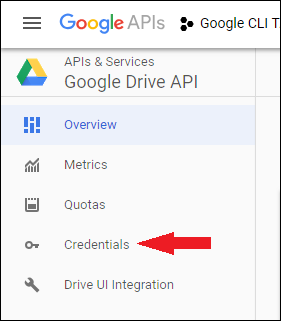
And click "CREATE CREDENTIAL"
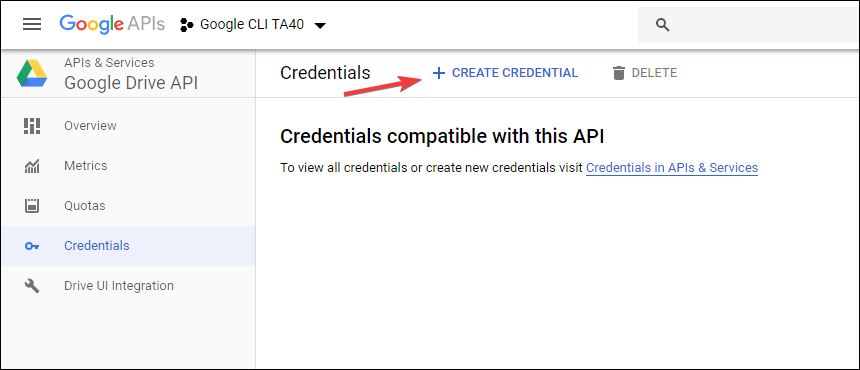
Fill the things like I did and then click on "What credentials do I need?"
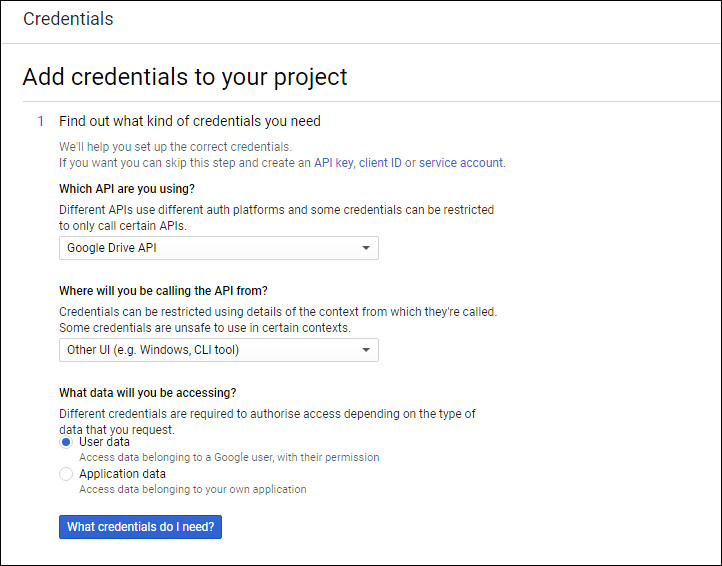
Give it a name (I took the name of the API)
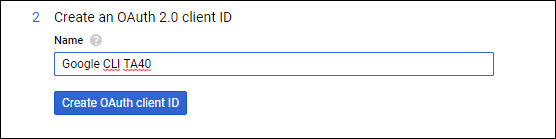
Next select your e-mail and then give it a name (I again took the name of the API)

Click on "Download" (A .json file will be downloaded)

Open the .json file in the editor of your choice.(Notepad++ prefered)
You should see :
81915486XXXX-XXXX22bh62ql2rbnaqtpds82od4ql976.apps.googleusercontent.comlnA7ZFg5NEGOMpFhd6e4PqnyIn the unzipped repository open the file names "handlers_drive.go" (via Notepad++) and change these 2 variables to the ones you got in step 14

and save it
open CMD/terminal and go to the folder where the "handerls_drive.go" is.
First type this:
go get github.com/prasmussen/gdrive(thanks to mbenlioglu TUTORIAL: How to get rid of 403 Errors #426 (comment))Now type this:
go build -ldflags '-w -s'Now you should have an executable for you platform which you can use normally
You can reset your data by deleting the
%appdata%\.gdriveon Windows,$HOME/.gdriveon other platformsCross Compiling a Linux/OS X/Windows etc. version of gdrive from your device:
If you want to compile the binary for an OS other than the one you're using you should first set
GOOSandGOARCHvariables for that system.Look up your target OS here: https://golang.org/doc/install/source#environment
Now do this in terminal:
On Windows:
On Mac OS/Linux:
then do
go build -ldflags '-w -s'Example variables if target platform is a 64 bit Linux machine:
GOOS=linuxGOARCH=amd64Edit: Updated to cover all platforms