Problem
I started using Omawrite without knowing Markdown syntax. Common formatting is available through keyboard shortcuts, but those actions are difficult to discover unless the user already knows both Markdown and the shortcuts.
Proposal
Add a compact, always-visible Markdown formatting toolbar above the editor.
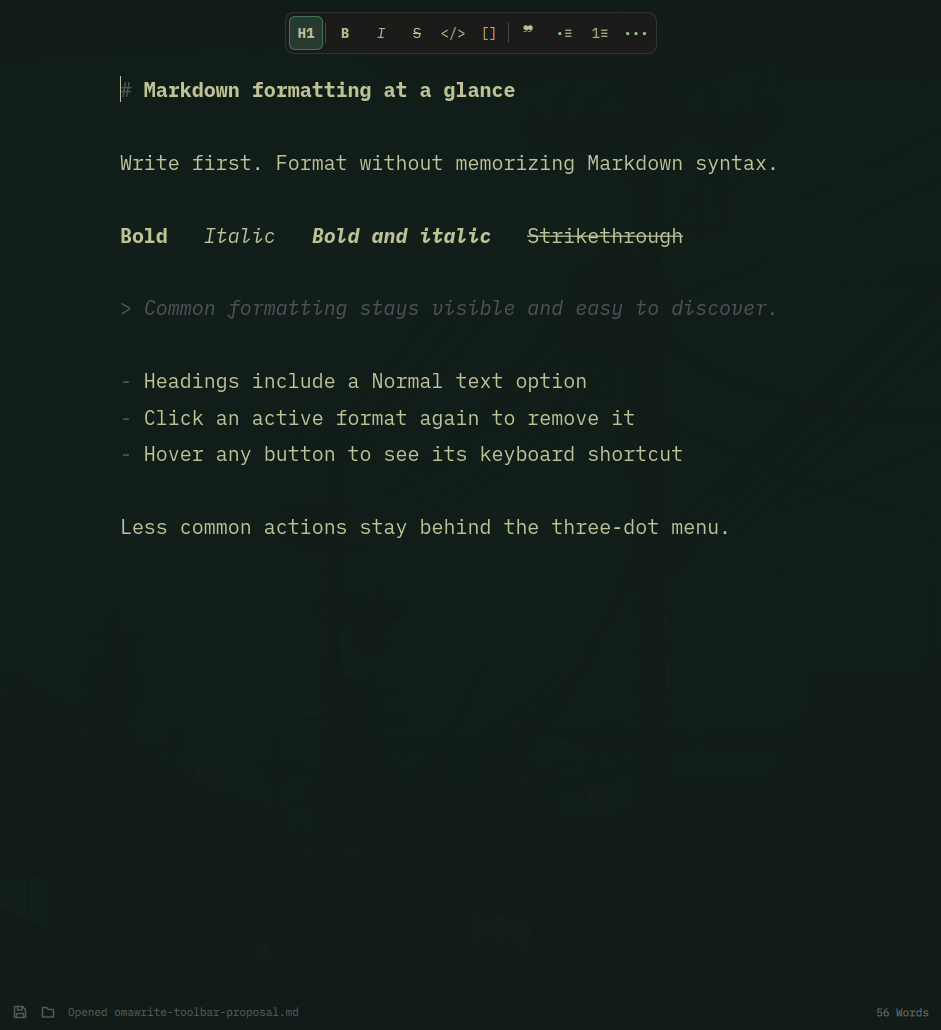
The current implementation provides the most common actions at a glance:
- Heading selection from H1 through H6, including a Normal text option
- Bold, italic, strikethrough, inline code, and links
- Block quotes, bulleted lists, and numbered lists
- A three-dot menu for less common actions such as code blocks, task lists, and horizontal rules
Interaction details
- Hovering a control shows its keyboard shortcut and Markdown syntax.
- A control is highlighted when that formatting is active at the current selection or cursor.
- Clicking an active format again removes only that format.
- Combined formatting remains valid when one style is removed. For example, removing bold from bold + italic + strikethrough preserves italic + strikethrough.
- Formatting markers are rewritten into canonical Markdown instead of accumulating broken or redundant marker runs.
The goal is to make Markdown approachable without turning Omawrite into a full rich-text editor. The document remains plain Markdown, and every action remains available through the keyboard.
Working implementation
A working implementation is available in my fork:
https://github.com/NomadicSoultribe/omawrite/tree/feature/markdown-formatting-toolbar
It was developed iteratively with Codex, manually exercised in Omawrite, and currently passes the complete automated test suite:
The branch currently applies cleanly to master.
Related work
PR #15 already implements strikethrough and formatting toggles. I do not want to duplicate or replace that work. If this toolbar fits Omawrite's direction, I would adapt it to whichever implementation is accepted there.
Issue #16 discusses much broader editor capabilities. This proposal is intentionally narrower: discoverability for the Markdown formatting Omawrite already supports or is already considering.
Questions for the maintainers
- Does an always-visible formatting toolbar fit Omawrite's intentionally focused interface?
- Which actions should remain directly visible, and which should live in the three-dot menu?
- If the direction is welcome, would you prefer the implementation as several small pull requests or as one feature pull request?
I am happy to adjust the scope and split the existing implementation into reviewable pieces before opening a pull request.
Problem
I started using Omawrite without knowing Markdown syntax. Common formatting is available through keyboard shortcuts, but those actions are difficult to discover unless the user already knows both Markdown and the shortcuts.
Proposal
Add a compact, always-visible Markdown formatting toolbar above the editor.
The current implementation provides the most common actions at a glance:
Interaction details
The goal is to make Markdown approachable without turning Omawrite into a full rich-text editor. The document remains plain Markdown, and every action remains available through the keyboard.
Working implementation
A working implementation is available in my fork:
https://github.com/NomadicSoultribe/omawrite/tree/feature/markdown-formatting-toolbar
It was developed iteratively with Codex, manually exercised in Omawrite, and currently passes the complete automated test suite:
The branch currently applies cleanly to
master.Related work
PR #15 already implements strikethrough and formatting toggles. I do not want to duplicate or replace that work. If this toolbar fits Omawrite's direction, I would adapt it to whichever implementation is accepted there.
Issue #16 discusses much broader editor capabilities. This proposal is intentionally narrower: discoverability for the Markdown formatting Omawrite already supports or is already considering.
Questions for the maintainers
I am happy to adjust the scope and split the existing implementation into reviewable pieces before opening a pull request.