Thank you for your example which should help me to understand the whole scenario. Unfortunately I get the same errors I had before which is the reason I was looking for an example.
I created a setup as given by your instruction, mainly by copy and paste,
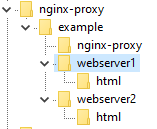
# cat /etc/hosts
127.0.0.1   localhost localhost.localdomain localhost4 localhost4.localdomain4
::1         localhost localhost.localdomain localhost6 localhost6.localdomain6
127.0.0.1 web1.localhost web2.localhost
The result is:
root@IONOS_1: /root/nginx-proxy/example # curl web1.localhost
<html>
<head><title>502 Bad Gateway</title></head>
<body>
<center><h1>502 Bad Gateway</h1></center>
<hr><center>nginx/1.17.6</center>
</body>
</html>

root@IONOS_1: /root/nginx-proxy/example # curl web2.localhost
<html>
<head><title>503 Service Temporarily Unavailable</title></head>
<body>
<center><h1>503 Service Temporarily Unavailable</h1></center>
<hr><center>nginx/1.17.6</center>
</body>
</html>
This is the output of the proxy:
root@IONOS_1: /root/nginx-proxy/example/nginx-proxy # docker-compose up
WARNING: The Docker Engine you're using is running in swarm mode.

Compose does not use swarm mode to deploy services to multiple nodes in a swarm. All containers will be scheduled on the current node.

To deploy your application across the swarm, use `docker stack deploy`.

Creating nginx-proxy_nginx-proxy_1 ... done
Attaching to nginx-proxy_nginx-proxy_1
nginx-proxy_1  | WARNING: /etc/nginx/dhparam/dhparam.pem was not found. A pre-generated dhparam.pem will be used for now while a new one
nginx-proxy_1  | is being generated in the background.  Once the new dhparam.pem is in place, nginx will be reloaded.
nginx-proxy_1  | forego     | starting dockergen.1 on port 5000
nginx-proxy_1  | forego     | starting nginx.1 on port 5100
nginx-proxy_1  | dockergen.1 | 2020/05/21 21:09:58 Generated '/etc/nginx/conf.d/default.conf' from 2 containers
nginx-proxy_1  | dockergen.1 | 2020/05/21 21:09:58 Watching docker events
nginx-proxy_1  | dockergen.1 | 2020/05/21 21:09:58 Contents of /etc/nginx/conf.d/default.conf did not change. Skipping notification 'nginx -s reload'
nginx-proxy_1  | dockergen.1 | 2020/05/21 21:11:24 Received event start for container 5dee7b3cd3a8
nginx-proxy_1  | dockergen.1 | 2020/05/21 21:11:25 Generated '/etc/nginx/conf.d/default.conf' from 3 containers
nginx-proxy_1  | dockergen.1 | 2020/05/21 21:12:28 Received event start for container 00112b8847bc
nginx-proxy_1  | dockergen.1 | 2020/05/21 21:12:29 Generated '/etc/nginx/conf.d/default.conf' from 4 containers
nginx-proxy_1  | 2020/05/21 21:12:42 [notice] 48#48: signal process started
nginx-proxy_1  | Generating DH parameters, 2048 bit long safe prime, generator 2
nginx-proxy_1  | This is going to take a long time
nginx-proxy_1  | dhparam generation complete, reloading nginx
nginx-proxy_1  | nginx.1    | 2020/05/21 21:13:17 [error] 49#49: *1 no live upstreams while connecting to upstream, client: 172.17.0.1, server: web1.localhost, request: "GET / HTTP/1.1", upstream: "http://web1.localhost/", host: "web1.localhost"
nginx-proxy_1  | nginx.1    | web1.localhost 172.17.0.1 - - [21/May/2020:21:13:17 +0000] "GET / HTTP/1.1" 502 157 "-" "curl/7.61.1"
nginx-proxy_1  | nginx.1    | web2.localhost 172.17.0.1 - - [21/May/2020:21:16:07 +0000] "GET / HTTP/1.1" 503 197 "-" "curl/7.61.1"
nginx-proxy_1  | nginx.1    | 2020/05/21 21:22:20 [error] 49#49: *3 no live upstreams while connecting to upstream, client: 172.17.0.1, server: web1.localhost, request: "GET / HTTP/1.1", upstream: "http://web1.localhost/", host: "web1.localhost"
nginx-proxy_1  | nginx.1    | web1.localhost 172.17.0.1 - - [21/May/2020:21:22:20 +0000] "GET / HTTP/1.1" 502 157 "-" "curl/7.61.1"
nginx-proxy_1  | nginx.1    | web2.localhost 172.17.0.1 - - [21/May/2020:21:22:27 +0000] "GET / HTTP/1.1" 503 197 "-" "curl/7.61.1"
The same in colors:
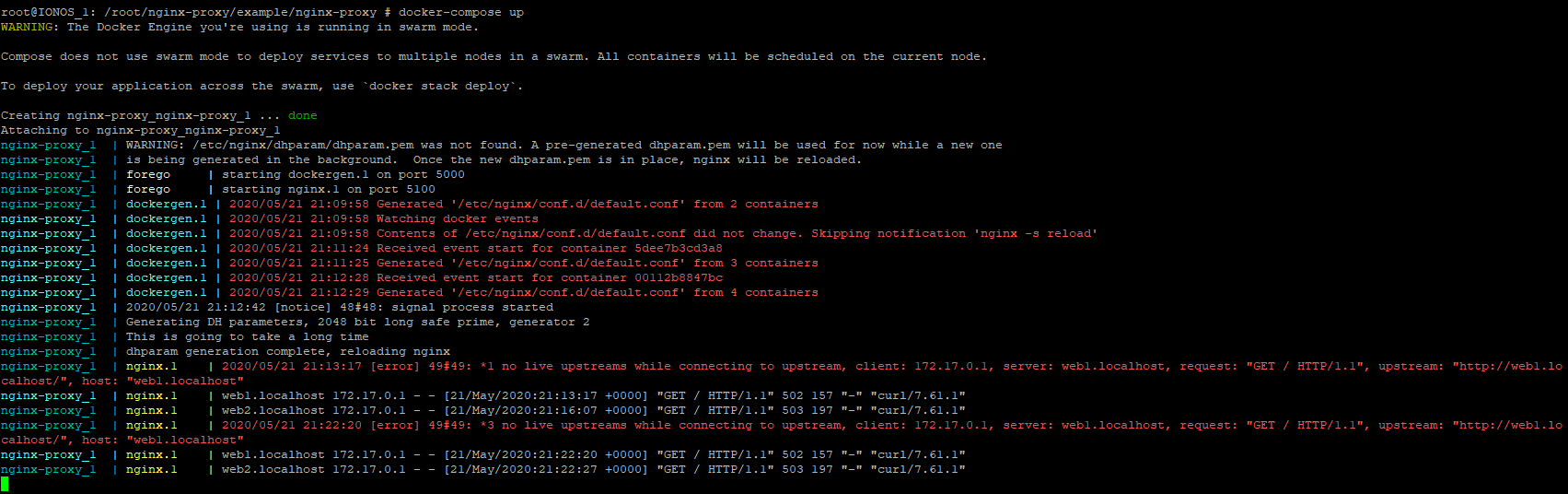
Obviously, there are errors, but I can't make any sense of the error messages. I'd be grateful for any hint.
Thank you for your example which should help me to understand the whole scenario. Unfortunately I get the same errors I had before which is the reason I was looking for an example.
I created a setup as given by your instruction, mainly by copy and paste,
The result is:
This is the output of the proxy:
The same in colors:
Obviously, there are errors, but I can't make any sense of the error messages. I'd be grateful for any hint.