When upgrading to AF 3.9.0 we have noticed that a new display bug has been introduced in MS Edge for the Details element resulting in double arrows being shown in the closed state.
Problem/Feature
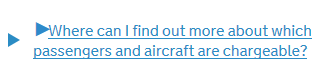
Expected behaviour
We expect there to be only one arrow shown.
Proposed solution
Overriding the declaration from _details.scss for the display for the arrow when the no-details class has been added to from "inline-block" to "none" fixes the issue
We need to add this like this:
.no-details details summary .arrow-closed { display: none !important; }
to make it work ok.
Explain the steps to reproduce the bug
In Microsoft Edge load a page with a Details element on it when Assets Frontend v3.9.0 is the only CSS and JS being used
Tell us about your environment
- Version used: 3.9.0
- Browser Name and version: Microsoft Edge 42.17134.10
- Operating System and version (desktop or mobile): Windows 10 desktop (Virtualbox on Ubuntu 16.04)
When upgrading to AF 3.9.0 we have noticed that a new display bug has been introduced in MS Edge for the Details element resulting in double arrows being shown in the closed state.
Problem/Feature
Expected behaviour
We expect there to be only one arrow shown.
Proposed solution
Overriding the declaration from _details.scss for the display for the arrow when the no-details class has been added to from "inline-block" to "none" fixes the issue
We need to add this like this:
.no-details details summary .arrow-closed { display: none !important; }to make it work ok.
Explain the steps to reproduce the bug
In Microsoft Edge load a page with a Details element on it when Assets Frontend v3.9.0 is the only CSS and JS being used
Tell us about your environment