Summary
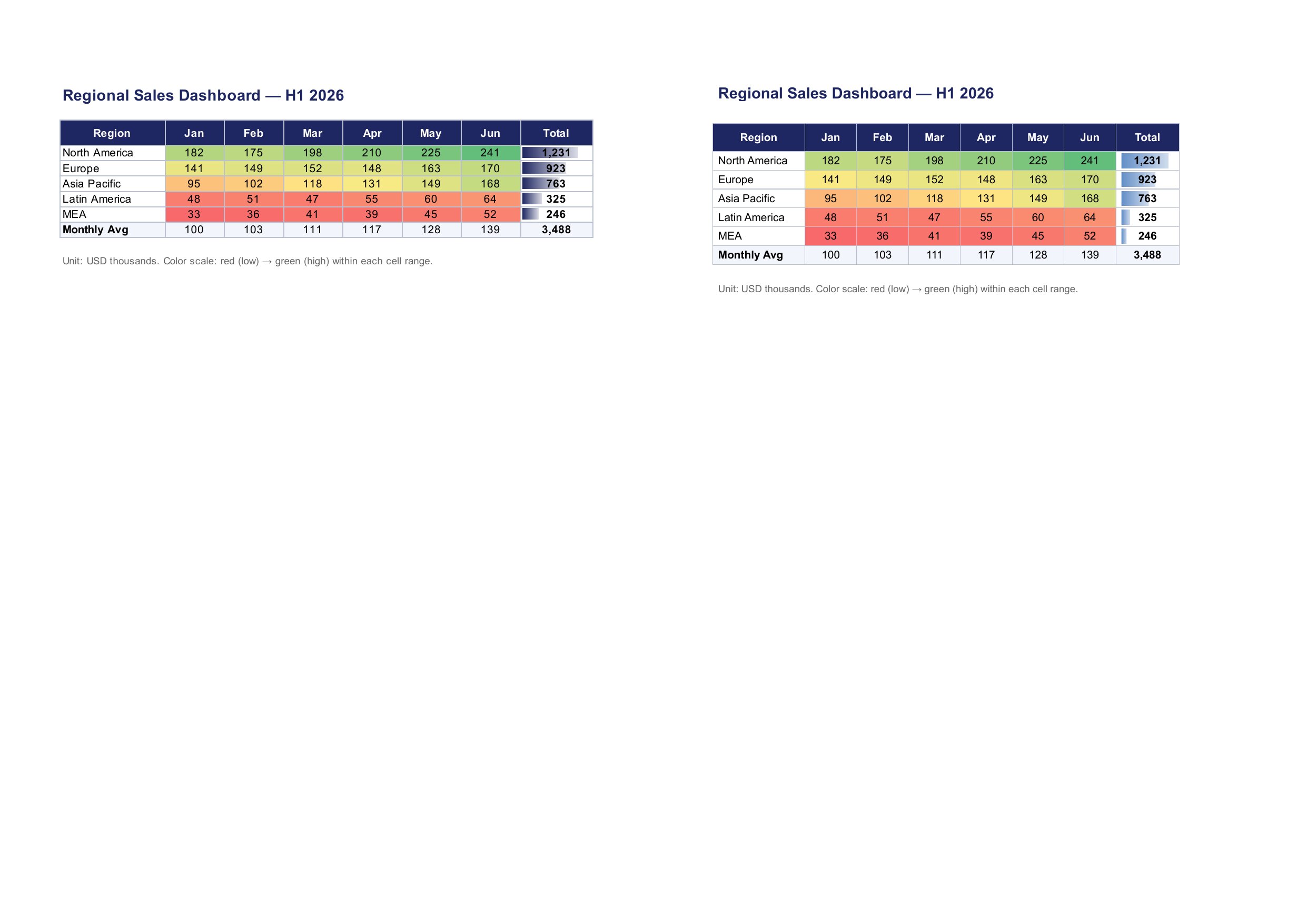
Data bars ignore the rule's <color rgb> and always render the parser's default steel blue (#638EC6). In 06_sales_dashboard_en.xlsx the dataBar rule specifies <color rgb="FF1E2761"/> (dark navy) and Excel prints navy bars; office2pdf prints light steel-blue bars.
apply_data_bar_rule reads db.get_color_collection().first(), which comes back empty for this file, so the fallback color is used. The <color> element inside <dataBar> is likely not exposed where the parser looks (possible umya-spreadsheet mapping gap — needs upstream investigation per the reference-projects rule).
Reproduction
Convert an XLSX with:
<cfRule type="dataBar" priority="3"><dataBar showValue="1" minLength="10" maxLength="90">
  <cfvo type="num" val="0"/><cfvo type="num" val="1400"/><color rgb="FF1E2761"/>
</dataBar></cfRule>
and compare bar color with an Excel PDF export.
Expected
Bars use the rule color #1E2761.
Actual
Bars render in the default #638EC6.
Related
Related: #362, #292
Visual comparison
Ground truth (native Microsoft Excel export) is on the left; office2pdf output at filing time (after the #362 height fix) is on the right. Both pages were rendered with pdftoppm at 150 DPI.
Summary
Data bars ignore the rule's
<color rgb>and always render the parser's default steel blue (#638EC6). In06_sales_dashboard_en.xlsxthe dataBar rule specifies<color rgb="FF1E2761"/>(dark navy) and Excel prints navy bars; office2pdf prints light steel-blue bars.apply_data_bar_rulereadsdb.get_color_collection().first(), which comes back empty for this file, so the fallback color is used. The<color>element inside<dataBar>is likely not exposed where the parser looks (possible umya-spreadsheet mapping gap — needs upstream investigation per the reference-projects rule).Reproduction
Convert an XLSX with:
and compare bar color with an Excel PDF export.
Expected
Bars use the rule color
#1E2761.Actual
Bars render in the default
#638EC6.Related
Related: #362, #292
Visual comparison
Ground truth (native Microsoft Excel export) is on the left; office2pdf output at filing time (after the #362 height fix) is on the right. Both pages were rendered with
pdftoppmat 150 DPI.