Summary
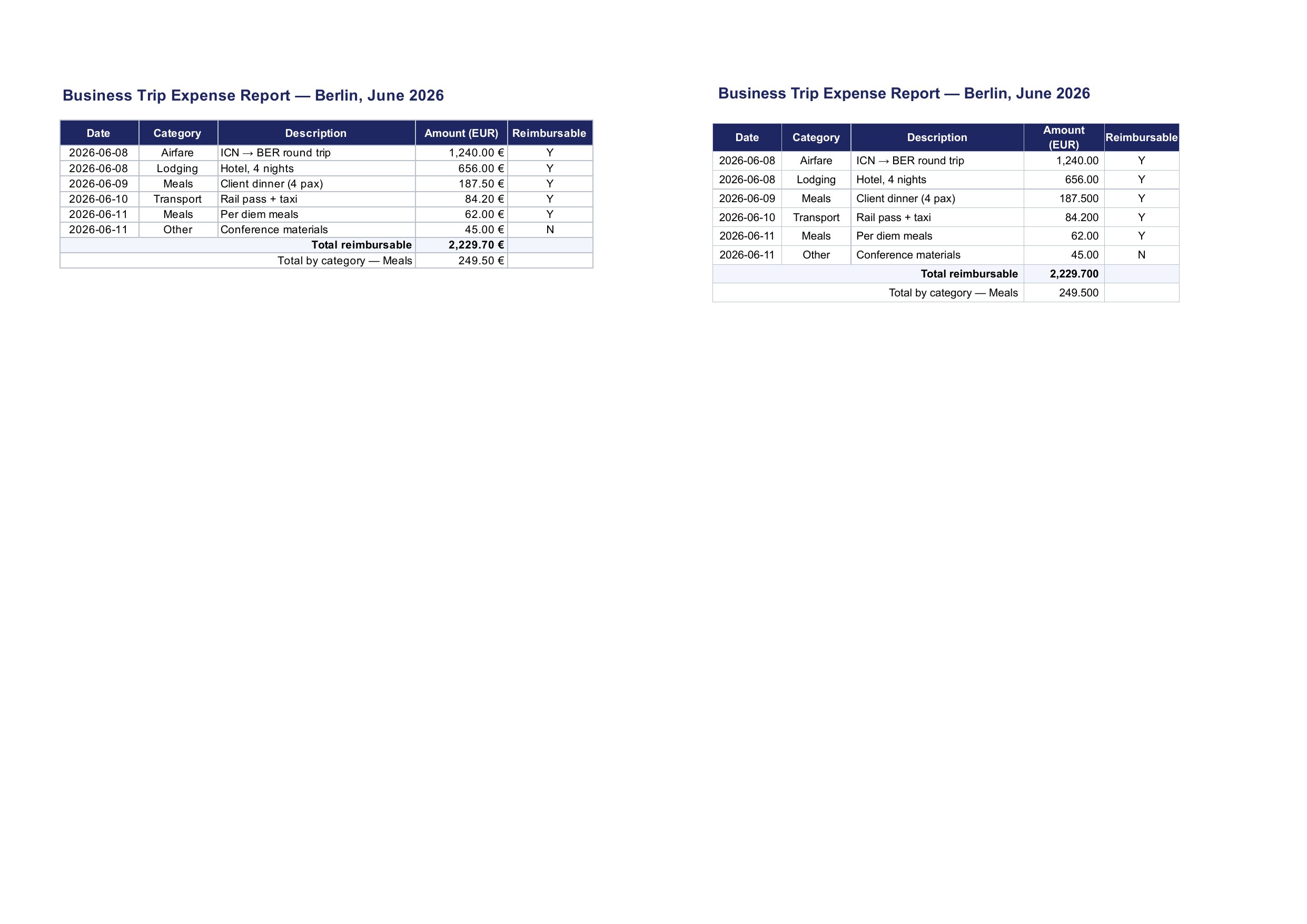
Two-decimal number formats render three decimals when the underlying value has fewer significant decimals. In 03_inventory_en.xlsx, $39.10 (value 39.1) renders as $39.100, $26.80 as $26.800, $2.80 as $2.800, $17.30 as $17.300. In 09_expense_report_en.xlsx, 187.50 renders as 187.500, 84.20 as 84.200, 2,229.70 as 2,229.700, 249.50 as 249.500. Values that naturally carry two decimals (e.g. $57.67) render correctly.
Reproduction
Convert an XLSX cell with value 39.1 and format $#,##0.00 (or 0.00) and compare with Excel.
Expected
Exactly two decimal places: $39.10.
Actual
Three digits appear after the decimal point: $39.100.
Related
Related: #256
Visual comparison
Ground truth (native Microsoft Office export) is on the left; office2pdf output at filing time is on the right. Both pages were rendered with pdftoppm at 150 DPI.
Summary
Two-decimal number formats render three decimals when the underlying value has fewer significant decimals. In
03_inventory_en.xlsx,$39.10(value 39.1) renders as$39.100,$26.80as$26.800,$2.80as$2.800,$17.30as$17.300. In09_expense_report_en.xlsx,187.50renders as187.500,84.20as84.200,2,229.70as2,229.700,249.50as249.500. Values that naturally carry two decimals (e.g.$57.67) render correctly.Reproduction
Convert an XLSX cell with value
39.1and format$#,##0.00(or0.00) and compare with Excel.Expected
Exactly two decimal places:
$39.10.Actual
Three digits appear after the decimal point:
$39.100.Related
Related: #256
Visual comparison
Ground truth (native Microsoft Office export) is on the left; office2pdf output at filing time is on the right. Both pages were rendered with
pdftoppmat 150 DPI.