Summary
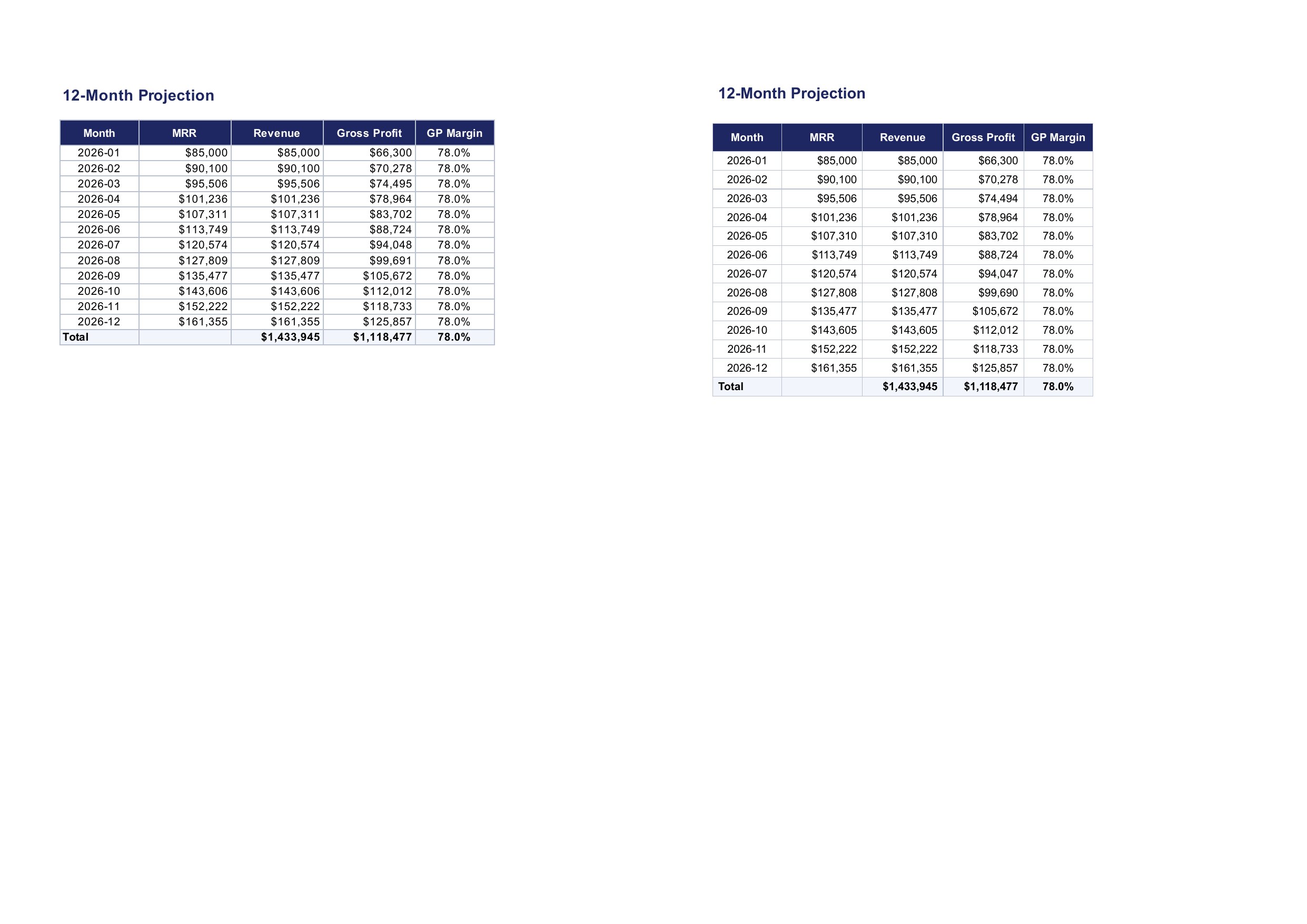
Evaluated numeric values are truncated instead of rounded when formatted. In 02_financial_model_en.xlsx, Excel's cached results show $107,311, $127,809, $143,606, $74,495, $94,048, $99,691; office2pdf prints $107,310, $127,808, $143,605, $74,494, $94,047, $99,690 — every value with a fractional part ≥ .5 is one off. Likewise 10_kpi_tracker_en.xlsx shows 106% where Excel shows 107% (21,300 / 20,000 = 106.5%).
Reproduction
Convert an XLSX cell whose value is e.g. 107310.6 with format $#,##0 (or 1.065 with 0%) and compare with Excel's rendering.
Expected
Display rounding follows Excel (round half away from zero): $107,311, 107%.
Actual
The fractional part is truncated: $107,310, 106%.
Related
Related: #256
Visual comparison
Ground truth (native Microsoft Office export) is on the left; office2pdf output at filing time is on the right. Both pages were rendered with pdftoppm at 150 DPI.
Summary
Evaluated numeric values are truncated instead of rounded when formatted. In
02_financial_model_en.xlsx, Excel's cached results show$107,311,$127,809,$143,606,$74,495,$94,048,$99,691; office2pdf prints$107,310,$127,808,$143,605,$74,494,$94,047,$99,690— every value with a fractional part ≥ .5 is one off. Likewise10_kpi_tracker_en.xlsxshows106%where Excel shows107%(21,300 / 20,000 = 106.5%).Reproduction
Convert an XLSX cell whose value is e.g.
107310.6with format$#,##0(or1.065with0%) and compare with Excel's rendering.Expected
Display rounding follows Excel (round half away from zero):
$107,311,107%.Actual
The fractional part is truncated:
$107,310,106%.Related
Related: #256
Visual comparison
Ground truth (native Microsoft Office export) is on the left; office2pdf output at filing time is on the right. Both pages were rendered with
pdftoppmat 150 DPI.