Hey @davidegiacometti! 👋
I'm Niels, and I'm on the PowerToys team at Microsoft. First off — thanks so much for building Edge Favorites and Visual Studio for Command Palette for Command Palette! We're really excited about what you've created and love seeing the community build awesome stuff.
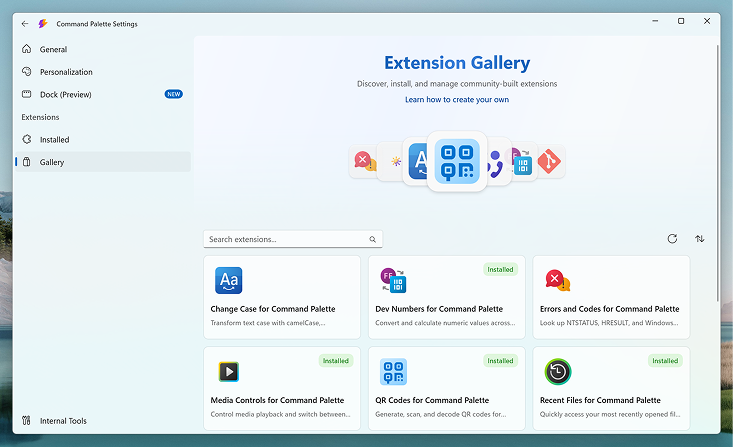
We're launching a brand new Extensions Gallery for Command Palette in PowerToys 0.99 (roughly 2 weeks from now). The gallery will make it super easy for users to discover, browse, and install extensions — whether they're on winget, the Microsoft Store, or GitHub.
Here's a sneak peek of what it looks like:
We'd love for Edge Favorites and Visual Studio for Command Palette to be part of this! If you add it before launch, we'll make sure it shows up on day one. 🚀
Getting started is easy — just head over to the CmdPal-Extensions repo and follow the contributing guide. It's basically just a small JSON file with some metadata — things like a description, an icon, maybe some screenshots — and then it links to wherever your extension already lives (winget, the Store, GitHub releases, etc.). We don't host any extensions ourselves, it's just a one-time thing to make sure your extension shows up in front of users.
If you have any questions or need help, feel free to ping me. Happy to help! 🙏
Hey @davidegiacometti! 👋
I'm Niels, and I'm on the PowerToys team at Microsoft. First off — thanks so much for building Edge Favorites and Visual Studio for Command Palette for Command Palette! We're really excited about what you've created and love seeing the community build awesome stuff.
We're launching a brand new Extensions Gallery for Command Palette in PowerToys 0.99 (roughly 2 weeks from now). The gallery will make it super easy for users to discover, browse, and install extensions — whether they're on winget, the Microsoft Store, or GitHub.
Here's a sneak peek of what it looks like:
We'd love for Edge Favorites and Visual Studio for Command Palette to be part of this! If you add it before launch, we'll make sure it shows up on day one. 🚀
Getting started is easy — just head over to the CmdPal-Extensions repo and follow the contributing guide. It's basically just a small JSON file with some metadata — things like a description, an icon, maybe some screenshots — and then it links to wherever your extension already lives (winget, the Store, GitHub releases, etc.). We don't host any extensions ourselves, it's just a one-time thing to make sure your extension shows up in front of users.
If you have any questions or need help, feel free to ping me. Happy to help! 🙏