👋 again
After resolving the previous issue which was blocking our sync w/ jira, we are noticing that we have old jira tickets which aren't being resolved. When we run a deploy, we push a new set of instances using a whole new AMI, rather than updating the OS in place. I'm not sure if this is contributing.
Here's an example jira which was created on april 16:
Halo detected sva issue in server prod-integproxy-app--i-0a23729ade516f185

Vulnerable package: accountsservice version 0.6.40-2ubuntu11.3

Critical: False
CVE-2018-14036 Score: 4.0 Supressed: False
Server prod-integproxy-app--i-0a23729ade516f185 at -unknown-
Here's a list of our currently active servers, you can see that there aren't any with a matching server id:
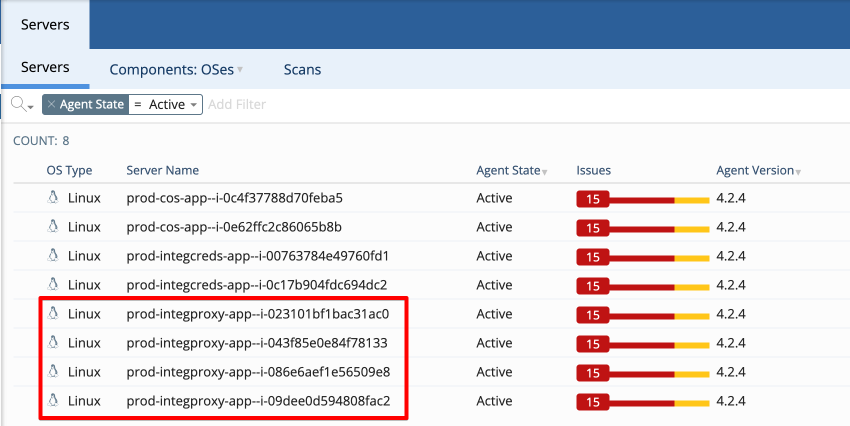
Any thoughts on how to handle this? I did retire the previous set of instances shortly after the deploy - is it possible this would've been picked up and resolved if the instances were just deactivated instead of retired?
Ideally, all issues related to instances which are no longer active should be resolved as part of the sync (I think).
👋 again
After resolving the previous issue which was blocking our sync w/ jira, we are noticing that we have old jira tickets which aren't being resolved. When we run a deploy, we push a new set of instances using a whole new AMI, rather than updating the OS in place. I'm not sure if this is contributing.
Here's an example jira which was created on april 16:
Here's a list of our currently active servers, you can see that there aren't any with a matching server id:
Any thoughts on how to handle this? I did retire the previous set of instances shortly after the deploy - is it possible this would've been picked up and resolved if the instances were just
deactivatedinstead ofretired?Ideally, all issues related to instances which are no longer active should be resolved as part of the sync (I think).