| layout | post | ||||||
|---|---|---|---|---|---|---|---|
| date | 2025-02-12 | ||||||
| changes | v032 + from openmct :weather-tech.md | ||||||
| file | weather-tech | ||||||
| title | Weather Technologies | ||||||
| excerpt | How to visualize, predict, and stay ahead of your microclimate weather using NASA's OpenMCT website and Python programs | ||||||
| tags |
|
||||||
| image |
|
||||||
| comments | true | ||||||
| created | 2023-01-10 |
{{ page.excerpt }} {% include l18n.html %} {% include _toc.html %}

{% include whatever.html %}
From NASA, the same organization that brought you the first man on the moon, the Space Station, landers and helicopters on Mars, etc. comes:

Open MCT is among the most popular of NASA's open-source projects at code.nasa.gov.
"Open MCT is designed to meet the rapidly evolving needs of mission control systems. At NASA, the requirements for Open MCT are being driven by a need to support distributed operations, access to data anywhere, data visualization for spacecraft analysis that spans multiple data sources, and flexible reconfiguration to support multiple missions and operator use cases."
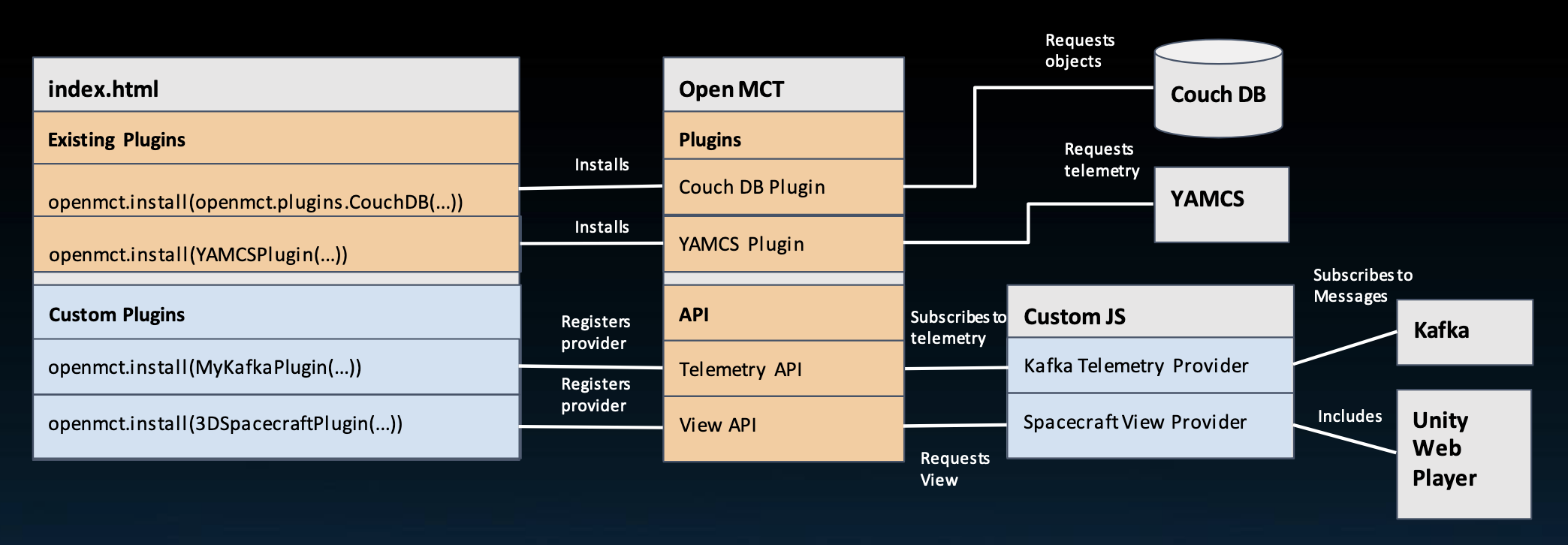
Open MCT is called "next generation" because it brings together many functions of mission operations so that operators no longer need to switch between different applications to view all data.
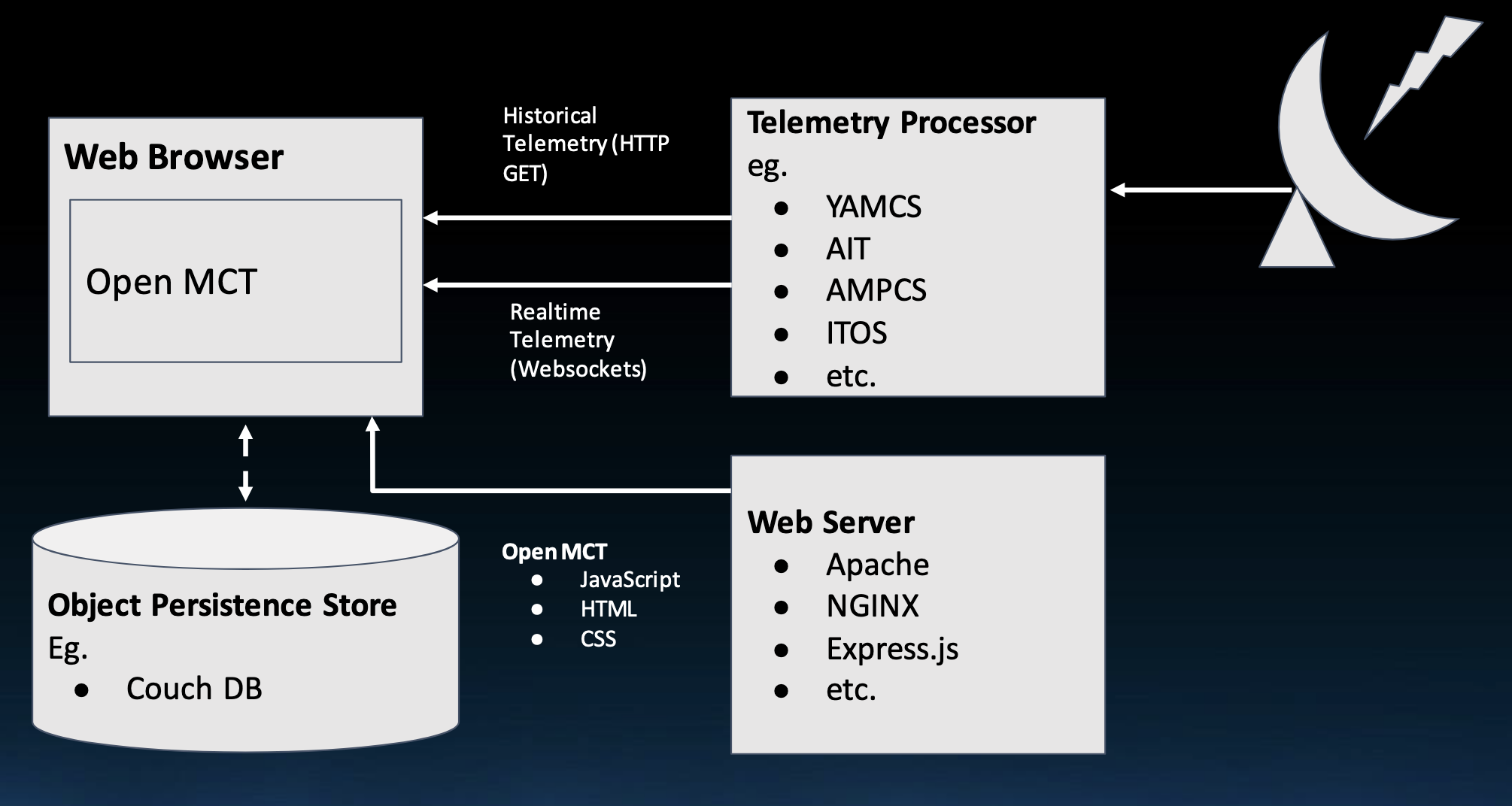
VIDEO: Open MCT is a front-end web server display accessed by desktop and mobile devices over the public internet. The server currently runs NodeJs using Vue.js GUI components.
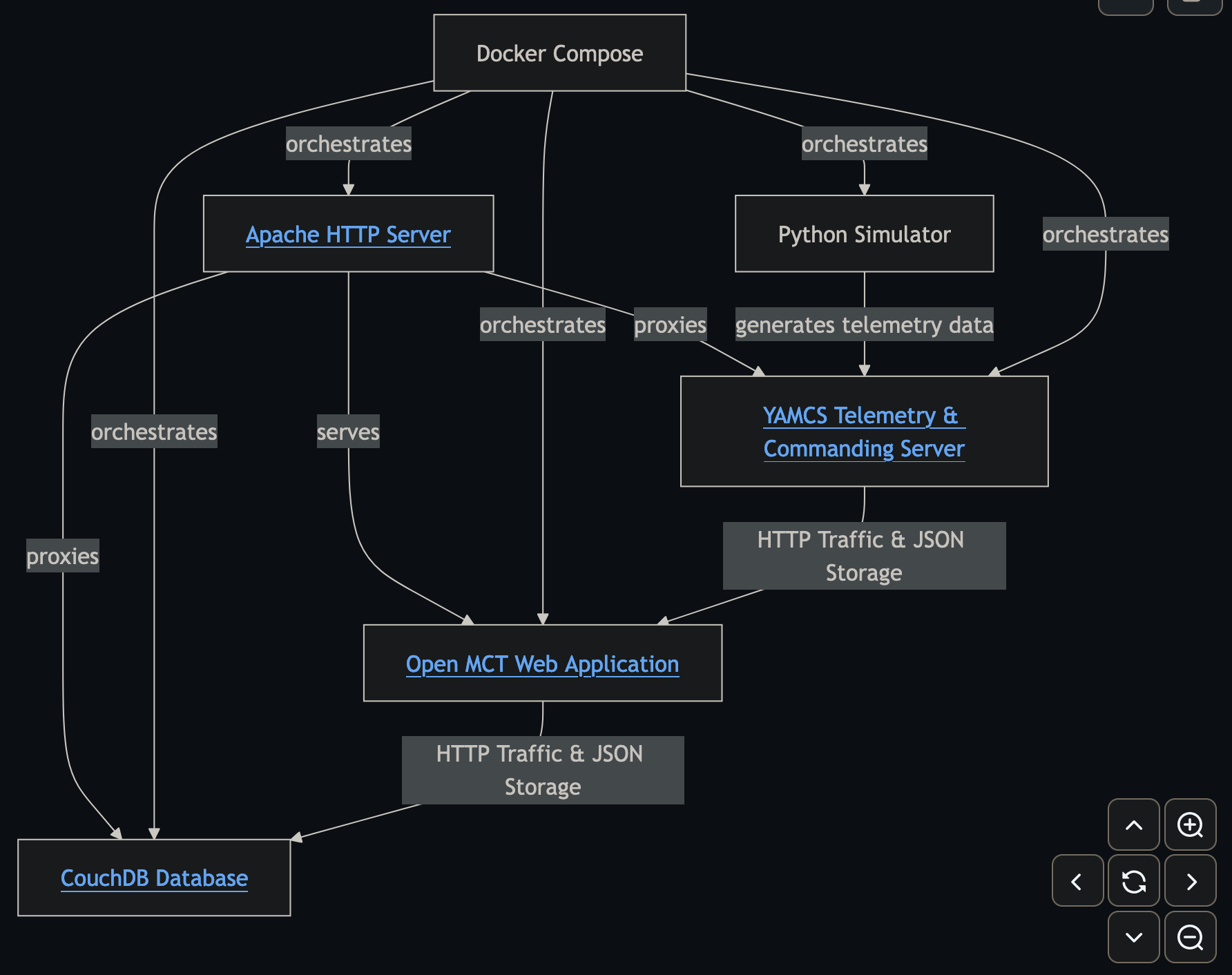
OBSOLETED WARNING: Open MCT now runs on Node.js as of 24-10-13. So ignore diagram on the openmct-quickstart repo on GitHub for a previous version using Apache, NGINX, and Express.js now deprecated.
https://www.youtube.com/watch?v=Yotx-l27MiM
Displays are used by spacecraft missions to visualize and analyze telemetry data from systems such as:
- YAMCS (Yet Another Mission Control System at https://yamcs.org/ under a GNU Affero GPL license at https://github.com/akhenry/openmct-yamcs), a Java-based open-source mission control system framework developed by Space Applications Services, a Belgian company. It's designed for monitoring and controlling spacecraft, satellites, payloads, ground stations and ground equipment. It supports space industry standards like CCSDS protocols.
- AIT (AMMOS Instrument Toolkit) is a Python-based software suite developed to handle Ground Data System (GDS), Electronic Ground Support Equipment (EGSE), commanding, telemetry uplink/downlink, and sequencing for instrument and CubeSat Missions. It is a generalization and expansion of tools developed for a number of ISS missions.
- AMPCS ( Advanced Multi-Mission Operations System at https://ammos.nasa.gov) is a catalog of mission operations and data processing capabilities for robotic missions through an "Ops in a Box" approach. AMMOS is a low-cost, highly reliable system utilized by more than 50 missions, including planetary exploration, deep space, earth science, heliophysics, and astrophysics, by NASA, ESA, industry, and academia. PDF
- ITOS (Integrated Test and Operations System athttps://itos.gsfc.nasa.gov) for flight operations, integration and test, and development.
Space Standards at CCSDS.org (Consultative Committee for Space Data Systems):
- CCSDS/OMG XML Telemetric and Command Exchange (XTCE) v1.1 and v1.2 PDF
- CCSDS 133.0-B-2 Space Packet Protocol
- CCSDS Space Data Link Protocols (AOS/TM/USLP/TC frames)
- CCSDS 232.1-B-2 Communications Operation Procedure (COP-1)
- CCSDS File Delivery Protocol (CFDP)
- CCSDS Space Link Extension (FCLTU/RAF/RCF)
As of February 2021: CCSDS Member Agencies:
- Agenzia Spaziale Italiana (ASI)/Italy.
- Canadian Space Agency (CSA)/Canada.
- Centre National d’Etudes Spatiales (CNES)/France.
- China National Space Administration (CNSA)/People’s Republic of China.
- Deutsches Zentrum für Luft- und Raumfahrt (DLR)/Germany.
- European Space Agency (ESA)/Europe.
- Federal Space Agency (FSA)/Russian Federation.
- Instituto Nacional de Pesquisas Espaciais (INPE)/Brazil.
- Japan Aerospace Exploration Agency (JAXA)/Japan.
- National Aeronautics and Space Administration (NASA)/USA.
- UK Space Agency/United Kingdom. CCSDS Observer Agencies:
- Austrian Space Agency (ASA)/Austria.
- Belgian Science Policy Office (BELSPO)/Belgium.
- Central Research Institute of Machine Building (TsNIIMash)/Russian Federation.
- China Satellite Launch and Tracking Control General, Beijing Institute of Tracking and Telecommunications Technology (CLTC/BITTT)/China.
- Chinese Academy of Sciences (CAS)/China.
- China Academy of Space Technology (CAST)/China.
- Commonwealth Scientific and Industrial Research Organization (CSIRO)/Australia.
- Danish National Space Center (DNSC)/Denmark.
- Departamento de Ciência e Tecnologia Aeroespacial (DCTA)/Brazil.
- Electronics and Telecommunications Research Institute (ETRI)/Korea.
- European Organization for the Exploitation of Meteorological Satellites (EUMETSAT)/Europe.
- European Telecommunications Satellite Organization (EUTELSAT)/Europe.
- Geo-Informatics and Space Technology Development Agency (GISTDA)/Thailand.
- Hellenic National Space Committee (HNSC)/Greece.
- Hellenic Space Agency (HSA)/Greece.
- Indian Space Research Organization (ISRO)/India.
- Institute of Space Research (IKI)/Russian Federation.
- Korea Aerospace Research Institute (KARI)/Korea.
- Ministry of Communications (MOC)/Israel.
- Mohammed Bin Rashid Space Centre (MBRSC)/United Arab Emirates.
- National Institute of Information and Communications Technology (NICT)/Japan.
- National Oceanic and Atmospheric Administration (NOAA)/USA.
- National Space Agency of the Republic of Kazakhstan (NSARK)/Kazakhstan.
- National Space Organization (NSPO)/Chinese Taipei.
- Naval Center for Space Technology (NCST)/USA.
- Netherlands Space Office (NSO)/The Netherlands.
- Research Institute for Particle & Nuclear Physics (KFKI)/Hungary.
- Scientific and Technological Research Council of Turkey (TUBITAK)/Turkey.
- South African National Space Agency (SANSA)/Republic of South Africa.
- Space and Upper Atmosphere Research Commission (SUPARCO)/Pakistan.
- Swedish Space Corporation (SSC)/Sweden.
- Swiss Space Office (SSO)/Switzerland.
- United States Geological Survey (USGS)/USA
Open MCT provides integrated situational awareness, health monitoring and telemetry display to many segments of rover mission teams, including operators, instrument specialists and strategic planners.
Open MCT is currently in use supporting multiple missions at NASA including:
- ASTERIA,
- Cold Atom Laboratory operating on the ISS, and
- Mars Cube One, which played an integral role supporting the InSight lander on Mars.
- "VISTA" is a multi-mission operations system built with Open MCT.
There was a demo of Mars Science Laboratory dashboard at:
https://openmct-demo.herokuapp.com
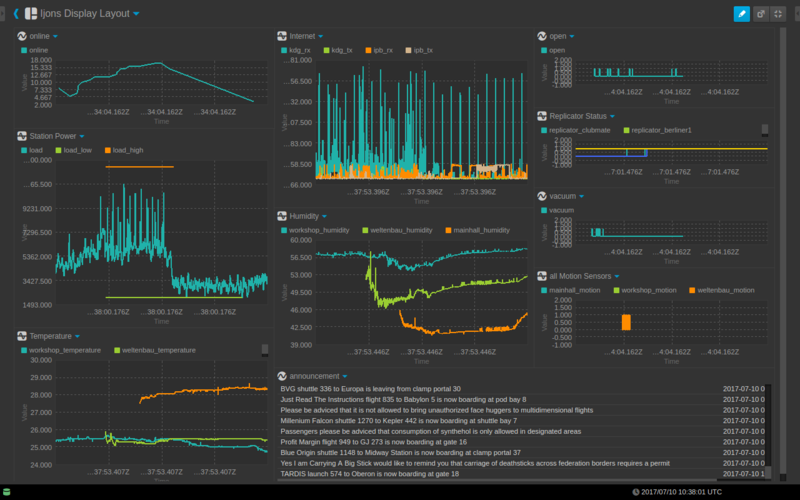

https://forum.kerbalspaceprogram.com/
"announcement" on the middle-bottom indicate that the dashboard is part of a pretend universe of various science fiction fandoms, such as the Kerbal Space Program adventure game
Notice date/time stamps are by default in UTC time at Grenwich, near London, UK.
On the left, lines over the same time span:
- "online" hours?
- "Station Power" load, with low and high bars
- "Temperature" In the middle:
- "Internet" kdg_rx/tx & ipb_rx/tx (receive & transmit)
- "Humidity" in workshop, welbenbau, mainhall On the right:
- "open" at nominal 0 with occassional spikes to 1.0.
- "Replicator Status"
- "vacuum" from -1 to 2, averaging 0.
- "all motion sensors" (from zero) in mainhall, workshop, wellerbau
A snapshot recoverd from The Mars Weather Display:
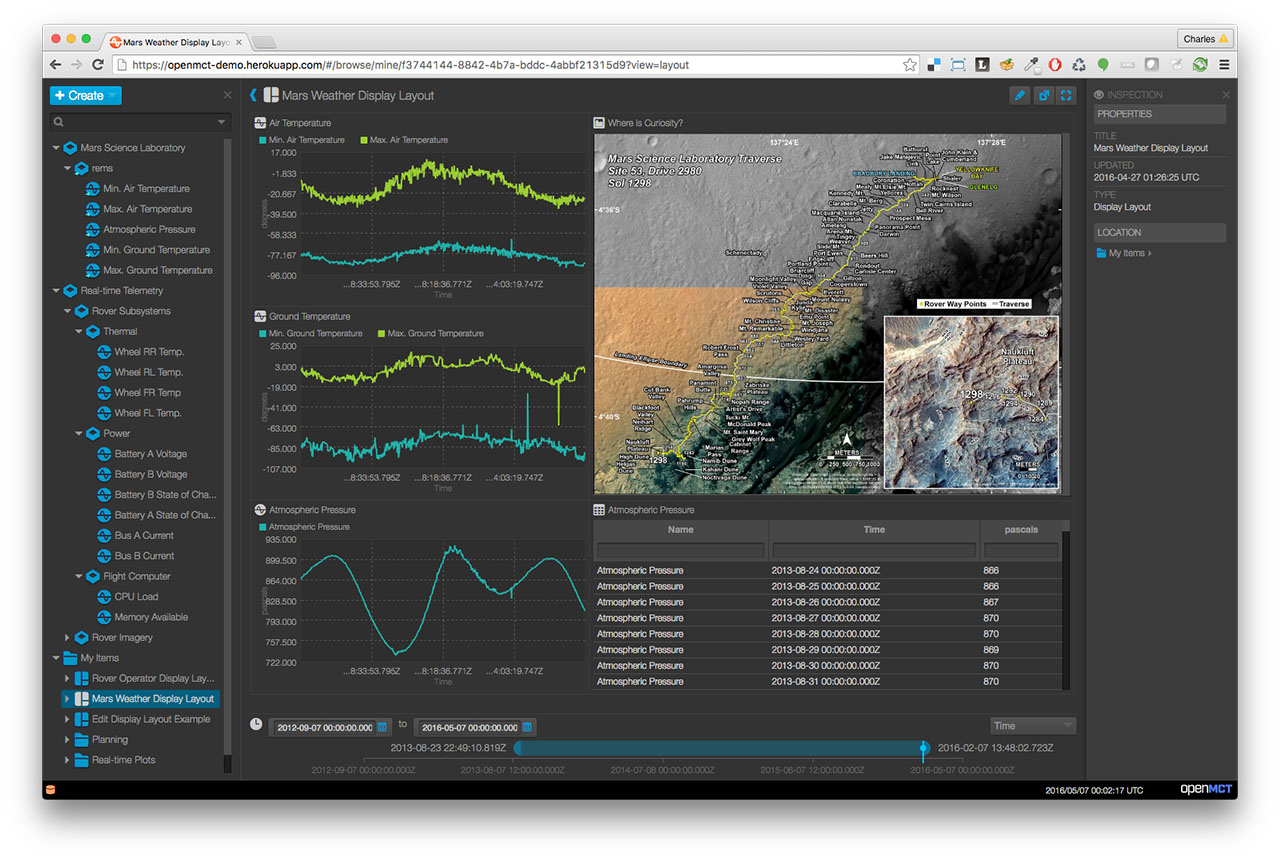
On the left bottom is a list of "My items"
- Rover Operator Display Layout
- Mars Weather Display Layout
- Edit Display Layout Example
- Planning
- Real-time Plots
Above it are details of each item.
Lines in the middle-right: - "Air Temperature" (Min. in green and Max. in turquoise)
- "Ground Temperature"
- "Atmospheric Pressure" which osillates between 722 and 935
On the upper-right is a map "Where is Curiosity" with track trace labeled at each waypoint.
On the lower-right are details of "Atmospheric Pressure" for each time stamp.
On the far-right is the "INSPECTION" pane to display "PROPERTIES".
Open MCT was open-sourced for generalizable use for building applications for planning, operation, and analysis of ANY system producing telemetry data. Interfaces have been built for:
-
VIDEO: Build a space program, construct powerful spacecraft, and navigate expansive celestial bodies as you explore cosmic mysteries. Version 2 of the Kerbal Space Program (KSP) non-violent cartoon adventure game plays on Steam. Version 1 plays on Windows 10.
-
PROTIP: I'm working on sending data from micro:bit
Open MCT is a next-generation mission operations data visualization framework. Web-based, for desktop and mobile.
Open MCT could be adapted for applications such as:
- Monitoring of IOT devices
- Drones
- Cubesats
- Robotics
- High altitude balloons
- Electronic health monitoring
- Computer and network performance monitoring
- Enterprise data visualization
- Process control monitoring
Open MCT capabilities can be extended with plugins such as telemetry sources, object providers or new telemetry visualizations. Some Open MCT plugins are packaged along with Open MCT, with others are available for you to download from https://nasa.github.io/openmct/plugins/
- Views and Visualizations
- Telemetry Adapters
- Object Types
- Object Providers
- Actions
- Toolbars
- User Notifications
- Indicators
- Many others...
Configure at: https://github.com/nasa/openmct/blob/master/index.html
Create your own Plugin at:
- Grafana was created for displaying Kubernetes
- Ignition from Inductive is part of an enterprise with links to SAP, specifically for Process Control of IIoT (Industrial Internet of Things)
- rocket.watch at the European Space Agency ERASMUS Center is no longer at http://rocket.watch
- COSMOS for software service telemetry
https://github.com/nasa/openmct/discussions
https://openplanetary.discourse.group/
https://news.ycombinator.com/item?id=40077048
- Open Source Mission Control Software from NASA - https://news.ycombinator.com/item?id=25950487 - Jan 2021 (48 comments)
- Open Source Mission Control Software for Web, Desktop and Mobile – By NASA - https://news.ycombinator.com/item?id=18864485 - Jan 2019 (1 comment)
- A web-based mission control framework by NASA - https://news.ycombinator.com/item?id=18429909 - Nov 2018 (67 comments)
- Integrate Kerbal Space Program Telemetry Data into NASA's Open MCT - https://news.ycombinator.com/item?id=12411333 - Sept 2016 (1 comment)
- NASA's Web-Based Mission Control Framework - Open Sourced on GitHub - https://news.ycombinator.com/item?id=12369073 - Aug 2016 (2 comments)
- Open MCT – Open-Source Mission Control Software - https://news.ycombinator.com/item?id=12339966 - Aug 2016 (14 comments)
- NASA funding line called Tipping Point used to commercialize NASA tech
The following terms are used throughout Open MCT. Other developer documentation, particularly in-line documentation, may presume an understanding of these terms.
-
bundle: A bundle is a removable, reusable grouping of software elements. The application is composed of bundles. Plug-ins are bundles. For more information, refer to framework documentation (under
platform/framework.) -
capability: An object which exposes dynamic behavior or non-persistent state associated with a domain object.
-
composition: In the context of a domain object, this refers to the set of other domain objects that compose or are contained by that object. A domain object's composition is the set of domain objects that should appear immediately beneath it in a tree hierarchy. A domain object's composition is described in its model as an array of id's; its composition capability provides a means to retrieve the actual domain object instances associated with these identifiers asynchronously.
-
description: When used as an object property, this refers to the human-readable description of a thing; usually a single sentence or short paragraph. (Most often used in the context of extensions, domain object models, or other similar application-specific objects.)
-
domain object: A meaningful object to the user; a distinct thing in the work support by Open MCT. Anything that appears in the left-hand tree is a domain object.
-
extension: An extension is a unit of functionality exposed to the platform in a declarative fashion by a bundle. For more information, refer to framework documentation (under
platform/framework.) -
id: A string which uniquely identifies a domain object.
-
key: When used as an object property, this refers to the machine-readable identifier for a specific thing in a set of things. (Most often used in the context of extensions or other similar application-specific object sets.)
-
model: The persistent state associated with a domain object. A domain object's model is a JavaScript object which can be converted to JSON without losing information (that is, it contains no methods.)
-
name: When used as an object property, this refers to the human-readable name for a thing. (Most often used in the context of extensions, domain object models, or other similar application-specific objects.)
-
navigation: Refers to the current state of the application with respect to the user's expressed interest in a specific domain object; e.g. when a user clicks on a domain object in the tree, they are navigating to it, and it is thereafter considered the navigated object (until the user makes another such choice.)
-
space: A name used to identify a persistence store. Interactions with persistence will generally involve a
spaceparameter in some form, to distinguish multiple persistence stores from one another (for cases where there are multiple valid persistence locations available.)
Here are my modifications piercing together several documents:
CAUTION: There are several obsolete versions of docs about Open MCT on the internet, including NASA's pages such as
https://github.com/nasa/openmct-hello give examples of extending the platform to add functionality and integrate with data sources.
* <a target="_blank" href="https://github.com/nasa/openmct-tutorial">https://github.com/nasa/openmct-tutorial</a>
* https://github.com/nasa/openmct/ contains docs/src/guide
* https://nasa.github.io/openmct/documentation/
* https://github.com/nasa/openmct-tutorial  <a target="_blank" href="https://ntrs.nasa.gov/api/citations/20150021313/downloads/20150021313.pdf">PDF</a>
https://github.com/CiscoDevNet/ContainerLabs/blob/master/artifacts/nodejs/openmct/README.md?plain=1
https://github.com/jaxxzer/openmct/blob/master/docs/src/guide/index.md?plain=1
https://www.youtube.com/watch?v=xWoR2OGSm9E
From the Institute of Aircraft Design TUM Jan 12, 2021:
- https://gitlab.lrz.de/lls/vis-frame with
- https://www.youtube.com/watch?v=cU_Lc6hVV2w Part 1
- https://www.youtube.com/watch?v=hXqlugfHrCo Part 2
- https://gitlab.lrz.de/lls/vis-frame/-/wikis/Home/How-to-Install-and-Update-OpenMCT
-
Install Google Chrome browser, the "test-" browser.
Because the browser cache can sometimes interfere with development (masking changes by using older versions of sources). So it is easiest to run Chrome with Developer Tools expanded, and “Disable cache” selected from the Network tab, as shown below.
-
Install Docker and Docker Compose.
QUESTION: Who keeps Docker images up to date and how long is the lag?
-
PROTIP: Do not specify --depth 1 to limit branches downloaded because the tutorial addresses a specific back branch.
git clone https://github.com/nasa/openmct.git cd openmct -
Install VSCode
-
Remove VSCode extension unwantedRecommendation ["octref.vetur"]
-
Install VSCode extensions https://github.com/nasa/openmct/blob/master/.vscode/extensions.json
- Python
- "Vue.volar",
- "dbaeumer.vscode-eslint",
- "rvest.vs-code-prettier-eslint"
-
eslint for https://github.com/nasa/openmct/blob/master/.eslintrc.cjs
-
cspell for https://github.com/nasa/openmct/blob/master/.cspell.json
-
Code Coverage for https://github.com/nasa/openmct/blob/master/codecov.yml
-
Karma for https://github.com/nasa/openmct/blob/master/karma.conf.cjs
-
PROTIP: Do not install the latest using brew install nodejs as instructed in the tutorial, which installs the absolute latest version:
-
Install the Node Version Manager (nvm) to install a specific version and then switch to it. On macOS:
brew install nvmFIXME: This did not work on my macOS.
-
Add the path to node into your .bash_profile or .zshrc PATH:
On a Mac Silicon machine:export PATH="/opt/homebrew/opt/node@20/bin:$PATH" -
Exit the Terminal and restart or source the startup file just edited.
-
Identify the version of NodeJs Open MCT currently supports by viewing:
PROTIP: The release ccompatible with Open MCT is version 20.
https://github.com/nasa/openmct.git
Specifying the back version of Nodejs avoids this error upon npm install:
npm error notsup Required: {"node":">=18.14.2 <22"}
npm error notsup Actual:   {"npm":"10.8.3","node":"v22.9.0"}
CAUTION: Regularly update your Node.js version to take advantage of the latest features, security patches, and performance improvements. It’s recommended to stay up to date with the LTS (Long-Term Support) versions if stability is a priority.
The list of specific release is at: https://nodejs.org/en/about/previous-releases
As of 24-10-13, there is " No available formula with the name "node@21".
There is a "20.18.0".
So, in a Terminal, define the specific version of NodeJs:
OPENMCT_NODE_VER=20.18.0 echo "${OPENMCT_NODE_VER}" -
PROTIP: Brew normally enables install of back versions using a command such as:
brew install node@20If this works, skip to npm install.
So the manual fall-back approach is all of the following:
So we can try to install a specific version of NodeJs using the command nvm install:
nvm install "${OPENMCT_NODE_VER}"Then switch to that version using the command:
nvm use "$OPENMCT_NODE_VER" -
click "Releases" on the same line as v21.7.3 dated "2024-04-10" at
-
Replace "X.X.X" with the actual version number you want, click to download the link such as,
on macOS:"https://nodejs.org/download/release/v${NODE_VER}/node-v${NODE_VER}-darwin-arm64.tar.gz"on Linux:
"https://nodejs.org/download/release/v${NODE_VER}/node-v${NODE_VER}-linux-arm64.tar.gz" -
Switch to a CLI Terminal and navigate to the Downloads folder:
cd ~/Downloads -
Verify the download (167_229_440 bytes):
ls -al "node-v${NODE_VER}-darwin-arm64.tar" -
Extract the contents of the .tar.gz file:
tar -xzf "node-v${NODE_VER}-darwin-arm64.tar"No response is a good response.
-
Verify:
ls -al "node-v${NODE_VER}-darwin-arm64" -
Move.
If on ARM64 machine:sudo mv "node-v${NODE_VER}-darwin-arm64" /usr/local/nodeIf on Intel AMD64 machine:
sudo mv "node-v${NODE_VER}-darwin-amd64" /usr/local/nodeType the Password when prompted.
-
Verify:
ls -al /usr/local/node/bin/nodeExpect to see (for v21.7.3):
-rwxr-xr-x@ 1 johndoe staff 100725664 Apr 10 2024 node -
Add Node.js to your PATH by editing your shell configuration file.
If you are using ~/.zshrcecho 'export PATH="/usr/local/node/bin:$PATH"' >> ~/.zshrcAlternately, on ~/.bash_profile:
echo 'export PATH="/usr/local/node/bin:$PATH"' >> ~/.bash_profile -
FIXME: If you get permission error on macOS:
xattr -d com.apple.quarantine /usr/local/node/bin/node
To the pop-up "“node” can’t be opened because Apple cannot check it for malicious software."
-
Click "OK"
-
Click the Apple icon to go to System Preferences > Security & Privacy > General tab.
-
Look for a message about the blocked application and click "Open Anyway" or "Allow".
-
Right-click to Open
Instead of double-clicking, right-click (or Control-click) on the application and select "Open".
You'll see a security warning, but you'll have the option to open the app anyway.
For developers or advanced users, you can temporarily disable Gatekeeper using Terminal commands. However, this is not recommended for most users as it reduces system security.
-
Verify the current Node.js version:
node -v -
Install Open MCT for webpack:
npm installSample response:
 > openmct@4.1.0-next prepare
 > npm run build:prod && npx tsc

 > openmct@4.1.0-next build:prod
 > webpack --config ./.webpack/webpack.prod.mjs

 webpack compiled successfully

 added 1042 packages, and audited 1044 packages in 39s

 161 packages are looking for funding
 run `npm fund` for details

 10 vulnerabilities (3 low, 4 moderate, 3 high)

 To address issues that do not require attention, run:
 npm audit fix

 To address all issues, run:
 npm audit fix --force

 Run `npm audit` for details.
NOTE: Webpack is a static module bundler for modern JavaScript applications.
-
Fix:
run npm audit --force -
Start the dev server process running locally on your laptop:
npm startSample response:
> openmct@4.1.0-next start
npx webpack serve --config ./.webpack/webpack.dev.mjs
[webpack-dev-server] Project is running at: [webpack-dev-server] Loopback: http://localhost:8080/ [webpack-dev-server] On Your Network (IPv4): http://192.168.1.26:8080/ [webpack-dev-server] On Your Network (IPv6): http://[fe80::1]:8080/ [webpack-dev-server] Content not from webpack is served from '$HOME/bomonike/openmct/dist' directory webpack compiled successfully
CAUTION: Create another Terminal window to do something else.
Press control+C to stop the app running.
1. On macOS, click "Allow" in the pop-up "Do you want the application "node" to accept incoming network connections?
### Run Web Browser
1. Switch to the Chrome web browser.
1. Obtain the GUI <strong>with logging</strong> using its default port without a SSL certificate:
<a target="_blank" href="http://localhost:8080?log=info">http://localhost:8080?log=info</a>
You should see a screen that's the beginnings of what is shown in the <a href="#Demo">demo screen above</a>.
PROTIP: Production servers have a different procedure:
npm run build.
1. View the log:
### Web server status
QUESTION: "Cannot GET /server-status" appears when the web server status is served from
http://localhost:8080/server-status
Skip to <a href="#Configure">Configure</a>
<hr />
### Docker Compose
1. QUESTION: Docker Compose ???
https://github.com/scottbell/openmct-quickstart/blob/main/openmct/Dockerfile
1. Enter the username/password testuser/NasaIsCool!
Hosted websites are available at the following URLs:
The OpenMCT web application is served from http://localhost:8040
openmct builds the Open MCT web application into a shared volume (and quits).
## Database
The CouchDB web application is served from
http://localhost:8040/couchdb/_utils
(with username admin and password password)
## Simulator
A simple python simulator that generates telemetry data for YAMCS to serve.
## Retrieve Telemetry Data
Telemetry is retrieved from the YAMCS telemetry & commanding server ???
http://localhost:8040/yamcs
<hr />
<a name="Configure"></a>
## OpenMCT Configuration
1. Click "+ CREATE" on the upper-left for the menu of <strong>domain objects</strong> (or views) to add:
<img align="right" width="30" alt="openmct-create-menu.png" src="https://res.cloudinary.com/dcajqrroq/image/upload/v1728884710/openmct-create-menu_mthlc5.png">
Domain objects can be created, organized, edited, placed in <strong>layouts</strong>.
Victor.Woeltjen, NASA's author of Web Tutorials describes how to customize Open MCT (add features to it)by showing how to create a ToDo app like http://todomvc.com. All the following are done within a Terminal program.
1. Be sure you have forked the openmct repo.
Below are customization of instructions to create a hello-world plugin:
https://github.com/nasa/openmct-hello
1. Create a root folder named "todo" along a file path. Results of this is at
https://github.com/bomonike.github.io/blob/main/openmct/bundle.json ???
1. Create a <tt>bundle.json</tt> file
A bundle is a group of software components (including source code, declared
as AMD modules, as well as resources such as images and HTML templates)
that is intended to be added or removed as a single unit. A plug-in for
Open MCT will be expressed as a bundle; platform components are also
expressed as bundles.
{ "name": "Todo Plugin", "description": "Create and edit todo lists.", "extensions": { "types": [ { "key": "example.todo", "name": "ToDo List", "glyph": "j", "description": "A list of what has to be done.", "features": ["creation"] } ] } }
1. In the root folder, <strong>create</strong> file <tt>bundles.json</tt> (note the plural) with an array of bundles (expressed as directory names) included in a running instance of Open MCT. Adding or removing paths from this list will add or remove bundles from the running application.

QUESTION: Does the file already exist in the repo?

1. Add a Domain Object Type


### Step 3. Add a View


### Step 4. Add a Controller


### Step 5. Support Editing


### Step 6. Customizing Look and Feel

<hr />

## Bar Graph
* Step 1. Define the View
* Step 2. Add a Controller
* Step 3. Using Telemetry Data
* Step 4. View Configuration

## Telemetry Adapter
* Step 0. Expose Your Telemetry
* Step 1. Add a Top level Object
* Step 2. Expose the Telemetry Dictionary
* Step 3. Historical Telemetry
* Step 4. Real time Telemetry

https://github.com/jvigliotta


## Grafana Performance

https://n8n.io/integrations/grafana/and/nasa/
Save yourself the work of writing custom integrations for Grafana and NASA and use n8n instead. Build adaptable and scalable Development, Analytics, and Miscellaneous workflows that work with your technology stack. All within a building experience you will love.

https://grafana.com/blog/2016/01/19/grafana-its-rocket-science/
Grafana- It's Rocket Science

https://www.youtube.com/watch?v=CpHQfwFPvw8
Grafana in Space: Monitoring Japan's SLIM Moon Lander in Real Time | GrafanaCON 2024 | Grafana

https://grafana.com/blog/2021/07/13/how-astronomers-use-grafana-dashboards-to-read-the-stars-and-their-data-on-the-sofia-airborne-observatory/
How astronomers use Grafana dashboards to read the stars (and their data) on the SOFIA airborne observatory

https://grafana.com/events/grafanacon/2023/automated-performance-modeling-with-nasa-open-mct-grafana-cloud-k6/
Automated performance modeling with NASA Open MCT, Grafana Cloud, and k6
by John Hill @Ames
* https://notes.nicolevanderhoeven.com/sources/Presentation/Automated+performance+modeling+with+NASA+Open+MCT+Grafana+Cloud+and+k6
* https://www.linkedin.com/posts/linkedjohnhill_automated-performance-modeling-with-nasa-activity-7072719448582881280-_uZB/

https://grafana.com/blog/2023/04/21/how-grafana-helped-a-rocket-engineering-team-break-a-world-record/
How Grafana helped a rocket engineering team break a world record

https://grafana.com/blog/2023/09/26/celebrating-grafana-10-top-10-oh-my-grafana-dashboard-moments-of-the-decade/
Celebrating Grafana 10: Top 10 'Oh my Grafana!' dashboard moments of the decade


## Weather tech

https://www.windandweather.com/category/advanced-weather-instruments

Air quality
https://map.purpleair.com/air-quality-standards-us-epa-aqi