The repository can be used to install the services and all the development environment for the Avenirs-ESR's ePortfolio.
It is based on bash scripts for bootstraping and cleaning and a main docker compose file that includes a docker compose file for each service to deploy. The main bootstrap script will invoque the bootstrap script for each service. A service bootstrap script may create the docker volumes on file system, check the branch (if a git submodule), and create a .env file to propagate the settings.
- Git,
- Docker (tested with 24.0.6)
- Docker-compose >=2.2.0 for the support of "include".
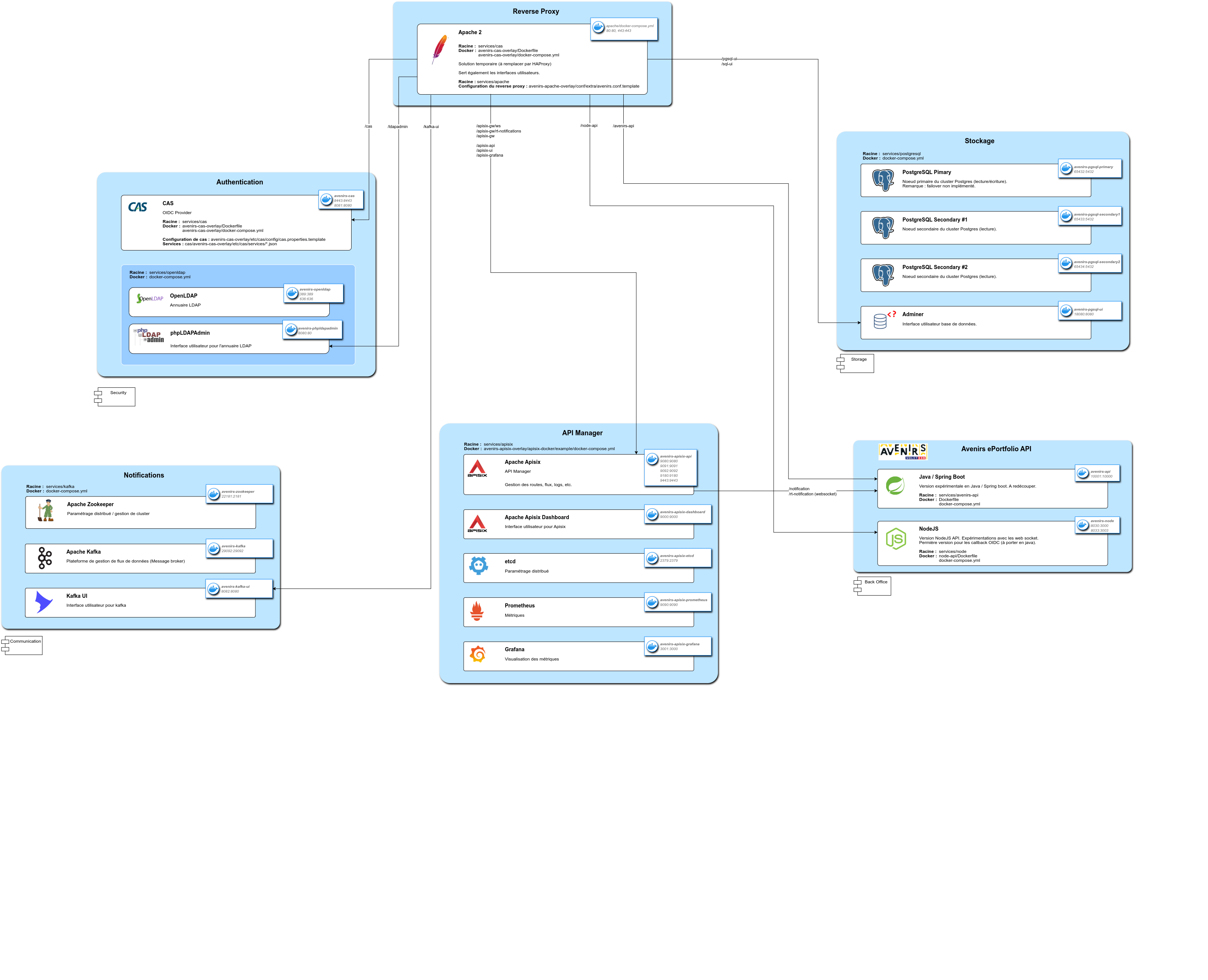
.
├── docker-compose.yml              Main docker compose file
├── scripts                         Main Scripts directory
│   ├── srv-dev-bootstrap.sh        Main bootstrapping script
│   ├── srv-dev-clean.sh            Removes all the bootstrap modifications
│   ├── srv-dev-commons.sh          Helpers and constants for the bash scripts
│   └── srv-dev-env.sh              Main environment file : can override the services environment files.
└── services
    ├── apisix
    │   ├── apisix-dashboard        git submodule https://github.com/apache/apisix-dashboard.git
    │   ├── apisix-docker           git submodule: https://github.com/apache/apisix-docker.git
    │   ├── avenirs-apisix-overlay
    │   │   ├──  apisix-dashboard
    │   │   │      ├── web
    │   │   │      │     └── config
    │   │   │      │           └── config.ts
    │   │   │      └── Dockerfile
    │   │   └──  apisix-docker
    │   │          ├── grafanapx_conf
    │   │          │     └── grafana.ini
    │   │          └── example
    │   │                └── docker-compose.yml
    │   │
    │   │
    │   └──  scripts
    │           ├── apisix-bootstrap.sh     Apisix bootsrapping script
    │           ├── apisix-clean.sh         Reverts Apisix bootstrapping
    │           └── apisix-env.sh           Apisix environment file
    │
    ├── apache                              Proxy for the docker containers
    │        ├── avenir-apache-overlay
    │        │    ├── conf
    │        │    │    ├── extra
    │        │    │    │    ├── avenirs.conf     Proxy rules
    │        │    │    │    └── httpd-ssl.conf
    │        │    │    └── httpd.conf
    │        │    └── htdocs
    │        └── scripts
    │
    ├── cas
    │   ├── avenirs-cas-overlay     git submodule: https://github.com/apereo/cas-overlay-template.git
    │   │   ├── build.gradle
    │   │   ├── docker-compose.yml
    │   │   ├── Dockerfile
    │   │   ├── entrypoint.sh
    │   │   └── etc
    │   │       └── cas
    │   │           ├── config
    │   │           │   ├── cas.properties
    │   │           │   └── log4j2.xml
    │   │           ├── services
    │   │           │   ├── all-1649925263.json
    │   │           │   └── apim-4000.json
    │   │           └── thekeystore
    │   ├── cas-overlay-template
    │   └── scripts
    ├── kafka
    │   └── (...)
    └── openldap                    custom container based on osixia's images
        ├── doc
        ├── fixtures
        └── scripts
    └── openldap
The scripts are located in the folders "scripts"; in the root for the main ones, and in each service directory for specific ones. The services' scripts can be executed via the main ones: srv-dev-bootstrap or srv-dev-clean.sh or individually directly.
git clone git@github.com:avenirs-esr/srv-dev.git --recurse
cd srv-dev/
npm i
npm run deploy
This instructions will :
- Download the project and all its submodules (--recurse option).
- Run the bootstratp scripts (the main one and the ones associated to each service).
- Download / generate the docker images.
- Run the containers associated to each service (via docker-compose).
Available npm scripts :
- npm run deploy: bootstrap each service and run the containers.
- npm run clean: stop the containers and reset all modifications made via the bootstrap scripts.
- npm run purge: idem as clean + docker system prune -a
- npm run reset: resets all the services as if they were just installed
- npm run dev: idem as deploy without detaching the containers
- npm run sync-modules: synchronize the submodules and set the head to the master or main branch (handles detached head)
- npm run sync: synchronizes everythind (without detached head)
curl "http://localhost/apisix-gw" --head | grep Server
  % Total    % Received % Xferd  Average Speed   Time    Time     Time  Current
                                 Dload  Upload   Total   Spent    Left  Speed
  0     0    0     0    0     0      0      0 --:--:-- --:--:-- --:--:--     0
 Server: APISIX/3.6.0
http://<server>/apisix-api/http://<server>/apisix-gw/http://<server>/apisix-ui/http://<server>/apisix-prometheus/http://<server>/apisix-grafana/http://<server>/ldapadmin/http://<server>/cas-> e.g.:http://<server\>/cas/loginhttp://<server>/kafka-ui/
Several containers should be deployed and running. The list of containers may vary, but this is the list at the time this document was written:
$ docker ps
CONTAINER ID   IMAGE                        COMMAND                  CREATED      STATUS      PORTS                             NAMES
26af756ed65d   apache-le-apache             "httpd-foreground"       2 days ago   Up 2 days   0.0.0.0:80->80/tcp,               apache
                                                                                              :::80->80/tcp,
                                                                                              0.0.0.0:443->443/tcp,
                                                                                              :::443->443/tcp

15105354c245   osixia/phpldapadmin:latest   "/container/tool/run"    2 days ago   Up 2 days   443/tcp, 0.0.0.0:8080->80/tcp,    ldapadmin
                                                                                              :::8080->80/tcp

8217143735e2   apache/apisix:3.6.0-debian   "/docker-entrypoint.…"   2 days ago   Up 2 days   0.0.0.0:9080->9080/tcp,           apisix
                                                                                              :::9080->9080/tcp,
                                                                                              0.0.0.0:9091-9092->9091-9092/tcp,
                                                                                              :::9091-9092->9091-9092/tcp,
                                                                                              0.0.0.0:9180->9180/tcp,
                                                                                              :::9180->9180/tcp,
                                                                                              0.0.0.0:9443->9443/tcp,
                                                                                              :::9443->9443/tcp

f4ee3837401a   srv-dev-apisix-dashboard     "/usr/local/apisix-d…"   2 days ago   Up 2 days   0.0.0.0:9000->9000/tcp,             apisix_dashboard
                                                                                              :::9000->9000/tcp


38dbbc0caea3   prom/prometheus:v2.25.0      "/bin/prometheus --c…"   2 days ago   Up 2 days   0.0.0.0:9090->9090/tcp,           apisix_prometheus
                                                                                              :::9090->9090/tcp

aecb067e65dc   grafana/grafana:7.3.7        "/run.sh"                2 days ago   Up 2 days   0.0.0.0:3000->3000/tcp,           apisix_grafana
                                                                                              :::3000->3000/tcp

7e6ef9e8423d   srv-dev-cas                  "java -server -nover…"   2 days ago   Up 2 days   0.0.0.0:8443->8443/tcp,           cas
                                                                                              :::8443->8443/tcp,
                                                                                              0.0.0.0:8081->8080/tcp,
                                                                                              :::8081->8080/tcp

836c3be31027   bitnami/etcd:3.4.15          "/opt/bitnami/script…"   2 days ago   Up 2 days   0.0.0.0:2379->2379/tcp,          apisix_etcd
                                                                                              :::2379->2379/tcp,
                                                                                              2380/tcp

f09872ea87d8   osixia/openldap:1.5.0        "/container/tool/run"    2 days ago   Up 2 days   0.0.0.0:389->389/tcp,           openldap
                                                                                              :::389->389/tcp,
                                                                                              0.0.0.0:636->636/tcp,
                                                                                              :::636->636/tcp