



Transform your development workflow with AI-powered ticket management, supporting Linear, Jira, and more.
Privacy-First: Works with or without AI. Organizations with strict security policies can disable external AI and use intelligent rule-based analysis instead.
| Feature | Description | Platforms |
|---|---|---|
| Sidebar Management | View and manage all tickets from VS Code | Linear, Jira |
| AI Workflows | Generate PR summaries and standups automatically | Linear, Jira |
| TODO Converter | Convert TODOs to tickets with automatic code permalinks | Linear, Jira |
| Chat Participant | Ask @devbuddy questions in natural language |
Linear (Jira soon) |
| Branch Integration | Create and manage branches directly from tickets | Linear, Jira |
| Monorepo Support | Intelligent package detection and validation | All platforms |
| Platform | Status | Features |
|---|---|---|
| Linear | ✅ Full Support | Complete feature set with AI integration |
| Jira Cloud | ✅ Full Support | Feature parity with Linear - AI, branches, webviews |
| Jira Server (beta) | 🚧 Beta | Self-hosted Jira support - testing phase |
| Monday.com | ⏳ Planned | Future release |
| ClickUp | ⏳ Planned | Future release |
Stop context switching. Manage tickets, generate documentation, and track work without leaving VS Code.
| Task | Manual Workflow | With DevBuddy | Time Saved |
|---|---|---|---|
| Create ticket from TODO | Open browser, create ticket, copy ID, paste in code, add permalink manually | Right-click → Convert TODO | 5 min → 10 sec |
| Track TODOs across files | Create ticket, manually update 4 files with ticket ID | Create once → paste in 3 more locations | 10 min → 30 sec |
| Generate PR summary | Review changes, write description, list affected packages | One command → AI generates full summary | 15 min → 1 min |
| Daily standup | Review commits, check tickets, write update | One click → AI generates standup | 10 min → 30 sec |
| Update ticket status | Open browser, find ticket, update status | Right-click in sidebar → select new status | 1 min → 5 sec |
From VS Code Marketplace:
- Open VS Code
- Go to Extensions (Cmd/Ctrl + Shift + X)
- Search for "DevBuddy"
- Click Install
Or install from command line:
code --install-extension angelogirardi.dev-buddyOpen Settings and set your preferred platform:
{
  "devBuddy.provider": "linear"  // or "jira"
}| Setting Value | Platform | Configuration Required |
|---|---|---|
"linear" |
Linear | API token from linear.app/settings/api |
"jira" |
Jira Cloud | Site URL, email, API token |
For Linear Users
- Get your API key: linear.app/settings/api
- Open Command Palette:
Cmd+Shift+P(macOS) orCtrl+Shift+P(Windows/Linux) - Run:
DevBuddy: Update Linear API Key - Paste your API token
Optional Configuration:
{
  "devBuddy.linear.organization": "yourorg",
  "devBuddy.linear.teamId": "team-id-here"
}
For Jira Cloud Users
- Open Command Palette:
Cmd+Shift+P(macOS) orCtrl+Shift+P(Windows/Linux) - Run:
DevBuddy: Setup Jira Cloud - Enter your Jira site URL (e.g.,
yourcompany.atlassian.net) - Enter your email address
- Create an API token: id.atlassian.com/manage-profile/security/api-tokens
- Paste the API token when prompted
Tip: You can paste any Jira ticket URL and DevBuddy will extract your site URL automatically.
Three ways to interact with DevBuddy:
- Sidebar: Click the checklist icon in the Activity Bar
- Chat: Open VS Code Chat → type
@devbuddy - Commands: Press
Cmd+Shift+P→ search "DevBuddy"
Works across all supported platforms with a consistent interface.
Sidebar Features:
- View all assigned tickets/issues organized by status
- Quick actions: Update status, assign, comment
- Filter by status, project, priority
- Visual priority indicators
- One-click to open ticket details

Key Benefits:
- Single interface for multiple platforms
- Real-time synchronization
- Keyboard shortcuts for common actions
- Inline actions without opening browser
Transform TODO comments into fully-tracked tickets with automatic code permalinks. Works with both Linear and Jira Cloud.
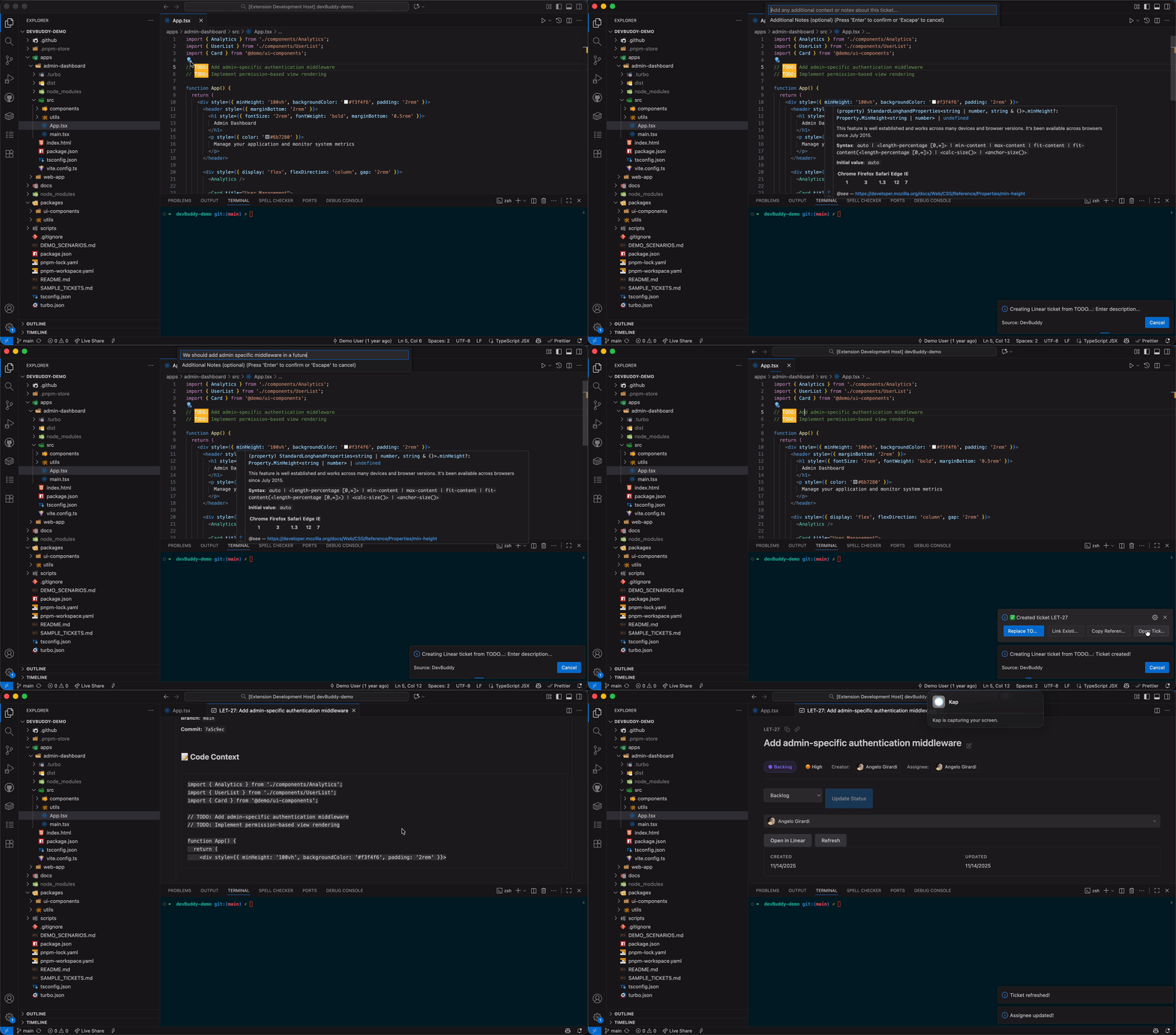
How it works:
- Write a TODO comment in your code
- Right-click → "Convert TODO to Ticket"
- Review auto-generated ticket with permalink
- Choose: Replace TODO, Add More TODOs, or Link Existing TODOs
- Works seamlessly with Linear or Jira Cloud
What gets included automatically:
- File path and line number
- GitHub/GitLab/Bitbucket permalink to exact code location
- 5 lines of surrounding code context
- Current branch and commit SHA
- Syntax highlighting in Linear
Multi-File Workflow:

After creating a ticket, use "Add More TODOs" to:
- Navigate to multiple files with Quick Open (Cmd+P)
- Paste ticket reference in each location
- Track complex refactors across your codebase
- Keep all TODOs linked to the same ticket
Key Benefits:
- Zero context loss for your team
- Permanent links that survive refactoring
- 10x faster than manual ticket creation
- Works with GitHub, GitLab, and Bitbucket
Learn more about TODO Converter
Generate comprehensive pull request descriptions automatically, with special support for monorepos. Works with both Linear and Jira Cloud.

Monorepo Intelligence:
- Automatically detects affected packages
- Analyzes changes per package separately
- Shows scope of your changes
- Warns if too many packages are modified
What gets generated:
- High-level overview of changes
- Per-package breakdown in monorepos
- Testing notes and checklist
- Linked tickets (Linear or Jira)
- Breaking changes detection
- Migration notes if needed
PR Template Integration:
- Reads your
.github/pull_request_template.md - Fills in sections automatically
- Preserves formatting and checkboxes
- Keeps custom fields and instructions
Key Benefits:
- Works with monorepos out of the box
- Customizable writing tone (professional, casual, technical, concise)
- Includes git diff analysis
- Ready to paste into GitHub/GitLab
Let AI generate your standup update automatically from commits and ticket activity. Works with both Linear and Jira Cloud.

How it works:
- Open Standup Builder
- Review your recent commits and Linear tickets
- Click "Generate with AI"
- Get formatted standup with Yesterday/Today/Blockers
- Copy and share
What gets analyzed:
- Git commits in configurable time window (default: 24 hours)
- Tickets you've updated (Linear or Jira)
- Code changes across packages
- Commit message context
- Branch associations
Customization:
- Adjust time window (24 hours, 2 days, since last standup)
- Choose writing tone (professional, casual, technical, concise)
- Select AI model preference
- Edit generated content before sharing
Key Benefits:
- Never forget what you worked on
- Consistent standup format
- Takes 30 seconds instead of 10 minutes
- Automatically links to relevant tickets
Learn more about Standup Builder
Talk to DevBuddy using the VS Code Chat interface.
Available Commands:
/tickets- Show your current tickets/standup- Generate standup update (Linear)/pr- Generate PR summary (Linear)/status- Update ticket status
Natural Language Queries:
@devbuddy what am I working on?
@devbuddy show me ENG-123 (Linear) or PROJ-456 (Jira)
@devbuddy create a ticket for authentication bug
@devbuddy update ENG-456 to in progress
@devbuddy generate my standup
@devbuddy generate PR summary
Key Benefits:
- Works with both Linear and Jira
- Natural conversation about your work
- Quick access to ticket information
- No need to remember command names
Linear users get the complete DevBuddy experience with full feature support.
| Feature | Status | Description |
|---|---|---|
| View Tickets | ✅ | Rich sidebar with webview panels |
| Create/Edit Tickets | ✅ | Full ticket management interface |
| Status Management | ✅ | Visual workflow with all states |
| Branch Creation | ✅ | Create and manage branches from tickets |
| Branch Association | ✅ | Link existing branches to tickets |
| TODO Converter | ✅ | Convert TODOs with automatic permalinks |
| AI Standup | ✅ | Generate standup from commits and tickets |
| AI PR Summary | ✅ | Generate PR descriptions with monorepo support |
| Chat Participant | ✅ | Full chat integration with all commands |
| Comments | ✅ | Read and add comments to tickets |
| Sub-issues | ✅ | View and manage sub-issues |
Branch Integration:

- Create branches with smart naming (conventional, simple, or custom)
- Auto-detect associations based on branch names
- Checkout associated branches from sidebar
- View linked PRs directly in ticket panel
Jira Cloud users get the complete DevBuddy experience with full feature parity to Linear.
| Feature | Status | Description |
|---|---|---|
| View Issues | ✅ | Rich sidebar with webview panels |
| Create/Edit Issues | ✅ | Full issue management interface in VS Code |
| Status Transitions | ✅ | Full workflow transition support |
| Branch Creation | ✅ | Create and manage branches from issues |
| Branch Association | ✅ | Link existing branches to issues |
| TODO Converter | ✅ | Convert TODOs with automatic code permalinks |
| AI Standup | ✅ | Generate standup from commits and Jira activity |
| AI PR Summary | ✅ | Generate PR descriptions with monorepo support |
| JQL Search | ✅ | Advanced search with Jira Query Language |
| Comments | ✅ | Read and add comments |
| Sprints & Boards | ✅ | View and manage sprints |
| Runtime Validation | ✅ | Production-grade API validation with Zod v4 |
| Chat Participant | ⏳ | Coming soon |
| Sub-tasks | ✅ | View and manage sub-tasks |
| Attachments | ✅ | View and download attachments |
Full Feature Set:

- Manage issues directly in VS Code without browser context switching
- View and edit issues with rich webview panels
- Create branches with smart naming (conventional, simple, or custom)
- Auto-detect associations based on branch names
- Generate standups from Jira activity and git commits
- AI-powered PR summaries with monorepo intelligence
- Convert TODOs to tickets with automatic code permalinks
- Update status with workflow transitions
- Quick actions: Add comment, assign, copy issue key
- JQL search for advanced filtering
- Sprint management and agile workflows
DevBuddy gives you complete control over AI usage.
Option 1: Use AI (Default)
Leverage VS Code's Language Model API (GitHub Copilot) for intelligent summaries.
Supported Models:
- GPT-4o (recommended)
- GPT-4.1
- GPT-4 Turbo
- Gemini 2.0 Flash
Configuration:
{
  "devBuddy.ai.model": "auto",  // Auto-selects best available
  "devBuddy.writingTone": "professional"  // or casual, technical, concise
}
Option 2: Privacy Mode (No External AI)
Perfect for regulated industries or strict security policies.
{
  "devBuddy.ai.disabled": true
}
DevBuddy will use intelligent rule-based analysis instead:
- Pattern detection in commits
- Commit message analysis
- File change categorization
- 100% local processing
- Works offline
DevBuddy is built for monorepos with intelligent package detection.
Configuration:
{
  "devBuddy.packagesPaths": ["packages/", "apps/", "libs/"],
  "devBuddy.maxPackageScope": 2,  // Warn if > 2 packages modified
  "devBuddy.baseBranch": "main"
}
Features:
- Automatic package detection
- Per-package change analysis in PR summaries
- Scope validation and warnings
- Package-aware commit analysis
- Multi-package workflow support
Work with any configured platform:
| Command | Description | Shortcut |
|---|---|---|
DevBuddy: Refresh Tickets |
Reload ticket list | - |
DevBuddy: Create Ticket |
Open ticket creation form | - |
DevBuddy: Generate Standup Update |
Generate standup (Linear) | - |
DevBuddy: Generate PR Summary |
Generate PR description (Linear) | - |
| Command | Description |
|---|---|
DevBuddy: Update Linear API Key |
Configure Linear authentication |
DevBuddy: Start Branch for Ticket |
Create new branch from Linear ticket |
DevBuddy: Associate Branch |
Link existing branch to Linear ticket |
DevBuddy: Checkout Branch |
Switch to associated branch |
| Command | Description |
|---|---|
DevBuddy: Setup Jira Cloud |
Configure Jira Cloud authentication |
DevBuddy: Test Jira Connection |
Verify Jira API connection |
DevBuddy: Update Jira Issue Status |
Update issue workflow state |
DevBuddy: Search Jira Issues |
Search with JQL |
DevBuddy: Start Branch for Issue |
Create new branch from Jira issue |
DevBuddy: Associate Branch with Issue |
Link existing branch to Jira issue |
Install directly from the VS Code Marketplace:
- Open VS Code
- Go to Extensions (Cmd/Ctrl + Shift + X)
- Search for "DevBuddy"
- Click Install
Download the latest .vsix file from GitHub Releases:
# Download the latest release from GitHub
# Visit: https://github.com/angelo-hub/devbuddy/releases

# Install the VSIX file
code --install-extension dev-buddy-x.x.x.vsix# Clone and build
git clone https://github.com/angelo-hub/devbuddy.git
cd devbuddy
npm install
npm run package
# Install locally
code --install-extension dev-buddy-0.2.0.vsix
# Quick reinstall script (for development)
./reinstall.shComprehensive guides for all features:
- Quick Start Guide - Get up and running in 5 minutes
- Complete Linear Guide - Full Linear feature documentation
- Multi-Ticket Workflows - Work across multiple tickets
- Jira Cloud Guide - Jira setup and features
- AI Features Guide - AI configuration and model selection
- Privacy Mode - Rule-based analysis without external AI
- TODO Converter - Complete TODO workflow guide
- PR & Standup Features - PR summaries and standup generation
- Branch Management - Branch creation and association
- Feature Compatibility Matrix - Detailed platform comparison
- Jira Cloud vs Server - Jira deployment options
- Development Setup - Contributing guide
- Architecture Guide - Extension architecture
- Release Process - Publishing workflow
- Support for Linear AND Jira Cloud
- Easy platform switching via settings
- Unified sidebar interface
- Full CRUD operations - Complete issue management in VS Code
- Webview panels - Rich ticket detail and creation forms
- Branch integration - Create and associate branches with issues
- AI features - PR summaries and standup generation
- TODO converter - Convert TODOs to Jira issues with permalinks
- JQL search - Advanced filtering and search
- Workflow transitions - Full status management
- Sprint and board management - Agile workflows
- Production-grade validation - Runtime safety with Zod v4
- Chat participant with
@devbuddy - Enhanced AI with code diff analysis
- Privacy-first fallback mode
- Runtime validation with Zod
- Better error handling
- Type-safe throughout
- Debug mode for troubleshooting
- ⏳ Jira Cloud chat participant (@devbuddy integration)
- ⏳ Enhanced keyboard shortcuts
- ⏳ Improved offline support
- 🚧 Jira Server/Data Center (beta) - Currently in testing
- ⏳ Custom fields UI
- ⏳ Offline mode
- ⏳ Advanced keyboard shortcuts
- ⏳ Monday.com integration
- ⏳ ClickUp integration
- ⏳ GitHub/GitLab Issues support
- ⏳ Team collaboration features
Dual License:
- Core Features: MIT License - Free and open source
- Pro Features: Commercial License - Requires subscription
The extension is free to use with all core features. Pro features (when available) will require a paid subscription. See LICENSING_MODEL.md for details.
- GitHub Issues - Report bugs or request features
- Documentation - Complete documentation index
- Quick Reference - Common tasks
We welcome contributions! See our contributing guide for:
- Development setup
- Code style guidelines
- Testing requirements
- Pull request process
- Release Process - Publishing workflow
- Architecture Guide - Extension structure
- Debug Guide - Debugging tips
Platforms: Linear (Full) | Jira Cloud (Full) | Jira Server (Beta) | More Coming Soon