

-
|
When I update a progress bar, it would be nice if the notification toast would just stay in place, instead of animating for each new notification. Is there a way to make that happen? Is there some way to add a |
Beta Was this translation helpful? Give feedback.
Replies: 3 comments

-
|
This is a cool one, but a bit of a rabbit hole. What you're seeing atm is the "replace" workflow, where the OS violently rips out the previous notification and displays a brand new one. It can be... jarring if you do them fast enough. foreach ($Number in 1..100) {
$ProgressBar = New-BTProgressBar -Status 'Running' -Value ($Number / 100)
$ToastSplat = @{
Text = 'Demo Replacement'
UniqueIdentifier = 'DemoReplace'
ProgressBar = $ProgressBar
}
New-BurntToastNotification @ToastSplat
Start-Sleep -Seconds 1
}
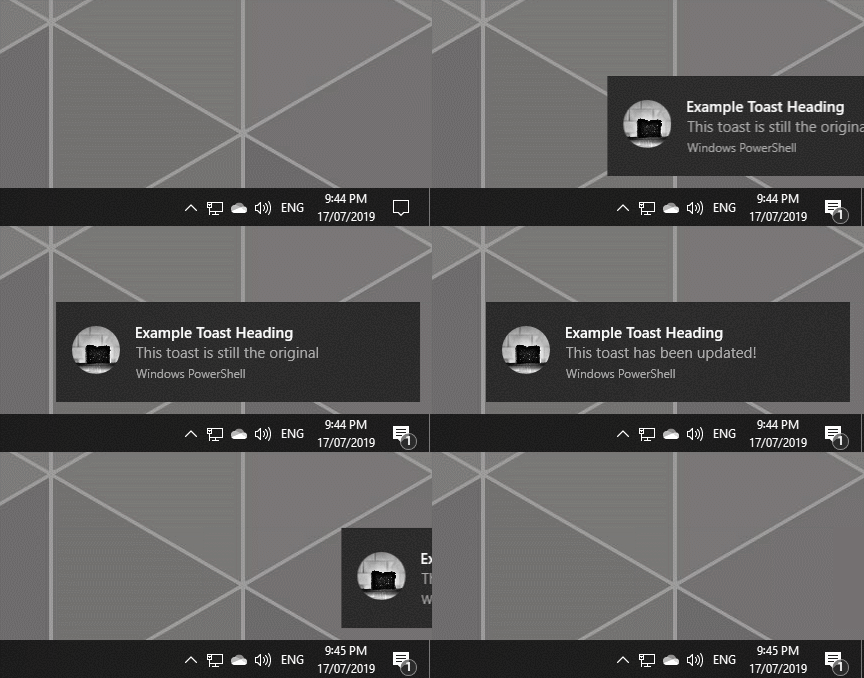
Instead of that, what you can do it "update" the existing notification. This requires using "databindings", basically a hashtable of keys (placeholders) and values (the text to replace the placeholders.) # Show your first toast
$FirstDataBinding = @{
FirstLine = 'Example Toast Heading'
SecondLine = 'This toast is still the original'
}
New-BurntToastNotification -Text 'FirstLine', 'SecondLine' -UniqueIdentifier 'ExampleToast' -DataBinding $FirstDataBinding
# Wait a bit and update the toast
$SecondDataBinding = @{
SecondLine = 'This toast has been updated!'
}
Update-BTNotification -UniqueIdentifier 'ExampleToast' -DataBinding $SecondDataBinding
You'll note there that I used a unique hashtable the second time around, what I've started doing is reusing the original, so my update might instead be: $FirstDataBinding['SecondLine'] = 'This toast has been updated!'
Update-BTNotification -UniqueIdentifier 'ExampleToast' -DataBinding $SecondDataBindingI've got a blog post on this: https://toastit.dev/2019/07/17/crouton-11/ Also an even more "dynamic" example from PSPowerHour yesterday, with a function that's doing the updates.
There are pros and cons of both the replace and the update methods. Replacing will ALWAYS show the user the new information, even as a brand new toast. e.g. it's half an hour between updates, and you want to alert the user to the updated information. But the replace isn't great when showing toasts rapidly as you get the flaky animations. Updating is graceful, and if the toast has gone to the action center it's contents can be updated without pinging onto the users' desktop. However, you can only update a toast if it exists. If the user dismissed it completely then there is nothing to update. If you update a toast while it is still on screen, it resets the timeout on it meaning you can keep updating a toast to keep it on screen as long as you're doing it frequently enough. |


Beta Was this translation helpful? Give feedback.
-
|
Thanks, yeah I had come across your blog post before. That last example you sent is really what I'm after ... updating a progress bar without the notification moving. That looks really nice. I'll have to dissect that |
Beta Was this translation helpful? Give feedback.
-
|
Hello, and thank you for your contribution to BurntToast. Today marks the official release of BurntToast v1.0.0. As part of this major milestone and to ensure the project starts its next chapter with a clean slate, I am declaring "issue bankruptcy." This decision is explained in more detail in the official announcement post: Ten Years Toasting: BurntToast Hits the Big v1! As a result, I am closing all outstanding issues and pull requests (and discussions), including this one. Please do not interpret this as a lack of interest in the problem, suggestion, or topic you've raised. This is a necessary step to clear a very old backlog and focus development efforts on the current state of the module. If this topic is still relevant to you:
I hope this reset will allow me to be more responsive to community feedback going forward. Thank you for your understanding and for being part of the BurntToast journey. |
Beta Was this translation helpful? Give feedback.


This is a cool one, but a bit of a rabbit hole.
What you're seeing atm is the "replace" workflow, where the OS violently rips out the previous notification and displays a brand new one. It can be... jarring if you do them fast enough.
Instead of that, what you can do it "update" the existing notification. This requires using "databindings", basically a hasht…