In this lab, you will learn how to reproduce the lighttpd exploit. You will:
- Introduce the basics of running a Docker image.
- Show you how to use
nc(netcat) to send results over a network. - Introduce the notion of mounting your local folder.
Time to complete: About 20 minutes
Click the Start button to move to the next step.
In the previous lab, you ran the lighttpd analysis. We assume you've already
run analysis, and the mayhem CLI is still logged in.
You download results using the mayhem download command, specifying an output
directory with -o.
mayhem download tutorial/lighttpd -o /tmp/lighttpd
Docker is a lightweight container, which is like a virtual machine but at the UNIX process level.
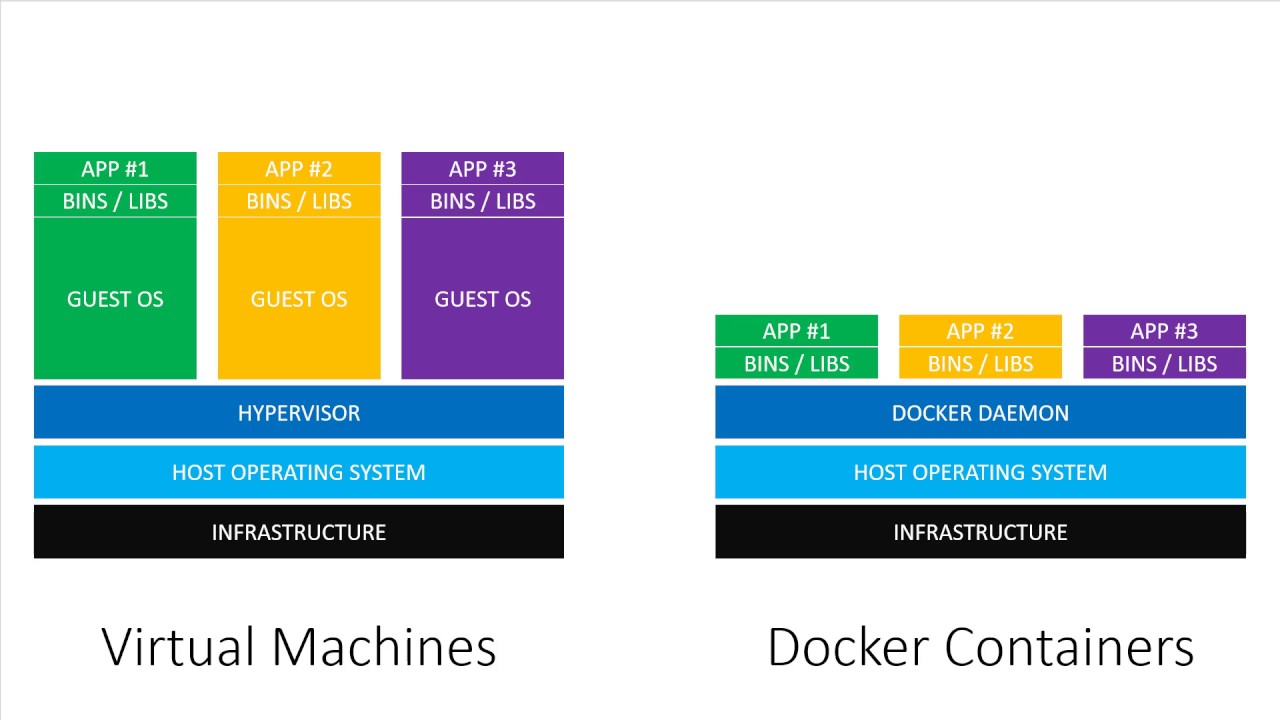
While a full docker tutorial is out of scope here, we show you here some basic nuts and bolts. We recommend you take some time to read the Docker tutorial.
To run the vulnerable image:
docker run --rm -i -d -p 8080:80 training.forallsecure.com:5000/forallsecure/tutorial/lighttpd:1.4.15
This command:
- Runs the docker image
training.forallsecure.com:5000/forallsecure/tutorial/lighttpd - The
-pbinds port 80 in the docker image to localhost port 8080 - The
--rmremoves any temporary state when the container exits. - The
-dsays to run in daemon mode, i.e., as a background process.
To check that the docker image is running, run the docker ps command:
docker ps -a
Since this is a network server, we will use a utility called
nc (netcat) to connect to the server and feed the test case generated by
Mayhem. For example:
nc localhost 8080 < /tmp/lighttpd/corpus/ba0dbafbd0b787a564635b887f77926ae0b3f979dcc72d30cf7fdb1707581919
If you replay the exploit, then you should see container no longer exists:
docker ps -a
You just replayed a test case that exists outside the docker container. Think of it like connecting to a remote machine. The container no longer exists because lighttpd crashed after replaying the Mayhem generated exploit.
While you've just touched the iceberg of docker, you've also just replayed an exploit. Congratulations!