| title | SQUAD Plugin Development | |||||
|---|---|---|---|---|---|---|
| description | Build and publish custom SQUAD plugins to extend agent capabilities with new skills and integrations | |||||
| authors |
|
|||||
| category | Agentic Software Development | |||||
| industry | Cross-Industry | |||||
| services | ||||||
| languages |
|
|||||
| frameworks |
|
|||||
| modernizationTools | ||||||
| agenticTools |
|
|||||
| tags |
|
|||||
| extensions |
|
|||||
| thumbnail | https://raw.githubusercontent.com/EmeaAppGbb/appmodlab-squad-plugin-development/main/assets/thumbnail-gpt-image.png | |||||
| video | ||||||
| version | 1.0.0 |
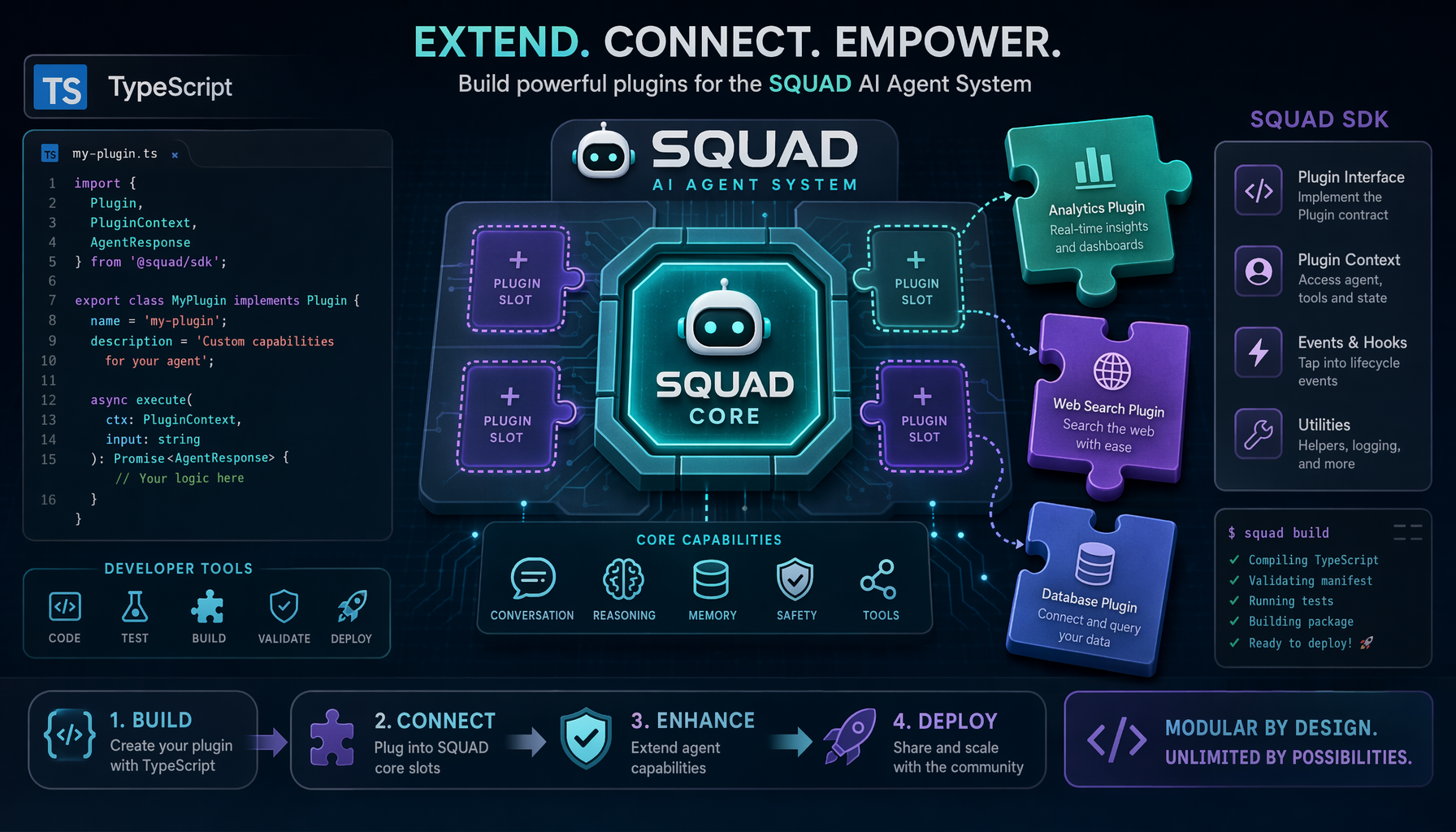
This lab teaches you how to build and publish plugins that extend SQUAD capabilities. Plugins can add new skills to agents, integrate with external tools, define custom ceremonies, or provide domain-specific review rules. You'll learn the SQUAD plugin API, packaging standards, and distribution through the plugin registry.
By completing this lab, you will:
- Understand the SQUAD plugin architecture and SDK
- Build a plugin that adds skills to SQUAD agents
- Build a plugin that integrates SQUAD with external tools (Jira)
- Build a plugin that defines custom review rules
- Package and publish SQUAD plugins to npm
- Strong TypeScript development experience
- Familiarity with SQUAD concepts (agents, skills, ceremonies)
- npm publishing experience (or npm account for publishing)
- Basic Jira API knowledge (for plugin 1)
This lab builds three functional SQUAD plugins:
- Jira Integration - Bidirectional issue synchronization
- DB Migration Checker - Detects destructive database changes
- Changelog Generator - Generates release notes from conventional commits
Each plugin exports a standard interface and integrates with SQUAD agents.
📸 View: Plugin Architecture Overview Open the HTML file in a browser to view the syntax-highlighted rendering.
Objective: Install SQUAD SDK and create plugin scaffold.
-
Review the three plugin directories:
plugins/jira-integrationplugins/db-migration-checkerplugins/changelog-generator
-
Each plugin has:
package.jsonwith@squad/sdkpeer dependency- TypeScript configuration
- Test setup
-
Review the Plugin SDK reference at
docs/plugin-sdk-reference.md
📸 View: Plugin SDK Reference — Interfaces Open the HTML file in a browser to view the syntax-highlighted rendering.
Objective: Implement issue sync and bidirectional status updates.
-
Review the Jira plugin implementation at
plugins/jira-integration/src/index.ts -
Key features:
- init() - Initializes plugin and returns metadata
- getSkills() - Defines two skills:
sync-issue-to-jira- Creates Jira issue from GitHub issuesync-status-from-jira- Updates GitHub status from Jira
-
Configuration:
{
  jiraUrl: 'https://your-org.atlassian.net',
  username: 'user@example.com',
  apiToken: 'your-api-token',
  projectKey: 'PROJ'
}
-
Usage in SQUAD:
# .squad/team.yml
plugins:
  - name: jira-integration
    config:
      jiraUrl: https://company.atlassian.net
      projectKey: DEV
📸 View: Jira Integration Plugin Source Open the HTML file in a browser to view the syntax-highlighted rendering.
Objective: Parse migration files and detect destructive changes.
-
Review the DB migration checker at
plugins/db-migration-checker/src/index.ts -
Safety rules detect:
- ❌
DROP TABLE- Error - ❌
DROP COLUMN- Error - ❌
TRUNCATE TABLE- Error ⚠️ RENAMEoperations - Warning⚠️ UNIQUEconstraints - Warning
- ❌
-
The checker:
- Scans migration directory recursively
- Applies regex patterns to detect issues
- Generates a safety report
-
Eyes agent uses this skill:
# Eyes reviews PR with migrations
- skill: check-migration-safety
  input: prisma/migrations
-
Test with sample migrations in
test-project/prisma/migrations/
📸 View: DB Migration Checker — Safety Rules & Patterns Open the HTML file in a browser to view the syntax-highlighted rendering.
📸 View: Test Migrations — Safe vs. Destructive SQL Open the HTML file in a browser to view the syntax-highlighted rendering.
Objective: Parse commits and generate changelog with version calculation.
-
Review the changelog generator at
plugins/changelog-generator/src/index.ts -
Features:
- Parses conventional commits (feat:, fix:, docs:, etc.)
- Categorizes commits by type
- Detects breaking changes
- Calculates semantic version bump
-
Version calculation:
- Breaking change → Major version (1.0.0 → 2.0.0)
- New feature → Minor version (1.0.0 → 1.1.0)
- Bug fix → Patch version (1.0.0 → 1.0.1)
-
Mouth agent uses this skill:
# Mouth generates release notes
- skill: generate-changelog
  commits: [...]
  version: v1.2.0
📸 View: Changelog Generator — Commit-Type Map & Semver Logic Open the HTML file in a browser to view the syntax-highlighted rendering.
Objective: Unit tests for each plugin with mocked SQUAD context.
-
Test structure for each plugin:
describe('PluginName', () => {
  it('should initialize', async () => {
    const plugin = new Plugin(config);
    const metadata = await plugin.init();
    expect(metadata.name).toBe('plugin-name');
  });

  it('should execute skill', async () => {
    const plugin = new Plugin(config);
    const result = await plugin.skillHandler(input);
    expect(result).toBeDefined();
  });
});
-
Run tests:
cd plugins/jira-integration
npm test
Objective: Configure npm packaging, peer dependencies, entry points.
-
Each plugin's
package.jsonincludes:- name:
@squad/plugin-{name} - main:
dist/index.js - types:
dist/index.d.ts - peerDependencies:
@squad/sdk
- name:
-
Build plugins:
cd plugins/jira-integration npm run build -
Verify output in
dist/folder
📸 View: npm Package Configurations Open the HTML file in a browser to view the syntax-highlighted rendering.
Objective: Configure SQUAD to use plugins and run development cycle.
-
The test project (
test-project/) demonstrates plugin usage:- Database migrations for testing DB checker
- Sample commits for changelog generator
-
Install plugins locally:
cd test-project npm install -
Plugins are linked via
file:../plugins/{name}in package.json -
Test each plugin:
# DB Migration Checker
node -e "
  const DbChecker = require('@squad/plugin-db-migration-checker');
  const checker = new DbChecker.default();
  checker.checkMigrationSafety('./prisma/migrations').then(console.log);
"
Objective: Publish plugins to npm registry.
-
Login to npm:
npm login
-
Publish each plugin:
cd plugins/jira-integration npm publish --access public -
Verify published:
npm view @squad/plugin-jira-integration
Note: For this lab, publishing is optional. You can test with local links.
Load → Init → Register Skills → Execute → Cleanup
{
  name: 'skill-name',
  description: 'What this skill does',
  handler: async (context, input) => {
    // Skill logic
    return result;
  }
}| Agent | Common Plugin Skills |
|---|---|
| Eyes | Code review rules, security checks |
| Mouth | Release notes, documentation |
| Brain | Architecture analysis, planning |
| Hands | Code generation, refactoring |
| Ralph | Task automation, scheduling |
✅ SQUAD Plugin SDK is documented with API reference
✅ Jira plugin syncs issues bidirectionally
✅ DB migration checker detects destructive changes
✅ Changelog generator produces correct Markdown
✅ All three plugins pass unit and integration tests
✅ Plugins install and configure via SQUAD team.yml
✅ Sample project demonstrates all three plugins
The assets/screenshots/ directory contains syntax-highlighted HTML renderings of the lab's key files. Open any .html file in a browser to view or capture a screenshot.
| # | File | What it shows |
|---|---|---|
| 1 | 01-plugin-architecture.html |
High-level overview: three plugins, lifecycle flow, agent mapping |
| 2 | 02-jira-plugin-source.html |
Jira Integration plugin source with config interface and skill handlers |
| 3 | 03-db-migration-checker-source.html |
DB Migration Checker safety rules table and regex patterns |
| 4 | 04-changelog-generator-source.html |
Changelog Generator commit-type map and semver bump logic |
| 5 | 05-test-project-migrations.html |
Test migrations: safe vs. destructive SQL side-by-side |
| 6 | 06-plugin-sdk-reference.html |
SDK interfaces (SquadPlugin, AgentContext, EventHooks) |
| 7 | 07-package-config.html |
npm package.json configs and local file: linking |
Issue: Plugin not loading in SQUAD
Solution: Verify peer dependency version matches SQUAD SDK
Issue: TypeScript compilation errors
Solution: Ensure @squad/sdk types are available
Issue: Plugin skill not registered
Solution: Check that getSkills() returns array of skill objects
The complete solution is on the solution-final branch with step-by-step tags.
git checkout main && git checkout -b solution-final
New-Item -ItemType Directory -Force -Path assets/outputsgh copilot -- -p "Review the SQUAD plugin SDK setup in this repo. Examine the three plugin directories and the SDK reference at docs/plugin-sdk-reference.md. Summarize the plugin architecture and interfaces." --allow-all-tools --yoloOutput: Identified 3 plugins (jira-integration, db-migration-checker, changelog-generator) implementing SquadPlugin interface with init()/getSkills(). SDK defines PluginMetadata, Skill, AgentContext, EventHooks, and PluginConfig interfaces.
gh copilot -- -p "Implement the Jira integration plugin at plugins/jira-integration/src/index.ts. It should export init(), getSkills() with two skills: sync-issue-to-jira and sync-status-from-jira. Follow the SquadPlugin interface from the SDK reference." --allow-all-tools --yoloOutput: JiraIntegrationPlugin with axios-based REST client. Skills: sync-issue-to-jira (creates Jira issues from GitHub issues) and sync-status-from-jira (maps Jira statuses: Done→closed, In Progress→in-progress, etc.).
gh copilot -- -p "Implement the DB migration checker plugin at plugins/db-migration-checker/src/index.ts. It should detect destructive SQL operations (DROP TABLE, DROP COLUMN, TRUNCATE) as errors and RENAME/UNIQUE as warnings. Scan migration files recursively and generate safety reports." --allow-all-tools --yoloOutput: DbMigrationCheckerPlugin with 7 safety rules (4 errors, 3 warnings). Recursively scans .sql/.ts files, applies regex patterns, generates SafetyReport with file/line/severity/snippet details.
gh copilot -- -p "Implement the changelog generator plugin at plugins/changelog-generator/src/index.ts. It should parse conventional commits (feat:, fix:, docs:, etc.), categorize them, detect breaking changes, and calculate semantic version bumps. Generate formatted CHANGELOG.md output." --allow-all-tools --yoloOutput: ChangelogGeneratorPlugin with 10 commit types mapped to emoji sections. Parses conventional commits via regex, detects breaking changes (!: or BREAKING CHANGE), calculates semver bumps (breaking→major, feat→minor, fix→patch).
cd plugins/jira-integration && npx vitest run && cd ../..
cd plugins/db-migration-checker && npx vitest run && cd ../..
cd plugins/changelog-generator && npx vitest run && cd ../..
Output: 22 tests passing across all 3 plugins:
- jira-integration: 5 tests (init, getSkills, syncIssueToJira, syncStatusFromJira x2)
- db-migration-checker: 6 tests (init, getSkills, checkMigrationSafety x2, generateReport x2)
- changelog-generator: 11 tests (init, getSkills, parseCommit x4, categorize, calculateVersion x3, generateChangelog)
gh copilot -- -p "Register all three plugins with the Squad team configuration. Update .squad/ config to reference the plugins with their configurations. Show how each plugin integrates with specific Squad agents (Jira→Lead, DB Migration→Eyes, Changelog→Mouth)." --allow-all-tools --yoloOutput: Created .squad/team.yml and .squad/plugins.json. Agent mapping: Lead→jira-integration, Eyes→db-migration-checker, Mouth→changelog-generator.
gh copilot -- -p "Generate packaging instructions and npm publish documentation for all three Squad plugins." --allow-all-tools --yoloOutput: Build with npx tsc, publish with npm publish --access public. Package names: @squad/plugin-{name}. Local dev via file:../plugins/{name} references.
git push origin solution-final --tagsAll step outputs are saved in assets/outputs/step-NN-*.txt.
Estimated Duration: 4-6 hours
Difficulty: Advanced
Category: Agentic Software Development