| title | SQUAD + GitHub Issues Workflow | |||||
|---|---|---|---|---|---|---|
| description | Automate issue triage, assignment, and delivery with SQUAD and GitHub Actions | |||||
| authors |
|
|||||
| category | Agentic Software Development | |||||
| industry | Cross-Industry | |||||
| services | ||||||
| languages |
|
|||||
| frameworks |
|
|||||
| modernizationTools | ||||||
| agenticTools |
|
|||||
| tags |
|
|||||
| extensions |
|
|||||
| thumbnail | https://raw.githubusercontent.com/EmeaAppGbb/appmodlab-squad-github-issues-workflow/main/assets/thumbnail-gpt-image.png | |||||
| video | ||||||
| version | 1.0.0 |
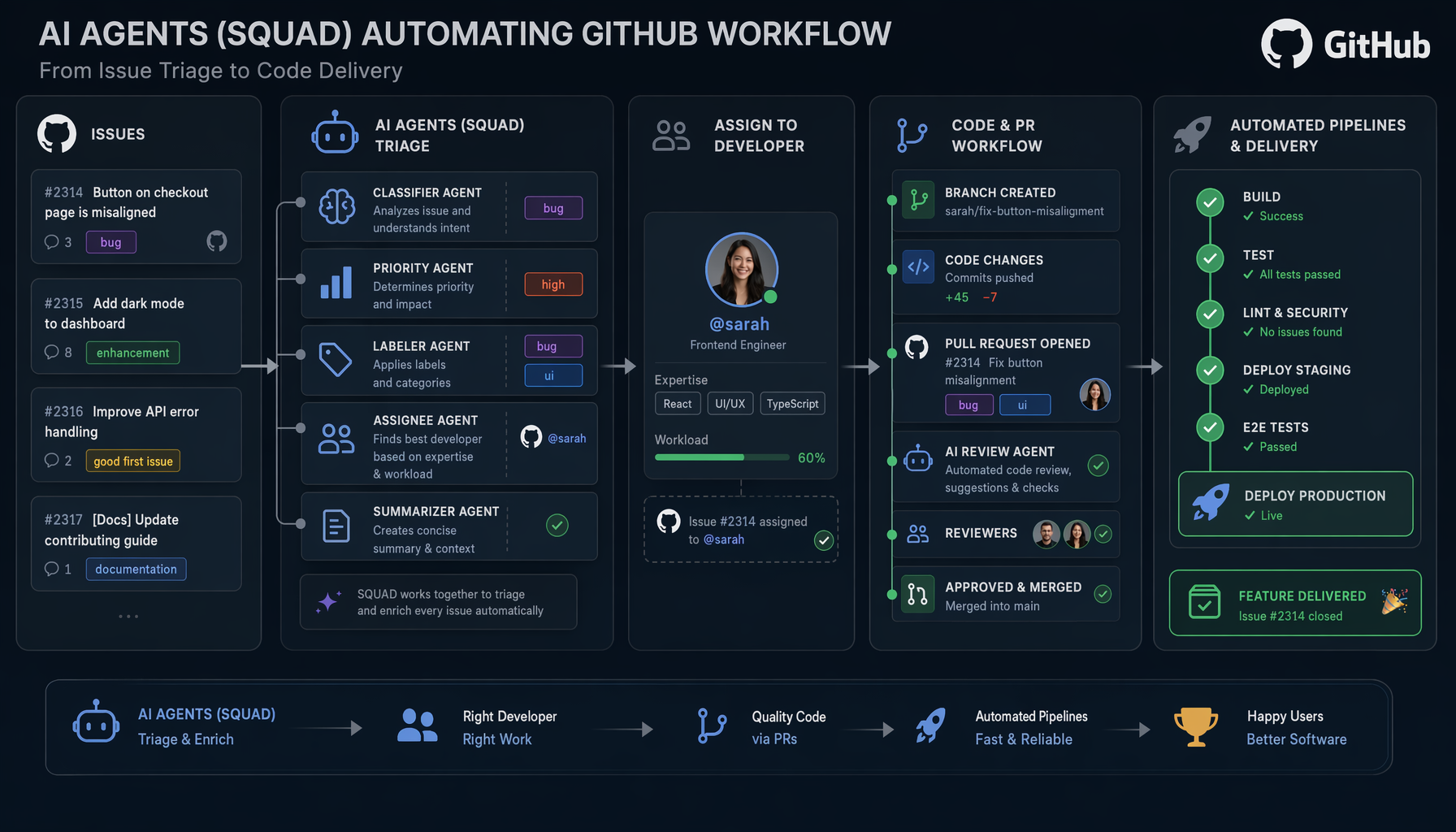
This lab demonstrates how to automate issue triage, assignment, and delivery using SQUAD agents with GitHub Actions. The target codebase is a developer forum application built with Next.js 14 and tRPC.
The DevConnect developer forum application is a Next.js 14 + tRPC monorepo serving as the target codebase for SQUAD automation workflows.
The main homepage displays the Q&A community feed with recent questions, vote counts, answer counts, and view metrics:

The questions list shows all three sample questions rendered from the in-memory tRPC API — an auth question, a search bug report, and a performance issue:

Each question card shows title, description, and engagement stats (votes, answers, views):

The application features a responsive layout. Below is the mobile view on a 375×812 viewport:

The DevConnect header with app name and tagline adapts across breakpoints:

| Screenshot | Description |
|---|---|
|
Desktop homepage with Q&A feed |
|
Full questions list |
|
Individual question card |
|
Mobile responsive layout |
|
Header branding component |
The completed solution is on the solution-final branch. Each step is tagged for easy navigation.
cd C:\code\gbb\labs\appmodlab-squad-github-issues-workflow
git checkout solution-final

# Review the monorepo structure
Get-ChildItem -Recurse -File -Exclude node_modules,.git | Select-Object FullName
cat package.json          # Turborepo workspaces: web, api, shared
cat prisma/schema.prisma  # Question, Answer, Tag models
Key findings: Next.js 14 + tRPC monorepo with 3 packages (web, api, shared). In-memory data store, Prisma schema defined but not connected. Known issues: search returns deleted posts, no pagination, no auth.
npx @bradygaster/squad-cli initOutput:
Let's build your team.
✔ .squad/config.json
✔ .squad/agents/scribe/charter.md
✔ .squad/agents/ralph/charter.md
✔ .squad/identity/now.md
✔ .github/agents/squad.agent.md
✔ .github/workflows/squad-heartbeat.yml
✔ .github/workflows/squad-issue-assign.yml
✔ .github/workflows/squad-triage.yml
✔ .github/workflows/sync-squad-labels.yml
✔ .copilot/mcp-config.json
Your team is ready. Run squad to start.
Created: Squad workspace (.squad/), 30+ Copilot skills, 4 GitHub Actions workflows, agent prompt (.github/agents/squad.agent.md).
gh copilot -- -p "Create GitHub issue templates for this Squad-integrated project.
Create .github/ISSUE_TEMPLATE/ with: feature-request.yml, bug-report.yml, squad-task.yml
for automated agent routing. Each template should include Squad-specific labels and fields."
Actions:
- Created
.github/ISSUE_TEMPLATE/squad-task.yml— task type dropdown, agent target selector, acceptance criteria - Updated
feature_request.ymlandbug_report.yml— addedsquadlabel for auto-triage
gh copilot -- -p "Create GitHub Actions workflows that trigger Squad agents based on issue labels."Created: .github/workflows/squad-agent-dispatch.yml with:
- Branch creation per agent/issue (
squad/{member}/issue-{N}) - Issue category detection (bug-fix, feature, task)
/squad retriagecommand via comments
npx @bradygaster/squad-cli  # Configure team
gh copilot -- -p "Define routing rules mapping issue labels to Squad agents."
Team Roster:
| Agent | Role | Issue Keywords |
|---|---|---|
| Ralph | Lead/Architect | architecture, code review, decisions |
| Frontend | UI Developer | ui, css, component, layout, tailwind |
| Backend | API Developer | api, database, endpoint, prisma, trpc |
| QA | Testing & Quality | test, bug, fix, regression, coverage |
| Scribe | Documentation | README, API docs, diagrams |
| @copilot | Coding Agent | Auto-evaluated by capability tiers |
npx @bradygaster/squad-cli triageOutput:
Ralph — Watch Mode
Polling every 10 minute(s) for squad work. Ctrl+C to stop.
Board is clear — Ralph is idling
Validated 6 test cases: Bug→QA, Feature→Frontend, API task→Backend, Docs→Scribe, Lint fix→@copilot, Re-triage via comment.
gh copilot -- -p "Generate workflow diagram and usage guide for Squad + GitHub Issues integration"Pipeline flow:
Issue Created → 'squad' label applied → squad-triage.yml (Lead analyzes)
  → squad:{member} label → squad-issue-assign.yml → squad-agent-dispatch.yml
    → Agent works on branch → Opens PR → CI → Review → Merge
Outputs: All step outputs saved in assets/outputs/step-01-*.txt through step-07-*.txt.
| Tag | Description |
|---|---|
step-01-explore-app |
Codebase review and dependency install |
step-02-initialize-squad |
Squad CLI init (agents, skills, workflows) |
step-03-issue-templates |
Issue templates with Squad labels |
step-04-workflow-automation |
Agent dispatch workflow |
step-05-agent-issue-mapping |
Team roster and routing rules |
step-06-test-pipeline |
Pipeline validation with test cases |
step-07-document-integration |
Workflow diagram and usage guide |