Maximum Throw Settings #2716


|
I have the RadioMaster TX16S Mark II running EdgeTX 2.7.1. I am confused by the maximum throw settings and was looking for some guidance. The particular model I'm trying to configure is using an Orange R620X v3 6-channel Telemetry Receiver using the DSMX protocol.
Thanks for any pointers or tips. |
Replies: 5 comments 3 replies

|
Where did you set? You should be able to do > 100 at output page. |

|
The MPM "Enable max. throw" option will make it so that instead of having a 1100µs to 1900µs range output range, you will get 1024µs to 1976µs. This is output limiting that is done by the multi-protocol module, in order to make it behave like Spektrum - which reserves some servo travel space so that you can do things like subtrim without losing "full travel" as Spektrum shows it - see more here. So basically Enable Max throws just gives that extra 16% back right away, without needing to change any settings.
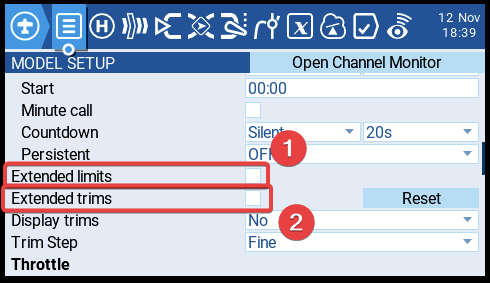
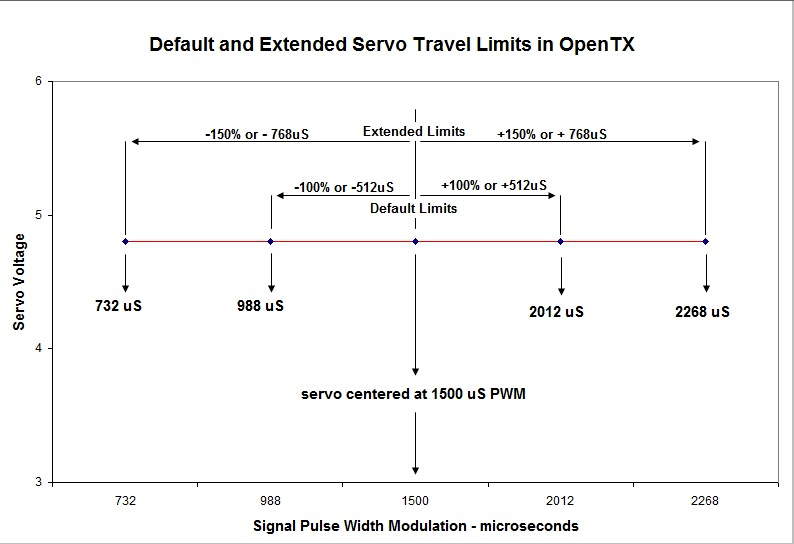
These two options are specific to edgetx/opentx. Regarding 1, extended limits, "Normal" output range is 988us to 2012us, extended limits lets you go further, from 732 to 2268us. This picture probably from OTX University explains that better:
Extended limits are probably only of interest if you are doing specific mixes, as this is much more than the normal servo output range. Regarding Extended trims, normally the trim can only deflect the sticks by 25% - this allows for 100% - so it can basically override the stick completely.
This seems to be a bug - it really should be a checkbox, as it is an on/off value.
Is there a particular reason you're after this option, or was it just general confusion as to what it does, and how it interacts with those other options? |

|
Thank you so much! This is a great explanation. I'm looking to get just a little more throw on my aileron servos on my 3D plane. I'm at my mechanical limits with the control rods and horns and I can only get 40% deflection. I would like 45%. Just a small increase. |

|
Ok, so Enable Max Throw should do what you want. If you reduce your outputs to 84%, you should be back to the original throws, and can then increase them as needed. |
|
pfeerick, I forgot to ask who should file the bug report about the value field instead of a checkbox in EdgeTX Companion? I don't know how to do that. "I see that in the EdgeTX Companion, on the Setup tab for the model, there is no Enable max. throw checkbox. Instead there is an Enable Max Throw value box which is set to a value of 16. I did not set this, so I'm assuming this is a default value." "This seems to be a bug - it really should be a checkbox, as it is an on/off value." |
|
Just reported it here #2723. Thanks :) |
|
Thanks!
*Steve Veach*
Laguna Woods, CA
Cell: 773-704-9661
http://steveveach.com
…On Sat, Nov 12, 2022 at 5:50 PM Peter Feerick ***@***.***> wrote:
Just reported it here #2723 <#2723>.
Thanks :)
—
Reply to this email directly, view it on GitHub
<#2716 (reply in thread)>,
or unsubscribe
<https://github.com/notifications/unsubscribe-auth/ALOOREA2VZU77JNWOV32LNDWIBCP3ANCNFSM6AAAAAAR6DXJJM>
.
You are receiving this because you authored the thread.Message ID:
***@***.***>
|
|
Thanks. It worked.
*Steve Veach*
Laguna Woods, CA
Cell: 773-704-9661
http://steveveach.com
…On Sat, Nov 12, 2022 at 5:51 PM Peter Feerick ***@***.***> wrote:
Ok, so Enable Max Throw should do what you want. If you reduce your
outputs to 84%, you should be back to the original throws, and can then
increase them as needed.
—
Reply to this email directly, view it on GitHub
<#2716 (reply in thread)>,
or unsubscribe
<https://github.com/notifications/unsubscribe-auth/ALOOREDXOT3YVVQ2Q7LJH6DWIBCT3ANCNFSM6AAAAAAR6DXJJM>
.
You are receiving this because you authored the thread.Message ID:
***@***.***>
|


Where did you set? You should be able to do > 100 at output page.