Can't Load MODELS... Error #2350

Replies: 2 comments 4 replies

|
If you're new, you will most likely have the 12 or so stock models that Radiomaster ship on the SD card. One of them, lucky number eight. has a mal-formed configuration file, as Companion is complain about. You can do one of a couple of things to resolve it. You can open the model on the radio (it's the "Eachine P-51D" one), and change something like the timer setting (I usually just tick the minute call option for timer one). Wait for three seconds, then reset that setting back to default. This will make the radio firmware re-write the entire model-settings file, and in the process, write valid settings. (Why three seconds you may ask? - because the firmware waits for 2 seconds after a change is made to settings to try and batch multiple settings changes together and reduce the wear on the SD card). That should be it - put the radio back in bootloader mode, and try to read it with Companion again. You could open the file, scroll to line 302, and see if you can spot what's wrong - that's what I did here => #1969 (comment) Another user who had this problem also uploaded a zipped copy of the fixed file here if you just want to download, unzip, and replace the existing one. => #1969 (comment) Now, why didn't I say to use this option first? Because that only works in this instance... it won't help if you face this error again for some reason in the future. Whereas the first option will always work. If you're not sure as to which model happens to be model8.yml, or whatever name the file happens to be... just open it up in any text editor, and the |

|
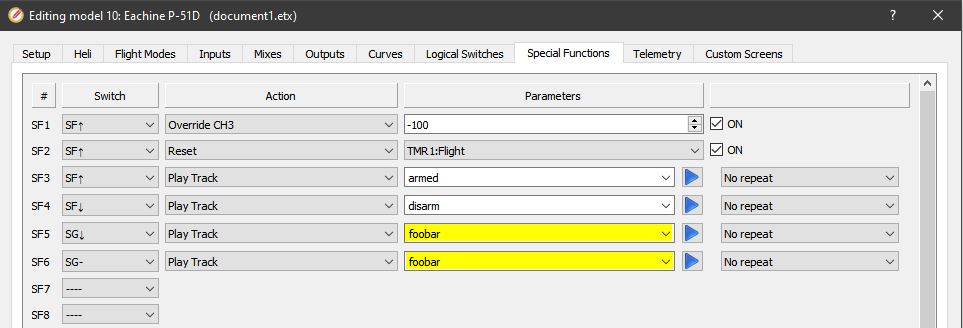
Thank you so much for the detailed response. I'm going to save this one for sure! I posted this same issue in another forum and a gentleman in the forum tipped me off that the file was somehow wrong at line 302. That prompted me to try this, which is the response I posted in the other forum: "Interesting. I used Notepad++ to edit the file at lines 302 and 306 which were missing a "Def" value. I added my favorite nonsense word "foobar" where the Def values should have been and EdgeTX Companion opened successfully this time! Will this change mess anything up? I don't understand what this model8.yml file is used for and if the change will impact me." So as you can see, pfeerick, not knowing what I was doing (but being technical) I "sort of" got around it. I'm going to try what you are suggesting to get a proper copy and see how that goes. Thanks again! |

|
No problem at all. This is one of the many reasons we wanted to use a text format (i.e. yaml in this case) for settings - as it means you can open the file, and make "some" sense of what is being shown, rather than it all being binary gobbledygook. As well as start making modifications using scripts, or even copying and pasting whole blocks of the model setup when you want to make the same changes to a bunch of models. |

|
Using your tip above that model8.yml is for the Eachine P-51D, I opened that model in the Companion and now I see where my workaround names are! :)
|
|
Yes, basically |
Got it. It was also easy to edit in Companion and remove those two settings entirely then write it back out to the SD card. I may have to do this in the future as well I assume if future releases still have a bad model file. |


Uh oh!
There was an error while loading. Please reload this page.
Hello everyone. I'm completely new to the RadioMaster TX16S, EdgeTX, and EdgeTX Companion. I downloaded ver. 2.7.1 and installed it on my Windows 10 64-bit system. When I click on the Read Models and Settings from Radio icon, I get the below error. Can anyone help? Thanks so much.
All reactions