Visual review for AI-generated HTML in Claude Code. Click elements, leave notes, paste back into chat.
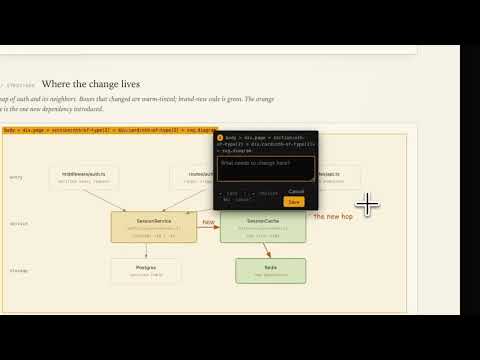
Three steps, in this order:
curl -fsSL https://raw.githubusercontent.com/DavelRad/htmlnote/main/install.sh | bashDownloads a precompiled binary for your platform (macOS arm64/x64, Linux x64/arm64) to ~/.local/bin/htmlnote. Make sure that's on your PATH.
Inside a Claude Code chat, run each line as a separate prompt (don't paste both at once):
/plugin marketplace add https://github.com/DavelRad/htmlnote.git
/plugin install htmlnote
Inside Claude Code:
/reload-plugins
This loads the hooks immediately without restarting the app. Done.
Ask Claude to write or edit any HTML file. When Claude finishes responding:
        you: "make me a landing page"
              ↓
      Claude writes/edits HTML
              ↓
  htmlnote tab opens automatically
              ↓
   click elements · leave notes
              ↓
        click Copy for chat
              ↓
       paste into chat · send
              ↓
    Claude applies your notes
              ↓
            (loop)
If your prompt isn't about HTML, no tab. Only fires when Claude actually wrote or edited an .html / .htm file in the turn that just ended.
htmlnote path/to/file.htmlOpens the same UI for any HTML file, outside of Claude's flow.
htmlnote --updatePulls the latest release, verifies SHA256, swaps the binary in place. Won't downgrade.
The tab doesn't open after Claude writes HTML
Almost always because the plugin hooks weren't reloaded after install. Run this inside Claude Code:
/reload-plugins
Then ask Claude to write some HTML again. The tab should open when the response finishes.
If /reload-plugins doesn't help, fall back to a full app restart (Cmd+Q and relaunch).
Reset everything (sessions, annotations, daemon state)
htmlnote --stop
rm -rf ~/.htmlnote
Wipes all saved annotations and the daemon's state. Next HTML edit starts fresh.
Build from source
If your platform doesn't have a prebuilt binary, or you want to hack on htmlnote:
git clone https://github.com/DavelRad/htmlnote
cd htmlnote
bash install.sh --local .
Requires Node 18+ and npm. Symlinks ~/.local/bin/htmlnote to the local build.
- Doesn't intercept non-HTML edits — only
.htmland.htmfiles - Doesn't send anything to the network — daemon binds to
127.0.0.1only, zero telemetry - Doesn't auto-submit feedback — you explicitly Copy and paste; htmlnote never types into Claude on your behalf
- Doesn't loosen the iframe sandbox — AI-generated HTML runs
sandbox="allow-scripts", no access to your host page or cookies