Embed a complete ISO/IEC 10279:1991 BASIC interpreter in your Unity game.
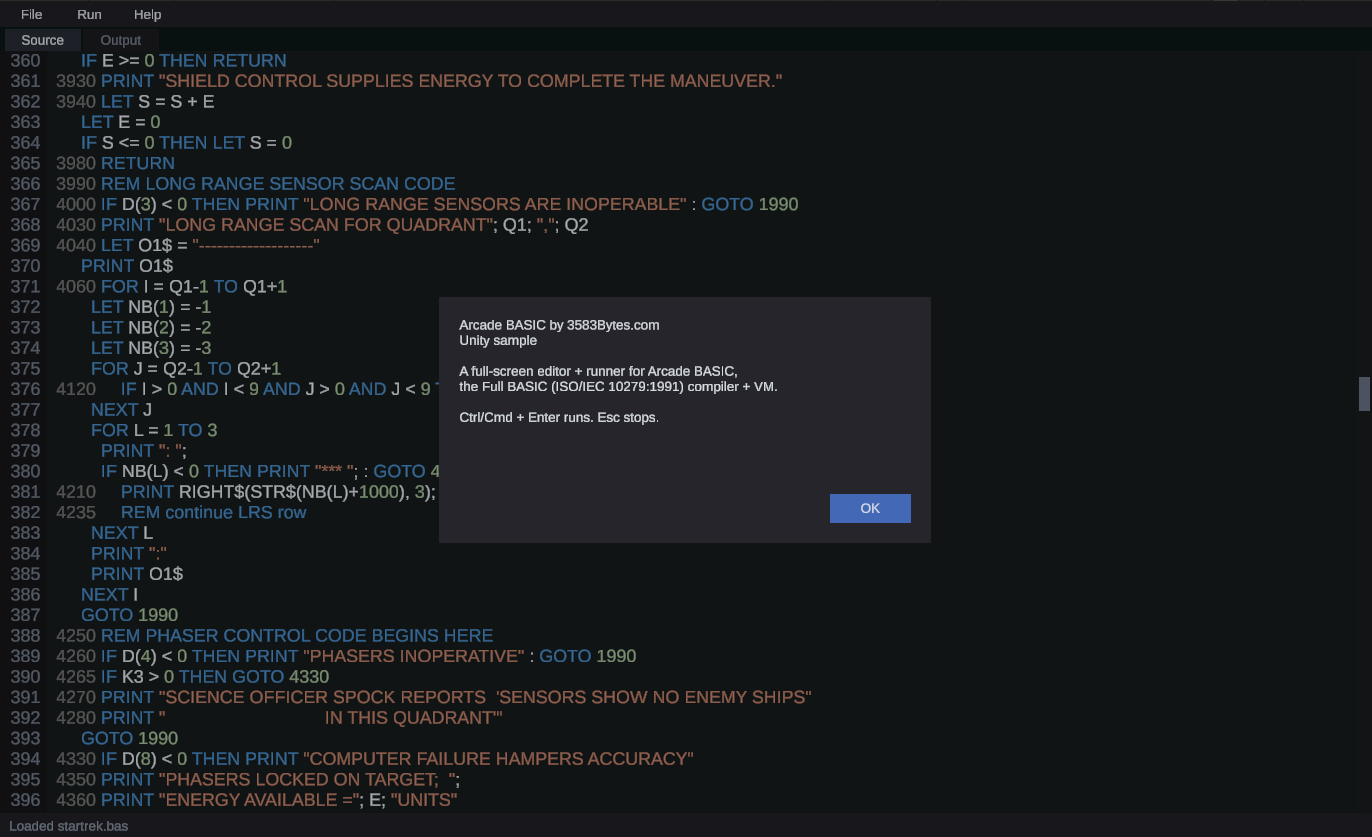
The published package ships pre-built netstandard2.1 DLLs and a clean embedding API. Two install paths:
In Unity, open Window → Package Manager, click the + button, choose "Add package from git URL", and paste:
https://github.com/3583Bytes/Arcade-BASIC.git?path=unity#v0.1.0
Pin to a tagged release rather than main so unrelated changes don't break your project.
Grab arcade-basic-unity-<version>.zip from the releases page, extract under Packages/com.arcadebasic.interpreter/ in your Unity project.
using ArcadeBasic;
using System.IO;
using UnityEngine;

public class HelloArcadeBasic : MonoBehaviour
{
    void Start()
    {
        const string source = @"
            PRINT ""hello from BASIC""
            FOR I = 1 TO 5
              PRINT ""square of ""; I; "" is ""; I * I
            NEXT I
        ";

        var result = BasicEngine.Run(source, out string output);
        Debug.Log(output);

        foreach (var diag in result.Diagnostics)
        {
            if (diag.Contains("error")) Debug.LogError(diag);
            else                        Debug.LogWarning(diag);
        }
    }
}
Output appears in the Unity console:
 hello from BASIC
 square of  1  is  1
 square of  2  is  2 0
 ...
using ArcadeBasic;

// One-call, output captured to a string.
BasicEngine.Result Run(
    string source,
    out string output,
    TextReader stdin = null,        // optional: for INPUT statements
    string filename = "<embedded>"  // optional: shows up in diagnostics
);

// One-call, output streamed to your TextWriter (e.g. a UI buffer).
BasicEngine.Result Run(
    string source,
    TextWriter stdout,
    TextReader stdin = null,
    string filename = "<embedded>"
);
Result.ExitCode is 0 on success, 1 on parse/sema/runtime failure. Result.Diagnostics is the rendered text of every compile-time warning and error.
For finer control (custom diagnostics handling, embedding the lexer/parser/sema/interpreter individually), reference ArcadeBasic.Lexer, ArcadeBasic.Parser, ArcadeBasic.Sema, ArcadeBasic.Interpreter directly — the public types are intentionally small but complete.
Per the upstream docs/conformance.md:
| Feature | Status |
|---|---|
| Statements, expressions, control flow | ✅ |
| Arrays + MAT | ✅ |
Exception handling (WHEN/USE/RETRY/CONTINUE) |
✅ |
| Modules | ✅ |
| File I/O (DISPLAY mode) | ✅ |
PRINT USING picture strings |
✅ |
Codepoint-aware string functions (LEN("π") = 1) |
✅ |
| Graphics + Picture (SVG) | ❌ Not yet |
| Fixed-decimal arithmetic | ❌ Not yet |
| Real-time module | ❌ Out of scope |
BASIC's ECMA-116 §13 graphics module (SET WINDOW/GRAPH LINES/AREA/POINTS/TEXT)
renders to a Texture2D you can show in your scene — an embedded "retro screen."
Add the Basic Screen component (Add Component → Arcade BASIC → Basic Screen)
to a GameObject, paste a program into its source, set a resolution, and assign
a Renderer (e.g. a Quad) to targetRenderer — the rendered texture becomes
that material's mainTexture. (For a UI RawImage, read the component's Screen
property and assign it yourself.)
var screen = gameObject.AddComponent<ArcadeBasic.Unity.BasicScreen>();
screen.source = "SET WINDOW 0,100,0,100\nGRAPH LINES: 10,10; 90,10; 50,90; 10,10\n";
screen.targetRenderer = GetComponent<Renderer>();
screen.Run();
The rasterization itself lives in the engine-agnostic, unit-tested
RasterGraphicsDevice in ArcadeBasic.Runtime; the Unity component just blits its
pixel buffer into a texture. Scope: v1 handles static programs (they run to
completion and the final frame is shown — e.g. examples/graphics.bas). Real-time
programs that loop on INKEY$/SLEEP (kanban, invaders) need the threaded driver
that runs the program off the main thread — a planned follow-up.
After building the engine DLLs (
./unity/scripts/copy-dlls.sh), theRasterGraphicsDevice/BitmapFontship insideArcadeBasic.Runtime.dll— no extra plugins needed.
Installing the package activates a small Unity editor extension:
Window → Arcade BASIC → Console— interactive REPL-ish window with a source pane, output pane, and run button.Ctrl/Cmd + Enterruns. Source persists across editor sessions viaEditorPrefs.Assets → Create → Arcade BASIC— templates for new.basfiles: Empty Program, Hello World, FOR Loop Demo, Function Demo..basfiles in the Project window are imported asTextAssets via aScriptedImporter. Selecting one shows a custom inspector with a source preview and a green ▶ Run button.Assets → Run Arcade BASIC Program(context menu) — right-click any selected.basto open it in the console.Window → Arcade BASIC → Documentation / Conformance notes / About— link straight to the project's docs and the spec-deviation list.
All of the above is in Editor/ of the package and only compiled when Unity is in Editor mode, so the runtime build stays clean.
The package ships an Arcade BASIC IDE sample — a full in-game IDE at feature parity with the console TUI IDE: menu bar (File / Run / Help), syntax-highlighted source pane with line gutter and live Ln/Col, scrollable output transcript, INPUT bar, Problems pane, Build Standalone, F5/F6/F7/Esc hotkeys, a Graphics tab that renders §13 GRAPH/SET drawing to a texture screen, and real-time INKEY$ input so SLEEP-driven games (Space Invaders) play in-IDE. It's delivered as a ready-to-play scene + prefab (an ArcadeBasicCodeEditor MonoBehaviour with its UI wired in the Inspector); the Graphics tab, Help menu, and About modal are built at runtime.
- Open Window → Package Manager → Arcade BASIC Interpreter → Samples and click Import next to "Arcade BASIC IDE".
- Open the imported
Scene/ArcadeBasicIDE.unity— or run Window → Arcade BASIC → Samples → Open BASIC IDE Scene, which locates and opens it for you. (To build your own, drop thePrefab/ArcadeBasicIDE.prefabinto a Canvas instead.) - Press Play.
See Samples~/ArcadeBasic/README.md for layout and customization notes.
Numeric values are arbitrary-precision decimal (Singulink.Numerics.BigDecimal). This is great for spec conformance and terrible for arithmetic-heavy real-time code. For physics or inner loops, do the math in C# and call into BASIC for high-level logic only.
A simple program (Lunar Lander, ~50 lines) ticks fine each frame on a desktop GPU. A MAT INV on a 200×200 matrix is not realtime.
If you imported a package built before this fix, Unity's strict plugin-reference validation may reject the netstandard2.1 DLLs because their System.* references don't bind exactly to Unity's bundled BCL.
The fix is to ship .meta files for every plugin DLL with validateReferences: 0, which the package now does. To recover:
- Delete
Packages/com.arcadebasic.interpreter/from your project (or whatever folder you extracted into). - Re-install from the
v0.1.0or later release zip, or re-pull the UPM git URL. - Re-open Unity. The DLLs should now load cleanly.
If you're developing against a local clone, re-run ./unity/scripts/copy-dlls.sh from the repo root — it now generates the .meta files alongside each DLL.
- API Compatibility Level must be
.NET Standard 2.1(Player Settings → Other Settings → Configuration). Unity 2021.3+ defaults to this. .basfiles don't show the custom inspector — make sure theEditorfolder is included (it is in the released zip; if you cherry-picked files, you need bothRuntime/andEditor/).- Console window doesn't appear under
Windowmenu — Unity sometimes caches menu entries; restart the editor or doAssets → Reimport All.
See LICENSE in the upstream repo.